Foojay Mastodon Service: Here It Is!
We started with a small instance to see who wants to join and from here on we will see where this journey will bring us...

We started with a small instance to see who wants to join and from here on we will see where this journey will bring us...
To Mastodon or not to Mastodon... Frank asked the question and let's take a look at the initial responses from around the Java community!
Let's investigate if the Java community is interested in joining a dedicated Mastodon instance.
When I (re)started the JavaFX Links Of The Week in September, I was wondering if there would be enough material to share every week...



 7,365 views
Let's look back and what has happened on Foojay during the last 2,5 years and talk to some of the people behind the project.
FXGL provides an impressive list of components with methods to override and build the exact functionality your game requires.
How to establish whether Azul Zulu Prime improves aspects of application behavior to a degree justifying using it within your organization.
The JavaFX links of the week are back on jfx-central.com, and here we collect the complete month for you in an excellent overview.


 9,131 views
It's September 20th, OpenJDK 19 has been released. In this podcast, we discuss the new features and the changes that this release brings.
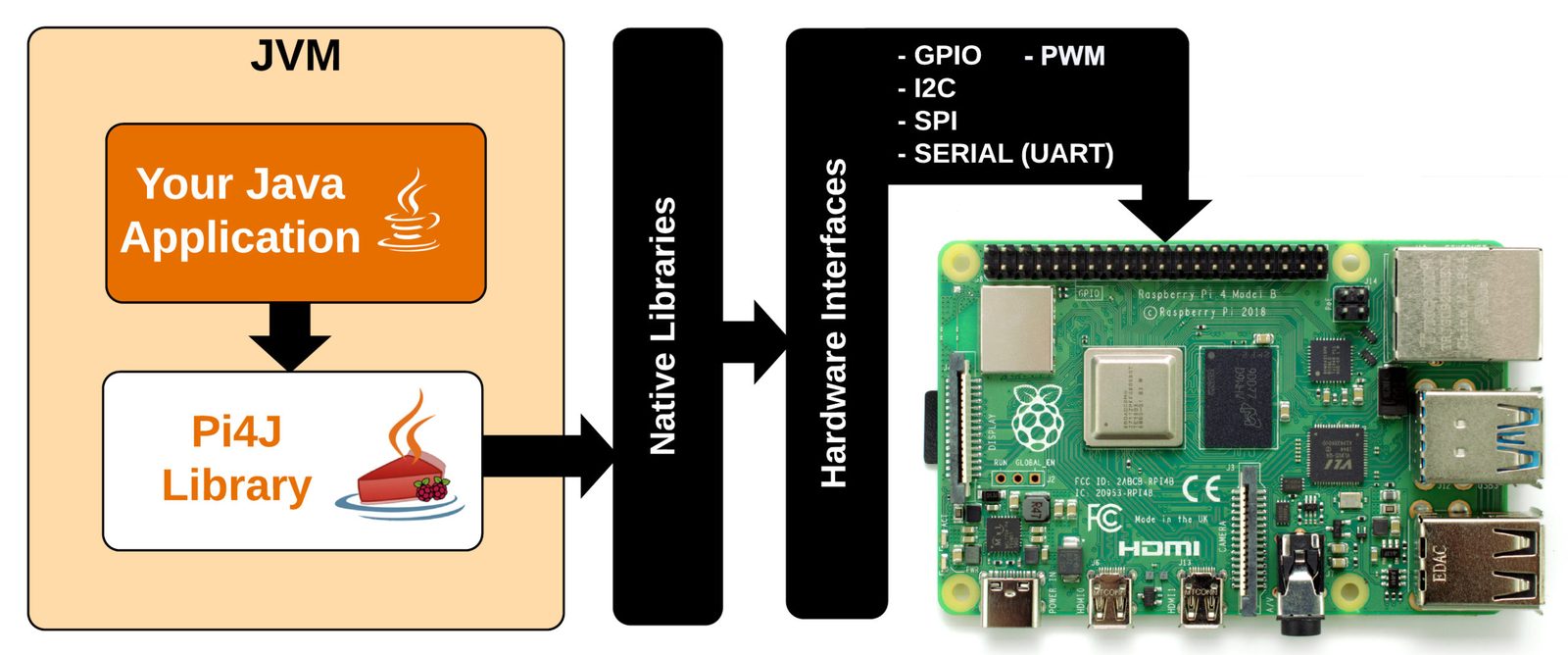
Pi4J provides friendly object-oriented I/O API and libraries for Java devs to access the full I/O capabilities of the Raspberry Pi platform.