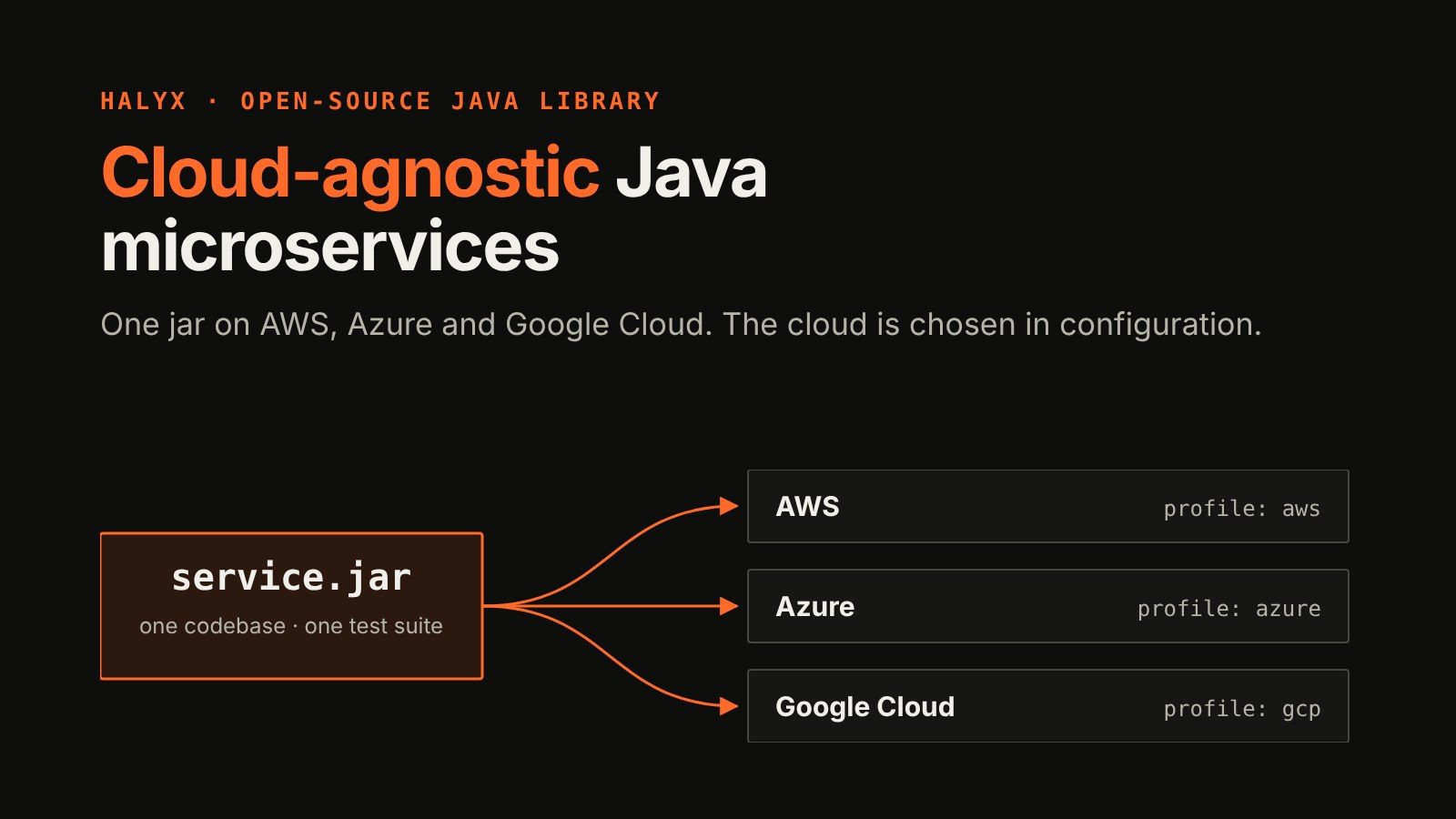
Cloud-Agnostic Java Microservices with Halyx: One Jar on AWS, Azure and Google Cloud

Many teams describe their microservices as cloud-agnostic, but the claim rarely survives a close look at the code. The business logic may be neutral; the integration layer usually isn’t. Data access, messaging, caching and authentication are typically built directly on one provider’s SDK. Moving such a service to another cloud, or running it on two, isn’t a configuration change: it means rewriting and retesting everything that talks to the platform.
Halyx, an open-source Java library I’ve been building, takes that integration layer out of your code. A service calls one Halyx API for each kind of cloud service it needs, from object storage, document stores and SQL databases to messaging, events, Kafka streams, caches and secrets, and Halyx runs it on each cloud’s own product. The API and the errors are the same everywhere, and where clouds really differ, Halyx declares the difference instead of hiding it. Moving to another cloud, or running on two, becomes the configuration change it should have been, and the code that talks to the platform is written and tested once.
With Halyx you write and build once, then deploy to any cloud, AWS, Azure or Google Cloud, with the choice made through configuration at deploy time.
This article shows how to build a truly cloud-agnostic, portable microservice with Halyx, using sym (short for Speak Your Mind) as the example: a tiny Twitter clone that uses a document database, object storage, a Kafka stream and a cache, with no direct reference to a cloud SDK anywhere in its Java code. You’ll see only the code that touches a cloud, one short snippet per service API, each the same on AWS, Azure and Google Cloud. Then why that matters for migration, cloud exit, multi-cloud and day-to-day maintenance. The full code is at github.com/kamranzafar/sym.
Four cloud services, one API each
sym needs four cloud services. Each is a different product on each cloud, and a single Halyx API in the code:
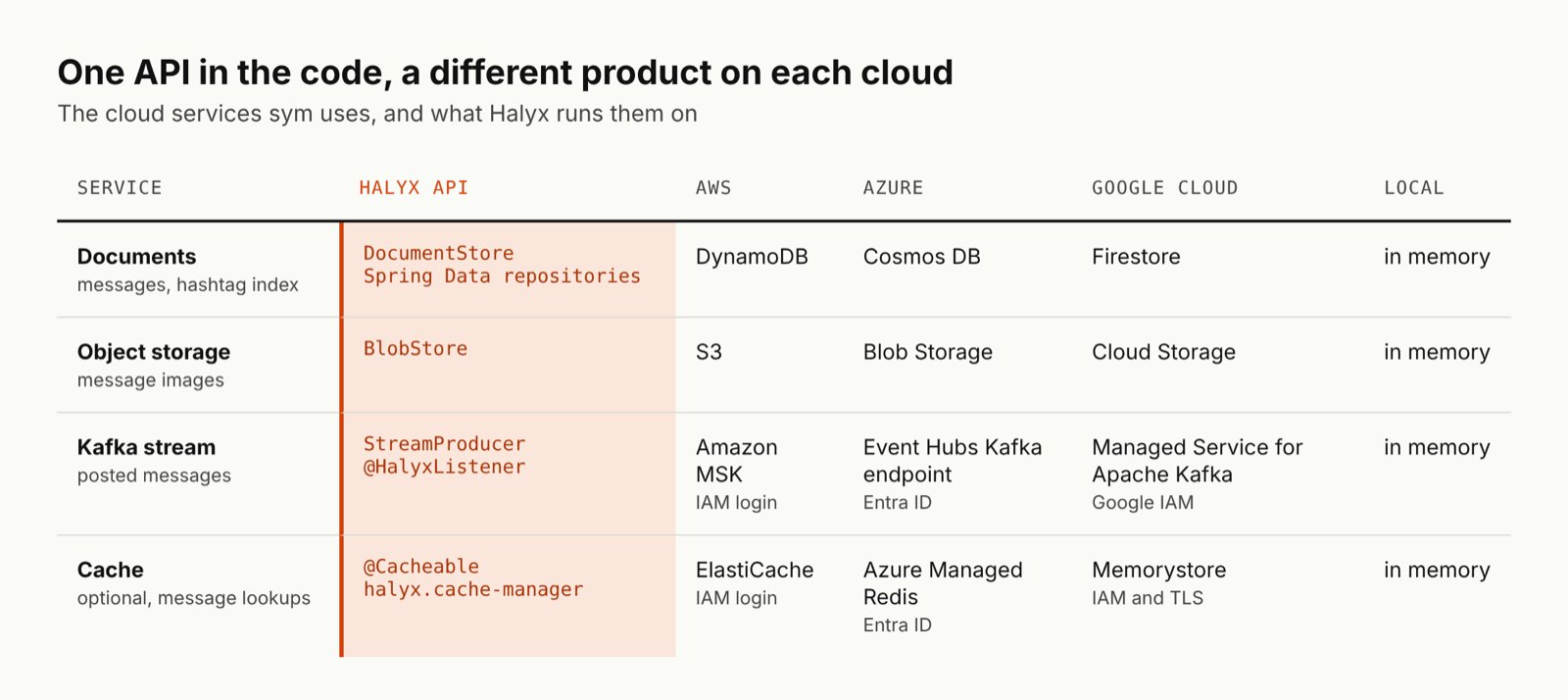
sym is tested on emulators. Halyx’s own real-cloud runs cover Event Hubs and Managed Kafka; the MSK run is ready but waiting on an AWS account that allows MSK.
No passwords appear anywhere. Halyx logs in with the platform’s identity: Pod Identity on EKS, Workload Identity on GKE, Entra Workload ID on AKS, or your own aws, az or gcloud login on a laptop.
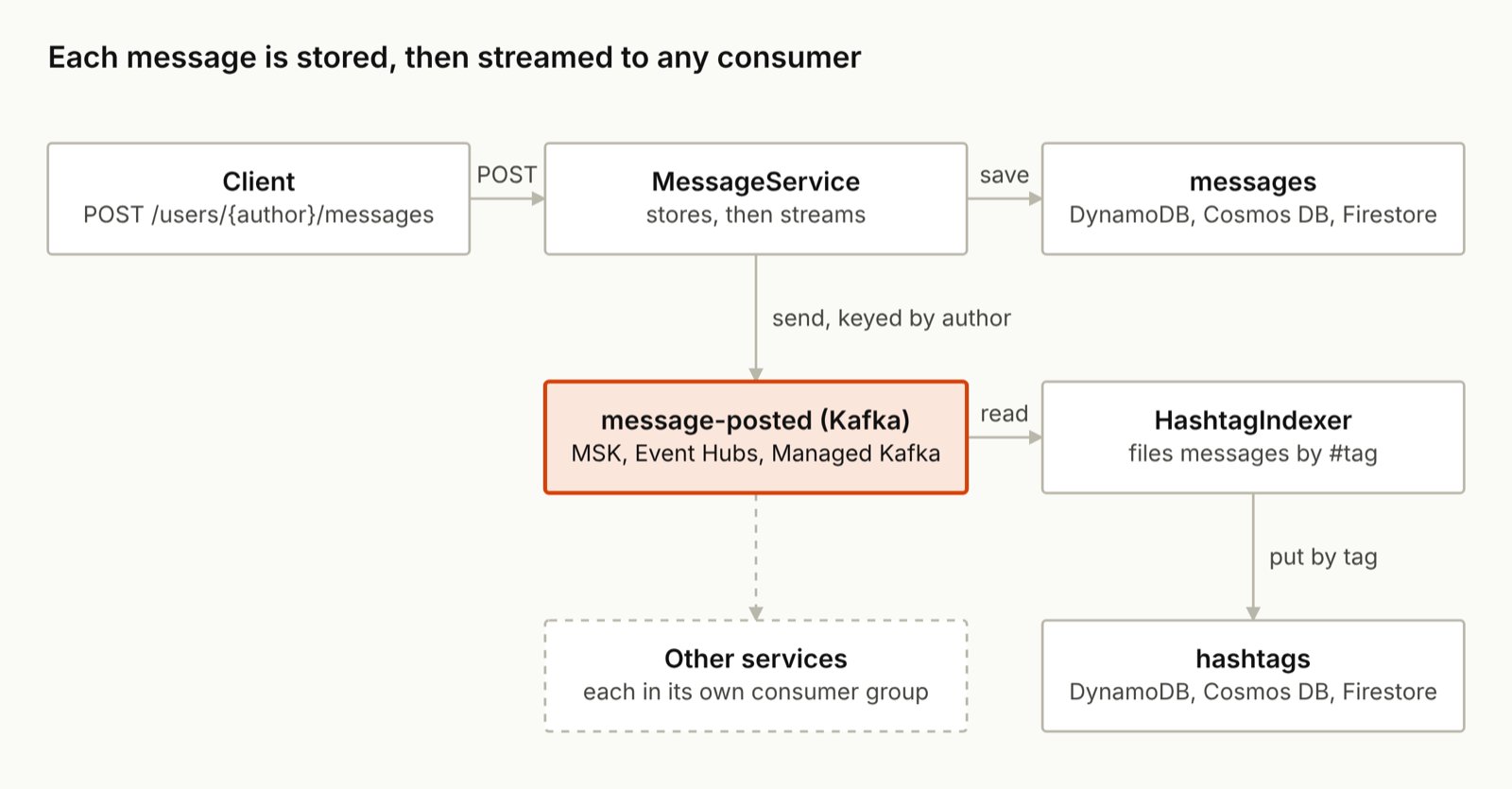
Here’s how a message moves through those services:
Resources are named once, in configuration
The code never names a table, a bucket or a topic. The shared part of application.yml does, the same on every cloud, and each key becomes a Spring bean the code injects by name:
halyx:
  document-stores:
    messages:
      table: ${SYM_MESSAGES_TABLE:sym-messages}
      sort-key: sk
  blob-stores:
    images:
      bucket: ${SYM_IMAGES_BUCKET:sym-images}
  stream-clusters:
    voices:
      bootstrap-servers: ${SYM_KAFKA_BOOTSTRAP_SERVERS}
      auth:
        type: ${SYM_KAFKA_AUTH:iam}
  stream-producers:
    message-posted:
      topic: ${SYM_MESSAGES_TOPIC:sym-message-posted}
      idempotent: true
  stream-consumers:
    hashtag-indexer:
      topic: ${SYM_MESSAGES_TOPIC:sym-message-posted}
      group: ${SYM_HASHTAG_INDEXER_GROUP:sym-hashtag-indexer}
What changes per cloud is a short profile naming the provider, plus what only the deployment knows:
# AWS
SPRING_PROFILES_ACTIVE=aws
AWS_REGION=eu-west-2
SYM_KAFKA_BOOTSTRAP_SERVERS=<MSK's IAM bootstrap servers>

# Azure
SPRING_PROFILES_ACTIVE=azure
SYM_COSMOS_ENDPOINT=<Cosmos DB endpoint>
SYM_STORAGE_ACCOUNT=<storage account>
SYM_KAFKA_BOOTSTRAP_SERVERS=<namespace>.servicebus.windows.net:9093

# Google Cloud
SPRING_PROFILES_ACTIVE=gcp
GOOGLE_CLOUD_PROJECT=<project id>
SYM_KAFKA_BOOTSTRAP_SERVERS=<the cluster's bootstrap address>

# No cloud: everything in memory, Kafka included
SPRING_PROFILES_ACTIVE=local
The local profile needs no Kafka address of its own: it points the stream cluster at Halyx’s in-process broker, with no authentication:
halyx:
  providers:
    local:
      type: memory
  stream-clusters:
    voices:
      bootstrap-servers: memory:9092
      auth:
        type: none
The build includes all three provider modules, halyx-aws, halyx-azure and halyx-gcp, so one jar runs anywhere and you build and test one artifact. Halyx uses resources but doesn’t create them: the tables, the bucket and the topic come from your infrastructure-as-code.
The same code on every cloud
These are the only places sym’s code touches a cloud. None imports a cloud SDK, and each runs unchanged on AWS, Azure, Google Cloud and in memory.
Documents: a Spring Data repository
@DocumentTable("messages")
public record Message(@PartitionKey String author, @SortKey String messageId, String text,
                      Instant postedAt, String imageType) {
}

public interface MessageRepository extends DocumentRepository<Message, Key> {
    List<Message> findByAuthorOrderByMessageIdDesc(String author, Limit limit);
}
Halyx checks each derived query at startup. It must use the partition key, or a declared index, with at most one condition on the sort key. Anything that would scan the table, such as Or, findAll or paging by offset, fails startup instead, so a query that’s cheap on one cloud is cheap on all three.
Streams: send and listen
@Qualifier("message-posted") StreamProducer posted;

posted.send(author, MessageRecords.posted(message));   // keyed by author, so in order per author

@HalyxListener("hashtag-indexer")
void onMessagePosted(String value) {
    Message message = MessageRecords.read(value);
    // file it under each hashtag: returning commits, throwing retries with backoff
}
StreamProducer.send waits until the broker has stored the record, on MSK, Event Hubs or Managed Kafka alike. Every cloud gets order per key and at-least-once delivery. Where clouds differ, Halyx says so: transactions are a declared capability that Event Hubs lacks, so sym uses an idempotent producer, which all three support.
Images: a BlobStore
@Qualifier("images") BlobStore images;

images.put(imageKey(author, messageId), BlobContent.ofBytes(image),
        PutOptions.builder().contentType(type).build());
BlobStore.put is the same call on S3, Blob Storage and Cloud Storage, and each stores the content type with the image. A missing image is Halyx’s NotFoundException on every cloud, which sym turns into a 404.
Caching: plain Spring annotations
@Cacheable(cacheNames = "messages", key = "#author + '/' + #messageId", unless = "#result == null")
public Optional<Message> find(String author, String messageId) { … }

@CacheEvict(cacheNames = "messages", key = "#author + '/' + #messageId")
public Optional<Message> attachImage(String author, String messageId, String contentType, byte[] image) { … }
The optional cache profile backs Spring’s cache abstraction with ElastiCache, Azure Managed Redis or Memorystore. It fails open: if the cache goes down, lookups go to the database.
Errors: one handler
@ExceptionHandler(CloudException.class)
ProblemDetail cloudFailure(CloudException e) {
    return e.isRetryable()
            ? ProblemDetail.forStatusAndDetail(HttpStatus.SERVICE_UNAVAILABLE, "try again later")
            : ProblemDetail.forStatus(HttpStatus.INTERNAL_SERVER_ERROR);
}
Failures raise the same exception types on every cloud, so one handler covers all three. isRetryable() is true only for ThrottledException and UnavailableException, so only those tell the client to try again; an AccessDeniedException or InvalidArgumentException is a fault in the service or its permissions, and retrying won’t fix it. A missing message or image is handled earlier, as a NotFoundException that sym turns into a 404. Nothing in sym catches a DynamoDB, Cosmos DB or Firestore exception.
That’s all of it. sym is 12 files and about 300 lines of code, and none of them knows which cloud it’s on.
Proving it: one test suite, every target
Portability you haven’t tested is a hope. sym’s tests are one suite, written against the HTTP API only, and each subclass runs it on a different profile. The emulator runs start each cloud’s emulator with Testcontainers:
- In memory:
LocalDeploymentTest(local) andLocalCacheDeploymentTest(local,cache), 11 tests each - AWS emulators:
AwsEmulatorIT(aws,cache) on Floci for DynamoDB and S3, plus Kafka and Valkey, 11 tests - Azure emulators:
AzureEmulatorIT(azure,cache) on Floci-az for Cosmos DB and Blob Storage, plus Kafka and Valkey, 11 tests - Google Cloud emulators:
GcpEmulatorIT(gcp,cache) on Floci-gcp for Firestore and Cloud Storage, plus Kafka and Valkey, 11 tests - The packaged jar:
PackagedJarITstarts the built jar withjava -jaronlocal,cache, 1 test
ProfilesTest resolves each cloud’s real profile without connecting anywhere and checks the provider types, the IAM logins, the absence of credentials and the resource names. With it and HashtagIndexerTest, which hands the consumer the same Kafka record twice and expects one entry, that’s 67 tests in all, and mvn verify runs them in under two minutes on a laptop. To check the suite can fail, I broke seven things one at a time, from a wrong table name to a consumer that isn’t idempotent, and it caught every one. Halyx itself runs the same conformance tests against real AWS, Azure and Google Cloud accounts and publishes the results; on AWS, the Kafka tier is still waiting on MSK access.
What this buys you
When the cloud is a deployment choice rather than a code dependency, the big cloud decisions become configuration and testing work instead of rewrites.
Migration and cloud exit. Moving clouds usually means rewriting and retesting every class that calls the old cloud’s SDK, and an exit plan is something nobody can test until the day it’s needed. With Halyx, you provision the target’s resources, switch the profile, run the same suite against it and move the data. Because the target’s profile already passes the suite, you can rehearse the exit any time.
Multi-cloud and disaster recovery. Running on a second cloud usually means a fork or a second codebase that drifts and rarely runs. With Halyx, the same jar runs on each cloud with its own profile and passes the same suite, so failover is a deployment you’ve rehearsed. One service can even span clouds: each resource names its provider in configuration, so the documents can live on one cloud and the stream on another. Keeping the data current on a standby is still your job, through scheduled exports or a cross-cloud stream mirror, and that sets how much you can lose.
A customer or regulator picks the cloud. Banks, government agencies and large enterprises often require a particular cloud or a sovereign region. Usually that means a port before you can say yes. With Halyx it’s a new profile and a run of the same suite.
Consistent operations. On-call teams running services on several clouds usually need to know each SDK’s failure modes. With Halyx, failures raise the same exceptions, with the same delivery and ordering guarantees, on every cloud, so one set of alerts, dashboards and runbooks covers them all.
Maintainability. Per-cloud code, errors and tests usually have to be kept in step by hand. With Halyx there’s one codebase, one exception model and one test suite, and the provider SDKs and logins live in the library. Upgrading the cloud SDKs is one Halyx version bump through the BOM, and with every login on the cloud’s own identity there are no secrets to rotate or leak.
Moving a running service still involves more than code. The data in DynamoDB and S3 needs copying to Firestore and Cloud Storage with the clouds’ own transfer tools, and the permissions come from your infrastructure-as-code. What Halyx takes away is the rewrite. For a service already built on Spring Cloud AWS, Azure or GCP, Halyx’s migration guide maps each integration to its Halyx equivalent, including existing data and rollouts.
What you give up
Halyx makes the code portable; it doesn’t make the clouds identical. A few things stay your concern:
- Not every feature exists everywhere. Differences are declared as capabilities rather than hidden: Pub/Sub has no message deduplication or delayed delivery, Halyx doesn’t declare Kafka transactions on Event Hubs, and presigned URLs on Google Cloud need credentials that can sign. Code checks a capability with
supports()or asserts it withrequire(), and an unsupported call throwsUnsupportedFeatureExceptionrather than being silently ignored. - Each cloud’s limits still apply. A document can be 400 KB on DynamoDB but 2 MB on Cosmos DB, secondary indexes are eventually consistent on DynamoDB, and Firestore stores decimals as doubles. A portable data design keeps to the strictest of the three.
- Native features leave the portable path.
unwraphands you the configured SDK client for things like S3 Object Lock or the Cosmos DB change feed. Keep those calls behind one interface of your own, because on another cloud they fail by design. - Infrastructure and retries are yours. Halyx doesn’t create tables, buckets or topics, doesn’t wait out eventual consistency, and doesn’t add retries of its own by default: the cloud SDKs already retry transient failures. For uniform retries across clouds, install the opt-in
RetryInterceptor, which retries idempotent operations that fail with a throttling or unavailability error. - It’s Java. Halyx needs Java 21 or later. A polyglot estate needs something like Dapr for its other languages.
How Halyx differs from Spring Cloud and Dapr
Spring Cloud AWS, Spring Cloud Azure and Spring Cloud GCP each bring one cloud into Spring: code written against Spring Cloud AWS’s DynamoDB support doesn’t run on Cosmos DB. Halyx puts one API over all three, and halyx-ai-migrate exists to move services off those projects. Dapr is portable too, but it’s a runtime: each service calls a sidecar over HTTP or gRPC, and the sidecar and its components are deployed and operated beside every service. Halyx is a library inside the jar, with no extra process, and it uses the idioms Java teams already know: Spring Data repositories, Spring’s cache annotations and Kafka with its ordering and consumer groups intact.
Keeping it portable: three AI skills
Most of sym, I didn’t type by hand. Halyx ships three skills for AI coding assistants in .claude/skills, plain Markdown that Claude Code runs as skills and other assistants can follow as instructions:
- halyx-ai-create plans a service before writing it: each resource, the service behind it on every cloud, and what differs per cloud. It built sym after I approved the plan.
- halyx-ai-review asks whether a service would run, and behave the same, on each cloud with only its profile changed. It looks for cloud SDK calls outside one class, cloud settings in shared configuration, messaging features one cloud lacks, credentials in a profile and tests that only run one cloud. sym’s report,
PORTABILITY-REVIEW.md, says ready on AWS, Azure and Google Cloud, with no blockers. - halyx-ai-migrate moves an existing Spring Cloud AWS, Azure or GCP service onto Halyx, one reviewed step at a time.
To try one, copy its folder into your project’s .claude/skills and run /halyx-ai-create, /halyx-ai-review or /halyx-ai-migrate.
Try it
- The code: github.com/kamranzafar/sym. With Java 21 and Maven, clone it and run
mvn verifywith Docker running, or start it onlocalwith no Docker at all. - Halyx: halyx.dev has a guide for each service, and the real-cloud test results for every provider.
- A bigger example: Halyx’s
portable-orderssample uses every Halyx service, with a Helm chart that deploys one image to EKS, GKE and AKS. - Your own service: the Halyx migration guide maps Spring Cloud AWS, Azure and GCP to Halyx, including existing data and rollouts.
If you try sym on a real cloud, or Halyx on your own service, I’d like to hear what worked and what didn’t. Open an issue or start a discussion on Halyx’s GitHub repository.
Found a mistake, or something to add? Edit this page on GitHub

Kamran Zafar
Kamran Zafar is a senior Java, cloud and AI engineer and the creator of Halyx, an open-source library for building cloud-agnostic Java microservices that run unchanged on AWS, Azure and Google Cloud.
Related posts
Introducing Floci: A High-Performance, GraalVM-Powered AWS Emulator


 1,427 views