# Explore Spring AI SDK – Amazon Bedrock AgentCore – Part 2
> Explore how to integrate AgentCore Memory in the Spring AI SDK with Amazon Bedrock. Learn how to add short-term to AI agents for improved context awareness, conversation continuity, and smarter responses in real-world applications.
- URL: https://foojay.io/today/explore-spring-ai-sdk-amazon-bedrock-agentcore-part-2/
- Published: 2026-04-27
- Authors: Mahendra Rao B
- Categories: AI, GenAI, IntelliJ IDEA, Java, Maven, Spring
*If you're joining us from [Part 1](https://foojay.io/today/spring-ai-amazon-bedrock-sdk-guide/) or need a quick refresher on the architecture, listen to this brief overview of how Spring AI and Amazon Bedrock work together.*
*Generated using Notebook LLM for my previous [article](https://foojay.io/today/spring-ai-amazon-bedrock-sdk-guide/)*
In this article, we explore one of the AgentCore capabilities i.e., ***memory***
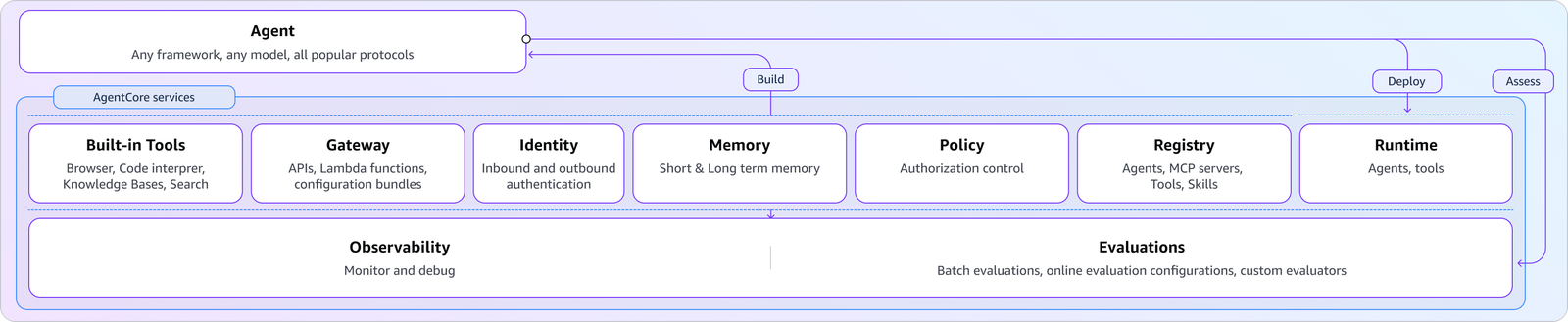 ***Source: Amazon***
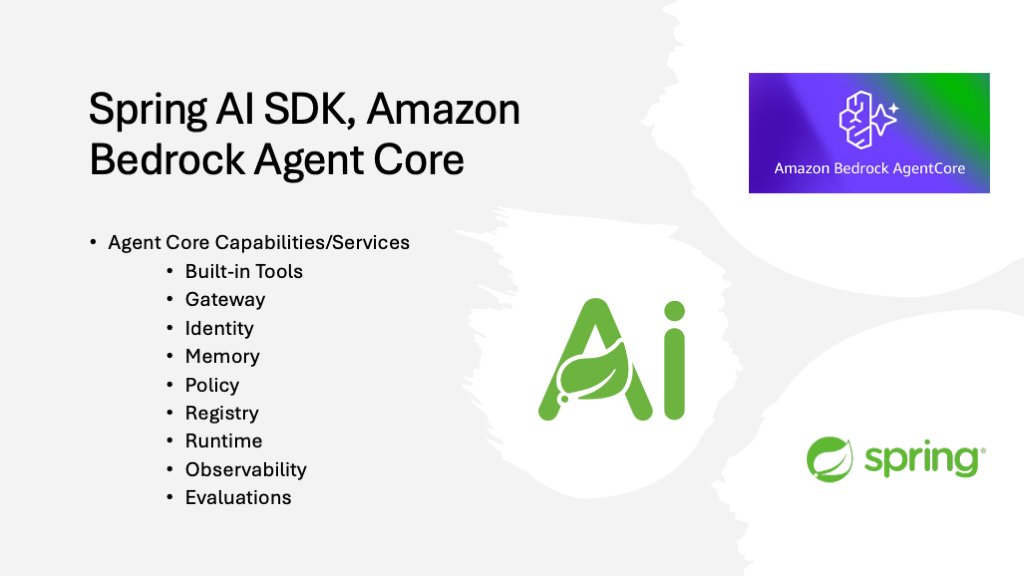
To begin, enable **AgentCore memory** for the agent you built earlier.
### Step 1: Add the Ai model and AgentCore memory dependencies
```xml
org.springframework.ai
spring-ai-model
org.springaicommunity
spring-ai-agentcore-memory
```
### Step 2: Create Short/Long Term in AWS Management Console
*Navigate to **Amazon Bedrock AgentCore \> Memory** to create short/long-term memories.*
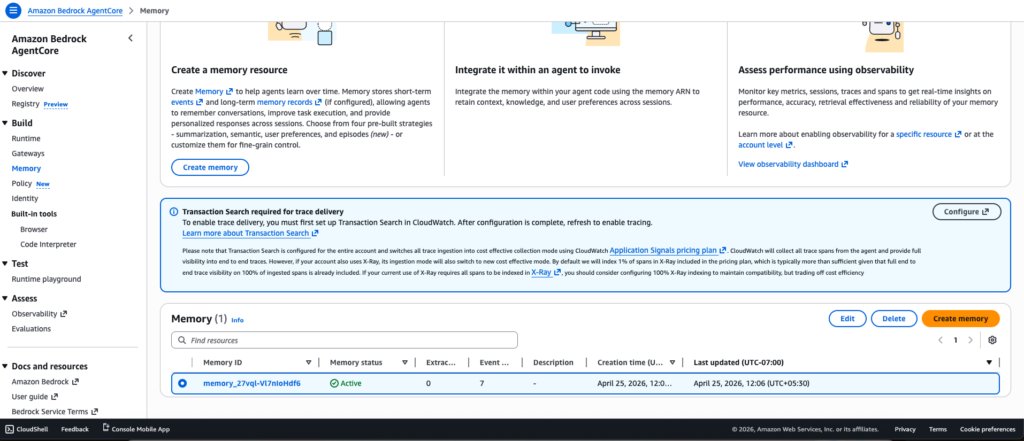 AgentCore Memory
### Step 3: Add the following memory-related properties.
`application.yml`
```yaml
agentcore:
memory:
memory_id: memory_27vql-Vl7nIoHdf6
total-events-limit: 100
default-session: default
page-size: 50
ignore-unknown-roles: false
```
`application.properties`
```powershell
agentcore.memory.memory_id=memory_27vql-Vl7nIoHdf6
agentcore.memory.total-events-limit=100
agentcore.memory.default-session=default
agentcore.memory.page-size=50
agentcore.memory.ignore-unknown-roles=false
```
### Step 4: Add the below `MemoryConfig` class.
```java
package com.bsmlabs.springai.config;
import org.springaicommunity.agentcore.memory.longterm.AgentCoreMemory;
import org.springframework.ai.chat.client.advisor.MessageChatMemoryAdvisor;
import org.springframework.ai.chat.memory.ChatMemory;
import org.springframework.ai.chat.memory.MessageWindowChatMemory;
import org.springframework.context.annotation.Bean;
import org.springframework.context.annotation.Configuration;
import java.util.List;
@Configuration
public class MemoryConfig {
@Bean
public ChatMemory chatMemory() {
return MessageWindowChatMemory.builder()
.maxMessages(20) // keeps last 20 messages
.build();
}
@Bean
public MessageChatMemoryAdvisor messageChatMemoryAdvisor(ChatMemory chatMemory) {
return MessageChatMemoryAdvisor.builder(chatMemory).build();
}
@Bean
public AgentCoreMemory agentCoreMemory(MessageChatMemoryAdvisor advisor) {
return new AgentCoreMemory(advisor, List.of());
}
}
```
Let's break down the structure of the beans defined in the above `configuration` class.
#### 4.1. ChatMemory Bean – The Core
```java
@Bean
public ChatMemory chatMemory() {
return MessageWindowChatMemory.builder()
.maxMessages(20) // keeps last 20 messages
.build();
}
```
This creates a ***sliding window memory*** that retains only the last 20 messages. Benefits include:
* Prevents unbounded memory growth
* Keeps recent context while discarding older, irrelevant messages
* Reduces token usage when calling LLMs, making it cost-effective
* Maintains conversation relevance
#### 4.2. MessageChatMemoryAdvisor – The Wrapper
```java
@Bean
public MessageChatMemoryAdvisor messageChatMemoryAdvisor(ChatMemory chatMemory) {
return MessageChatMemoryAdvisor.builder(chatMemory).build();
}
```
This advisor acts as an intermediary that:
* Integrates the *ChatMemory* into Spring AI's advisor chain
* Automatically injects conversation history into chat requests
* Manages when and how memory is applied to prompts
#### 4.3. AgentCoreMemory – The Orchestrator
```java
@Bean
public AgentCoreMemory agentCoreMemory(MessageChatMemoryAdvisor advisor) {
return new AgentCoreMemory(advisor, List.of());
}
```
This combines the ***advisor*** with an empty list of additional strategies. It:
* Coordinates memory across agent operations
* Provides a unified interface for long-term memory management
* Allows for extensibility (the ***List.of()*** can include custom memory strategies)
### Step 5: Create the ***ChatRequest*** and ***ChatResponse*** classes as shown below.
Add the following classes to the models folder. We will use them in the next REST controller.
```java
package com.bsmlabs.springai.models;
public record ChatRequest(String message) {
}
```
```java
package com.bsmlabs.springai.models;
public record ChatResponse(String response) {
}
```
### Step 6: Add the below `ShortTermController` class.
Adding memory to an existing agent helps improve response latency and relevance. The agent can store previous conversations in short-term memory (STM). It can also retain learned information over time using long-term memory (LTM).
The SDK integrates with AgentCore Memory through **Spring AI's advisor pattern**. These advisors act as interceptors that enrich prompts with relevant context before sending them to the model.
The below RestController demonstrates how to build a stateful chat API that maintains conversation history by leveraging the memory configuration from the previous example to provide a persistent conversational context.
```java
package com.bsmlabs.springai.agents;
import com.bsmlabs.springai.models.ChatRequest;
import com.bsmlabs.springai.models.ChatResponse;
import org.springaicommunity.agentcore.memory.longterm.AgentCoreMemory;
import org.springaicommunity.agentcore.memory.shorttem.AgentCoreShortTermMemoryRepository;
import org.springframework.ai.chat.client.ChatClient;
import org.springframework.ai.chat.memory.ChatMemory;
import org.springframework.ai.chat.messages.Message;
import org.springframework.web.bind.annotation.*;
import java.util.List;
@RestController
public class ShortTermMemoryController {
private final ChatClient chatClient;
private final ChatMemory chatMemory;
private final AgentCoreMemory agentCoreMemory;
private static final String CONVERSATION_ID = UUID.randomUUID().toString();
public ShortTermMemoryController(ChatClient.Builder chatClientBuilder,
ChatMemory chatMemory,
AgentCoreMemory agentCoreMemory,
AgentCoreShortTermMemoryRepository shortTermMemoryRepository) {
this.chatClient = chatClientBuilder.build();
this.chatMemory = chatMemory;
this.agentCoreMemory = agentCoreMemory;
// shortTermMemoryRepository.deleteByConversationId(CONVERSATION_ID);
}
@PostMapping("/api/short")
public ChatResponse shortTermChat(@RequestBody ChatRequest chatRequest) {
String response = chatClient.prompt()
.user(chatRequest.message())
.advisors(agentCoreMemory.advisors)
.advisors(a -> a.param(ChatMemory.CONVERSATION_ID, CONVERSATION_ID))
.call()
.content();
return new ChatResponse(response);
}
@GetMapping("/api/history")
public List getHistory() {
return chatMemory.get(CONVERSATION_ID);
}
@DeleteMapping("/api/history")
public void clearHistory() {
chatMemory.clear(CONVERSATION_ID);
}
}
```
* **ChatClient:**Send prompts to the LLM
* **ChatMemory:** Manages the conversation window/sliding window (20 messages)
* **AgentCoreMemory:** Orchestrates memory across operations
#### POST `/api/short` – Chat Endpoint
```java
@PostMapping("/api/short")
public ChatResponse shortTermChat(@RequestBody ChatRequest chatRequest) {
String response = chatClient.prompt()
.user(chatRequest.message())
.advisors(agentCoreMemory.advisors)
.advisors(a -> a.param(ChatMemory.CONVERSATION_ID, CONVERSATION_ID))
.call()
.content();
return new ChatResponse(response);
}
```
**What happens:**
1. Receives user message in ***ChatRequest***
2. Calls agentCoreMemory.advisors to inject the ***MessageChatMemoryAdvisor***
3. Passes CONVERSATION_ID to the advisor so it knows which conversation's history to retrieve
4. ChatClient automatically
* Retrieves last 20 messages for this conversation
* Appends them to the current user message
* Sends the full context to the LLM
* Stores the user message + response in ChatMemory
5. Returns just the LLM response to the client
#### GET `/api/history` – Retrieve Conversation History
```java
@GetMapping("/api/history")
public List getHistory() {
return chatMemory.get(CONVERSATION_ID);
}
```
This method returns all messages (up to 20) for the given conversation ID. It is useful for:
* Displaying chat history in the UI
* Debugging the conversation context
* Auditing interactions
#### DELETE `/api/history` – Clear History
```java
@DeleteMapping("/api/history")
public void clearHistory() {
chatMemory.clear(CONVERSATION_ID);
}
```
### Step 7: verify
```powershell
### Tell name - STM
POST http://localhost:8080/api/short
Content-Type: application/json
{
"message": "Mahendra is writing an article to Foojay on Spring AI SDK with Amazon Bedrock Agentcore"
}
### Ask name - STM
POST http://localhost:8080/api/short
Content-Type: application/json
{
"message": "What is my name?"
}
### Get history
GET http://localhost:8080/api/history
### Clear history
DELETE http://localhost:8080/api/history
```
Using ***curl*** commands
```powershell
# --- Short-Term Memory (STM) ---
# Tell your name and what you're talking about
curl -X POST http://localhost:8080/api/short \
-H "Content-Type: application/json" \
-d '{"message": "Mahendra is writing an article to Foojay on Spring AI SDK with Amazon Bedrock Agentcore"}'
# Ask for your name (memory recall)
curl -X POST http://localhost:8080/api/short \
-H "Content-Type: application/json" \
-d '{"message": "What is my name?"}'
# Get conversation history
curl http://localhost:8080/api/history
# Clear conversation
curl -X DELETE http://localhost:8080/api/history
```
### End-to-End Flow
```
User Request
↓
[/api/short endpoint]
↓
ChatMemory retrieves last 20 messages for CONVERSATION_ID
↓
Messages + current user input sent to LLM
↓
LLM generates response
↓
Exchange stored in ChatMemory (sliding window)
↓
Response returned to user
```
***In the next part, I will discuss the inclusion of the remaining AgentCore services adding built-in tools like browser, code interpreter, and deployment to Amazon Bedrock AgentCore runtime.***
Everything comes from the companion [repo](https://github.com/bsmahi/simple-spring-boot-agent), which contains fully working implementations of each example.
***Happy Learning Spring AI***
### References
*
* **Amazon Bedrock AgentCore:**
* **Spring AI:**
* **AWS Blog Spring AI SDK:**