# Exposing your data using Spring GraphQL
> An introductory look at how we can use Spring GraphQL in our Java applications.
- URL: https://foojay.io/today/exposing-your-data-using-spring-graphql/
- Published: 2023-09-19
- Authors: Simon Verhoeven
- Categories: Java, Tutorials
**In this article, we'll take an introductory look at how we can use Spring GraphQL in our Java applications.** **GraphQL is a query language (hence the QL) that in conjunction with a framework such as `Spring GraphQL` can be used to efficiently manage our data, and even reuse existing services.**
It has 2 core concepts:
1. queries: used to define which data should be fetched, and which fields thereof should be included
2. mutations: used to manage our dataset
It's an alternative to REST, SOAP, or gRPC, and supports calls over HTTP, WebSocket and RSocket.
We can use it to query \& mutate our data, and in the case of Spring Webflux/WebSocket/RSocket to set up subscriptions.
| | |
|-----------|---------------------------------------------------------------------------------------------------------------|
| **Note:** | Spring GraphQL is the successor of [GraphQL Java Spring](https://github.com/graphql-java/graphql-java-spring) |
Feel free to check out the code from [this repository](https://github.com/SimonVerhoeven/spring-graphql-demo/tree/main) to more easily follow along.
## Setup
### Dependencies
To get started we just need the following dependencies in our pom.xml:
```
org.springframework.boot
spring-boot-starter-graphql
org.springframework.boot
spring-boot-starter-websocket
org.springframework.boot
spring-boot-starter-test
test
org.springframework.graphql
spring-graphql-test
test
```
| | |
|-----------|-----------------------------------------------------------------------------------------------------------------------------------------------------------------------------------------------------------|
| **Note:** | We're using Spring MVC here, but we could also use web/webflux/rsocket here (see for reference: [possible starters](https://docs.spring.io/spring-boot/docs/current/reference/html/web.html#web.graphql)) |
### Schema resources
We'll create a folder `src/main/resources/graphql/` where we'll put our `.graphqls` or `.gqls` file(s).
Spring Boot will automatically pick up the files placed here.
These files define our graph's data types, the relationships between them and possible operations.
Our basic schema will look like this:
```
type Query {
bookById(id: ID): Book
}
type Book {
id: ID
name: String!
pageCount: Int
summary: String
publicationDate: String
author: Author!
}
type Author {
id: ID
firstName: String!
lastName: String!
shortBio: String!
linkedinUrl: String!
}
```
We define a top-level `Query` type (every GraphQL service has to have one, mutations are optional), which contains the exposed operations and its arguments. Here we can see we're exposing a `bookById` query which expects an `ID` to be passed in, and will return a `Book` type.
Below that we can see our `Book` and `Author` type with their fields. In this case, we're using the default scalar types, and the `!` marks the fields as non-null.
More information on how to define a `Schema` can be found on the [GraphQL schema](https://graphql.org/learn/schema/) page.
| | |
|-----------|----------------------------------------------------------------------------------------------------------------------------------------------------------------------------------------------------------------------------------------------------------------------------------------------------------------------------------------------------------------------------------------------------------------------------------------------------------------|
| **Note:** | * We can change the supported file type(s) by changing: `spring.graphql.schema.file-extensions` * The default schema location can be adapted using `spring.graphql.schema.locations`, we can even include files in our dependencies by using the `classpath*:` prefix * field introspection is enabled by default since tools like GraphiQL require it. If you do not want to expose your schema, set `spring.graphql.schema.introspection.enabled` to `false` |
### Properties
We'll also be enabling the graphical interactive GraphQL IDE ([GraphiQL](https://github.com/graphql/graphiql)), by adding:
```
spring.graphql.graphiql.enabled=true
```
to our `application.properties`.
This allows us to easily interact with \& develop GraphQL APIs.
And since we want to use Subscriptions in GraphIQL we'll also add:
```
spring.graphql.websocket.path=/graphql
```
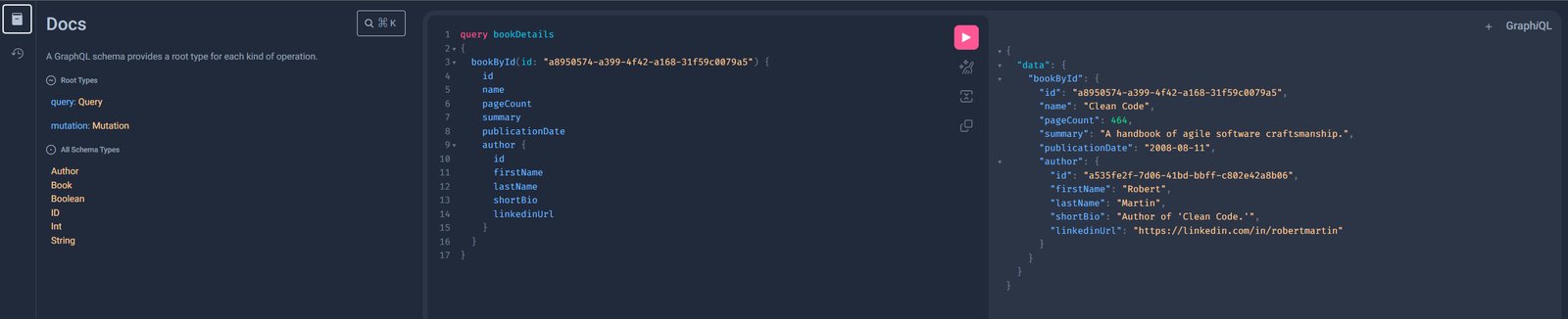
Using the default [GraphiQL](http://localhost:8080/graphiql) path.
| | |
|-----------|----------------------------------------------------------|
| **Note:** | This can be adapted by configuring `spring.graphql.path` |
### Registering extra scalar types
In some cases, you might need more than the default Scalar types that we mentioned earlier.
Let us add a simple Article:
```
type Article {
id: ID
title: String!
publicationDate: Date!
}
```
As you can see our `publicationDate` is of type `Date` which is not known by default.
To resolve this we can add the `graphql-java-extended-scalars` dependency to our project,
```
com.graphql-java
graphql-java-extended-scalars
21.0
```
and then we can add the following to our `@Configuration` to register the `Date` scalar:
```
@Bean
public RuntimeWiringConfigurer runtimeWiringConfigurer() {
return runtimeWiringConfigurer -> runtimeWiringConfigurer
.scalar(ExtendedScalars.Date);
}
```
And finally, also add this Scalar to our `schema.graphqls`
```
scalar Date @specifiedBy(url:"https://tools.ietf.org/html/rfc3339")
```
And then when we query for this Article, we'll get our `publicationDate` back properly.
## Controller configuration
Spring for GraphQL allows us to define handler methods using annotations in `@Controller` components.
The handler methods are registered as `DataFetcher` s through `RuntimeWiring.builder`.
Since we're using the Spring boot starter, we don't need to do anything special, but if you're not you'll need to add this `RuntimeWiringConfiguration` to `GraphQLSource.Builder`. ([see for reference](https://docs.spring.io/spring-boot/docs/3.1.1/reference/html/web.html#web.graphql.runtimewiring))
We can use `@SchemaMapping` to define our handler methods \& specify the type name, and field name. or leave it out in which case it'll use the simple class name of the source object \& the method nome.
However, we can also use the meta annotations to make our life a bit easier, since these preset the typeName for us.
These are:
* `@QueryMapping`
* `@MutationMapping`
* `@SubscriptionMapping`
### Querying data
For our earlier book query, we can add:
```
@QueryMapping
public Book bookById(@Argument String id) {
return Book.getById(id);
}
```
Which makes use of the implicit mapping.
Now in the case of our `Book`, we'll also need to do a little bit extra. Because our `Book` itself only contains the `authorId`, but in the response we want to return the `Author` immediately, to avoid our client having to do an extra round trip, and to aggregate the data.
We can resolve this by adding this to our controller:
```
@SchemaMapping
public Author author(Book book) {
return Author.getById(book.authorId());
}
```
Which will act as the `DataFetcher` for the `Author` field.
Which we can then test using the following query in GraphiQL:
```
{
authorById(id: "a535fe2f-7d06-41bd-bbff-c802e42a8b06") {
id
firstName
lastName
shortBio
linkedinUrl
}
}
```
If we add the following to our schema file:
```
authorById(id: ID): Author
```
We can set up an explicit mapping using the following, in case we don't want to call our function `authorById`
```
@QueryMapping("authorById")
public Author findAuthor(@Argument String id) {
return Author.getById(id);
}
```
Note that here we've explicitly added `authorById` to our `@QueryMapping`
While both approaches are valid, the value annotation does encourage a higher level of abstraction and leaves us free to rename our method names without breaking the integration.
### Mutations
We use `@MutationMapping` for these, and jut like with `@QueryMapping` our method name/annotation value must match the operation name.
We'd love to be able to add some of our favourite authors, so we'll add the following to our `schema.graphqls`
```
type Mutation {
addAuthor(firstName: String!, lastName: String!, shortBio: String!): Author
}
```
As you can see, we expect the first name, last name \& a short bio for the Author to be passed in, and we'll get an `Author` response.
This aligns with:
```
@MutationMapping("addAuthor")
public Author createAuthor(
@Argument String firstName,
@Argument String lastName,
@Argument String shortBio
) {
Author author = new Author(UUID.randomUUID().toString(), firstName, lastName, shortBio, "");
Author.addAuthor(author);
return author;
}
```
As you can see, our inputs are annotated with `@Argument`.
| | |
|-----------|--------------------------------------------------------------------------------------------------------------------------------------------------------------------------------------------------------------------------------------------------------------------------------------------------------------------------------------------------------------------------------------------------|
| **Note:** | `@Argument` does not have a `required` flag, nor the option to specify a default value. These can be specified in the GraphQL schema, and are enforced by GraphQL Java.If the distinction between `Null` and Omitted is important, one can instead declare an `ArgumentValue` parameter which is a container for the resulting value alongside a flag to indicate whether the input was omitted. |
We can then create a new one using:
```
mutation addAuthor {
addAuthor(
firstName: "Venkat"
lastName: "Subramaniam"
shortBio: "Venkat Subramaniam is an award-winning author, founder of Agile Developer, Inc., and an instructional professor at the University of Houston."
) {
id
firstName
lastName
}
}
```
### Subscriptions
In case we want to stay up to date, we can also set up a subscription.
| | |
|-----------|--------------------------------------------------------------------------|
| **Note:** | Keep in mind that we need WebSocket/RSocket transports for this support. |
Say we want to get a stream of new books we can add this to our schema:
```
type Subscription {
notifyNewBook: Book
}
```
Then in our controller, we can add:
```
@SubscriptionMapping("notifyNewBook")
public Flux newBooks() {
...
}
```
And we'll get an incoming stream of new books.
We can just do:
```
subscription {
notifyNewBook {
id
isbn
name
}
}
```
## Testing
So it's quite easy to set up our GraphQL API, but what about the testing?
Spring makes it easy for us to test our application using `GraphQLTester` which offers us an easy way to test agnostic of the underlying transport.
| | |
|-----------|------------------------------------------------------------------------------------------------------------------------------------------------------------------------------------------------------------------------------------------------------------------------------------|
| **Note:** | To perform requests through a client we need one of the following extensions: HttpGraphQLTester/WebSocketGraphQLTester/RSocketGraphQLTester To perform server-side testing without a client we need either the ExecutionGraphQLServiceTester or WebGraphQLServiceTester extension. |
It offers us a fluent API to write our test.
We can pass in a document (thank you text blocks!), or pass in a document filename ending with `.graphql` or `.gql` under `graphql-test/` in our `resources` folder.
### Testing a request
Let's start with a basic request test, where we check the expected output. (we could also )
```
@Test
void bookById() {
this.graphQlTester
.documentName("bookInfo") //1
.variable("id", "a8950574-a399-4f42-a168-31f59c0079a5") //2
.execute() //3
.path("bookById")
.matchesJson(CLEAN_CODE_PAYLOAD);
}
```
1. reference to the `bookInfo.graphql` file in our resources folder
2. passing in the variable we want to use for the call
3. in case your request has no response data use `executeAndVerify` rather than `execute` to check whether there were no errors in the response, or `executeSubscription` for Subscriptions.
### Testing a mutation
The flow for a mutation is basically the same as for a query:
```
final Author author = this.graphQlTester
.document(document)
.execute()
.path("addAuthor")
.entity(Author.class)
.get();
```
### Testing a subscription
Subscriptions are a bit different in that we invoke `executeSubscription` instead of `execute` and then use `StepVerifier` to inspect the Flux.
To start we'll need to add the `reactor-test` dependency:
```
io.projectreactor
reactor-test
3.5.10
test
```
Then we can get our Flux using:
```
final var bookFlux = this.graphQlTester.document(document)
.executeSubscription()
.toFlux("notifyNewBook", Book.class);
```
And let's add an easy-to-test to check we received Kent Beck's 9 books. (the API itself offers us a lot more options!)
```
final var bookFlux = this.graphQlTester.document(document)
.executeSubscription()
.toFlux("notifyNewBook", Book.class);
```
### Handling errors
If we use verify, any errors in the "errors" key will lead to an Assertion failure.
For example with this test case:
```
@Test
void bookById_verify() {
this.graphQlTester
.documentName("bookInfo")
.variable("id", "a8950574-a399-4f42-a168-31f59c0079a5")
.execute()
.errors()
.verify()
.path("data.bookById.name")
.entity(String.class)
.isEqualTo("Clean Code");
}
```
If we want to suppress specific error(s) we can filter these out using:
```
.errors()
.filter(error -> ...)
.path("data.bookById.name")
```
We can also apply this filtering on the builder level, so they apply to all our tests using:
```
WebGraphQlTester.builder(client)
.errorFilter(error -> ...)
.build()
```
Additionally, we can also inspect the errors through a `Consumer` using `satisfy`, which will also mark them as filtered so that we can inspect the data in the response.
```
.errors()
.satisfy(responseErrors -> ...)
.verify()
```
The other way around, in case we want to verify that an error exists we can use `expect` instead.
This will lead to an assertion error if the expected error is not present.
```
.errors()
.expect(error -> ...)
.verify()
```
## (Dis)advantages
GraphQL has its advantages, and disadvantages over REST, and one can even use both in the sample application.
Advantages:
* flexible: the client can specify the required fields
* higher decoupling from API changes
* less expensive operations (reduced payload size and data can be aggregated so fewer round trips)
* high discoverability given the APIs are introspectable, so clients can query the schema to find the available types \& fields
* real-time data using subscriptions, without the need for polling
* it is possible us to observe the requested field, thus allowing us to more easily deprecate seldom used fields which can be a much bigger challenge with REST.
Disadvantages:
* no native file upload support
* no native support for web caching
* harder to cache given its flexible nature
* the flexible nature can also lead to complexity in managing the schema and efficient query resolution
In case of data flexibility is needed/over-under-fetching is an issue/real-time data is needed/mobile use-cases GraphQL is a good fit.
However, if the data structure is stable, caching is critical, resource-based models or simple CRUD calls there's certainly nothing wrong with rest.
At the end of the day you need to evaluate which fits your use-cases the best, and maybe even use a mix of both.
## Extra
### Introspection report - detect mismatches
We can make use of this report to easily detect whether all our schema fields have corresponding data fetchers.
To enable it we'll need to enable introspection in our application.properties
```
spring.graphql.schema.introspection.enabled
```
And add a bean to our configuration to handle the reporting, for example to log it:
```
@Bean
GraphQlSourceBuilderCustomizer inspectionCustomizer() {
return schemaResourceBuilder -> schemaResourceBuilder.inspectSchemaMappings(reportConsumer -> log.info(reportConsumer.toString()));
}
```
When we then start our application we'll get a report akin to the following in our console:
```
Unmapped fields: {}
Unmapped registrations: {}
Skipped types: []
```
| | |
|--------------|--------------------------------------------------------------------------------------------------------------------------------------|
| **Warning:** | Introspected should be disabled in production as it exposes quite a bit of information about your API which might not be desireable. |
### File uploads
Whilst the GraphQL protocol is focused on textual data, there is the informal [graphql-multipart-request-spec](https://github.com/jaydenseric/graphql-multipart-request-spec) which allows file upload over HTTP. Keep in mind that this does lead to certain issues as documented on the [Appolo GraphQL blog](https://www.apollographql.com/blog/backend/file-uploads/file-upload-best-practices/). If you would like to use the spec in your application you can do so using: [multipart-spring-graphql](https://github.com/nkonev/multipart-spring-graphql)
### Data access
GraphQL isn't tied to a specific database/storage engine. However, there are certainly a lot of interesting \& convenient things to be done using the [Spring data QueryDSL extension](https://docs.spring.io/spring-data/commons/docs/current/reference/html/#core.extensions).
It allows us a flexible and typesafe approach for our query predicates.
Spring Data allows us to use our QueryDSL/Query by Example repositories for a `DataFetcher`, which will build a QueryDSL `Predicate` from GraphQL arguments. We can also to mark our repositories with `@GraphQlRepository` for automated detection and GraphQL Query registration.
## References
* [GraphQL](https://graphql.org/)
* [Querydsl](https://querydsl.com/)
* [Spring for GraphQL project](https://spring.io/projects/spring-graphql)
* [Demo repository](https://github.com/SimonVerhoeven/spring-graphql-demo)