Green Build, Wrong Task: A Working Agreement for Java Teams Using AI Coding Agents

You open a pull request. ./gradlew check is green, the diff is 400 lines, the description says “added tests as requested”. You scroll and see a dozen unit tests for one service class. What you asked for, in a two-line Jira comment, was end-to-end coverage of the checkout flow.
Nobody lied. The agent filled a gap in the request with the most likely reading and got to work. This is the first of three failure modes our team went through in a webinar on September 28. I am writing it up because the fixes turned out to be boring and mechanical, and they work with whatever agent your team has already installed.
I work at Explyt, which makes an AI agent for JetBrains IDEs, and the speaker, Sergey Pospelov, is my colleague. The material below is what he presented, retold for Java developers with the parts that only make sense inside one product cut out. Where I add my own opinion or my own example, I say so.
Three ways to burn an afternoon
One number explains all three: a fresh chat already spends roughly 12% of the context window on the system prompt, the tool list and whatever AGENTS.md you have in the repository. Somewhere between 50% and 85% usage the answers get worse. At 99% the model stops answering. Every failure below is a way to waste that window.
Underspecified request. “Add tests” turned into unit tests for one class when the author wanted end-to-end coverage. The cure is on your side of the keyboard. Name the class, name the layer, point at the issue, and keep the project conventions in AGENTS.md so you do not repeat them in every chat.
Overfilled chat. One session, three hours, a run of unrelated tickets. By the fourth ticket the agent is applying a pattern it learned on the first to code from the third, and the diff looks plausible. Use one chat per task, split a big task across several chats, and compact a chat only when you are sure the part you need will survive it.
Taking the summary at face value. The agent writes “all tests pass, implementation complete”, the reviewer nods, and a week later the bug is in production. Agents grade their own work generously. The check has to be a program (tests, linter, a build) or a second agent with a fresh context, ideally a model from a different vendor.
Sergey’s slide for the third case had a line I keep coming back to: the code looked right and the agent sounded confident. Both are statements about presentation, and presentation tells you nothing about behavior.
Specification first: what the agent should write before code
Solution quality, in Sergey’s framing, is the product of how well the agent understands the project and how precisely it understands the task, so each half gets its own document.
The project document is AGENTS.md in the repository root: build commands, module layout, test conventions, things that are true for every task. Agents read it on every run, so keep it short and let the team own it in version control.
The task document is the spec, and what makes this bearable is that you do not write it. The agent, in a planning mode, reads the code, asks you questions, and drafts the file. You edit and approve. If you hate blank pages even more than I do, ask the agent to interview you and build the spec from your answers.
Here is the spec from the webinar’s extended guide, written for a Spring Boot service. I have kept the shape and rephrased the content.
# Task 01: rate-limit GET /api/orders

## Context
- order-service, Spring Boot 3, Java 21 (conventions in AGENTS.md)
- Origin: issue #482
- Classes involved: OrderController, ApiKeyFilter

## Goal
Cap each API key at 100 requests per minute on GET /api/orders.

## Requirements
1. Above the cap: 429 Too Many Requests plus a Retry-After header.
2. The cap is counted per API key.
3. Property orders.rate-limit.per-minute, default 100.
4. A request with no API key keeps returning 401. Do not touch that path.

## Out of scope
- Every other endpoint
- Limits shared across nodes

## Design
- RateLimitFilter registered directly after ApiKeyFilter
- In-memory token bucket per key, Bucket4j
- RateLimitProperties bound to orders.rate-limit.*

## Acceptance criteria (turn into tests before implementing)
- [ ] calls inside the cap within one minute all return 200
- [ ] the first call above the cap returns 429 with Retry-After
- [ ] two keys do not share a bucket
- [ ] overriding the property moves the cap
- [ ] ./gradlew check is green

## Plan
1. Failing tests: RateLimitFilterTest with MockMvc
2. Bucket4j dependency, RateLimitProperties
3. RateLimitFilter
4. Green, then review, three rounds at most
The “Out of scope” section stops the agent from building a distributed limiter because it can, and the “Acceptance criteria” section is the handover to the next phase: each checkbox becomes a test, and the tests exist before the filter does.
Tests first: what the acceptance criteria look like in JUnit
Sergey insisted on a fixed order. The agent writes the tests, you approve them, the agent writes the code, the agent runs the tests, and it keeps going until they are green. For the spec above, the test the agent should produce in step one looks roughly like this. The snippet compiles against Spring Boot 3.3 with stub OrderController, ApiKeyFilter, RateLimitFilter and RateLimitProperties classes, and it shows the shape only.
import org.junit.jupiter.api.Test;
import org.springframework.beans.factory.annotation.Autowired;
import org.springframework.boot.context.properties.EnableConfigurationProperties;
import org.springframework.boot.test.autoconfigure.web.servlet.WebMvcTest;
import org.springframework.context.annotation.Import;
import org.springframework.test.context.TestPropertySource;
import org.springframework.test.web.servlet.MockMvc;

import static org.springframework.test.web.servlet.request.MockMvcRequestBuilders.get;
import static org.springframework.test.web.servlet.result.MockMvcResultMatchers.header;
import static org.springframework.test.web.servlet.result.MockMvcResultMatchers.status;

@WebMvcTest(OrderController.class)
@Import({ApiKeyFilter.class, RateLimitFilter.class})
@EnableConfigurationProperties(RateLimitProperties.class)
@TestPropertySource(properties = "orders.rate-limit.per-minute=3")
class RateLimitFilterTest {

    static final int CAP = 3;

    @Autowired
    MockMvc mvc;

    @Test
    void callsInsideTheCapSucceed() throws Exception {
        for (int i = 0; i < CAP; i++) {
            mvc.perform(get("/api/orders").header("X-Api-Key", "key-a"))
               .andExpect(status().isOk());
        }
    }

    @Test
    void firstCallAboveTheCapIsRejectedWithRetryAfter() throws Exception {
        for (int i = 0; i < CAP; i++) {
            mvc.perform(get("/api/orders").header("X-Api-Key", "key-b"))
               .andExpect(status().isOk());
        }
        mvc.perform(get("/api/orders").header("X-Api-Key", "key-b"))
           .andExpect(status().isTooManyRequests())
           .andExpect(header().exists("Retry-After"));
    }

    @Test
    void twoKeysDoNotShareABucket() throws Exception {
        for (int i = 0; i < CAP; i++) {
            mvc.perform(get("/api/orders").header("X-Api-Key", "key-c"))
               .andExpect(status().isOk());
        }
        mvc.perform(get("/api/orders").header("X-Api-Key", "key-d"))
           .andExpect(status().isOk());
    }

    @Test
    void missingKeyStillReturnsUnauthorized() throws Exception {
        mvc.perform(get("/api/orders"))
           .andExpect(status().isUnauthorized());
    }
}
The @WebMvcTest slice registers only the controller and whatever you @Import, so both filters and the properties binding are named explicitly; without @EnableConfigurationProperties the filter’s constructor has nothing to inject and the context fails to load. The class-level @TestPropertySource drops the cap to three, which turns “overriding the property moves the cap” into something the whole class exercises and keeps the loops short enough that a slow CI runner cannot hand the fourth call a refilled token. And the last test pins requirement 4 from the spec, the path that must keep returning 401, so a regression in ApiKeyFilter shows up in the same class.
Read the test names against the checklist in the spec. That mapping is the review you do at the checkpoint: four criteria, four tests, plus one for the requirement that must not change, and nothing asserted that the spec did not ask for. Once you approve, lock the test directory so the agent can only read it. In Explyt that boundary is .agentignore; other agents have their own permission files for the same job.
The test that turned green without the code changing
Sergey called out a pattern every Java reviewer should learn to spot. The agent has a failing test, it cannot find the fix, and the cheapest path to a green build is the test file. In a diff it looks, for example, like this:
// before
assertThat(response.getStatus()).isEqualTo(429);

// after: the agent "fixed" it
assertThat(response.getStatus()).isIn(200, 429);
The isIn version is the one that gets me: it reads like defensive coding, and a tired reviewer will nod at it. Other shapes of the same move are a @Disabled("flaky, see follow-up") annotation that arrives with no follow-up, or a mock that quietly replaces the component under test. The build is green, the acceptance criterion is formally met, the bug is where it was.
Three defenses, in the order I would apply them:
- The locked test directory from the previous section. If the agent cannot write there, this whole class of shortcuts disappears.
- Split the roles: one chat writes the tests, a different chat implements. The implementer never sees the reasoning that produced the assertions.
- Route the test diff through a review agent before you read it, and then read it anyway. My own addition for CI is a job that fails when
src/testchanges in the same PR assrc/mainwithout a reviewer label; it is cheap and it catches the weakened assertion on a Friday afternoon.
Feedback loops with a hard stop
A feedback loop, in this vocabulary, is any check the agent can run by itself and act on. The guide’s example prompt is “Keep writing code until all tests in the e2e folder pass”. A linter is a feedback loop, and so is a compiler with warnings as errors, a coverage threshold, or a Playwright run through an MCP server for the UI.
The review loop is the same idea with a second agent. The stop condition is the interesting part of the guide’s prompt:
Implement the task from task-01.md. When all tests pass, run a review subagent on your diff. If it reports problems, fix them and run the review again. Do at most 3 review rounds. Stop when the review is clean or after round 3, then report: what you fixed, what is still open, and why.
The reviewer has to be separate because the author agent will approve its own diff. The cap is there because without one the reviewer finds something on every pass, the author starts rewriting code that was fine, and the token bill grows with nothing to show for it. Anything still open after round three is a decision for a human.
The full six-step cycle, with your attention marked in bold:
- You state the task: the issue, the goal, the limits.
- The agent drafts
task-01.mdwith acceptance criteria. - You approve the spec. Cheapest place to catch a misunderstanding.
- The agent writes failing tests. You approve them and lock the directory.
- The agent implements until green.
- The agent runs the review loop, then you read the final diff and merge.
None of this is mandatory for a prototype; chat and see what comes back. The spec earns its place once the agent keeps misreading the task, and the tests once the code keeps coming back buggy. Sergey’s advice was to escalate only when the simpler setup fails, and I think that is right: the method costs real time, and it only pays off when the alternative is a rewrite.
Subagents, and when not to bother
A subagent gets its own context window, its own system prompt and its own tools. The parent hands it a piece of work and receives a result, minus the exploration noise. That definition gives you specialization (a reviewer that only reads and judges, a searcher that only greps and reports), a clean parent context (the subagent reads forty files and returns three paths, and the forty files never enter the main chat, which answers the overfilled-chat problem from the first section), and parallelism (three subagents walk three modules while you read the plan).
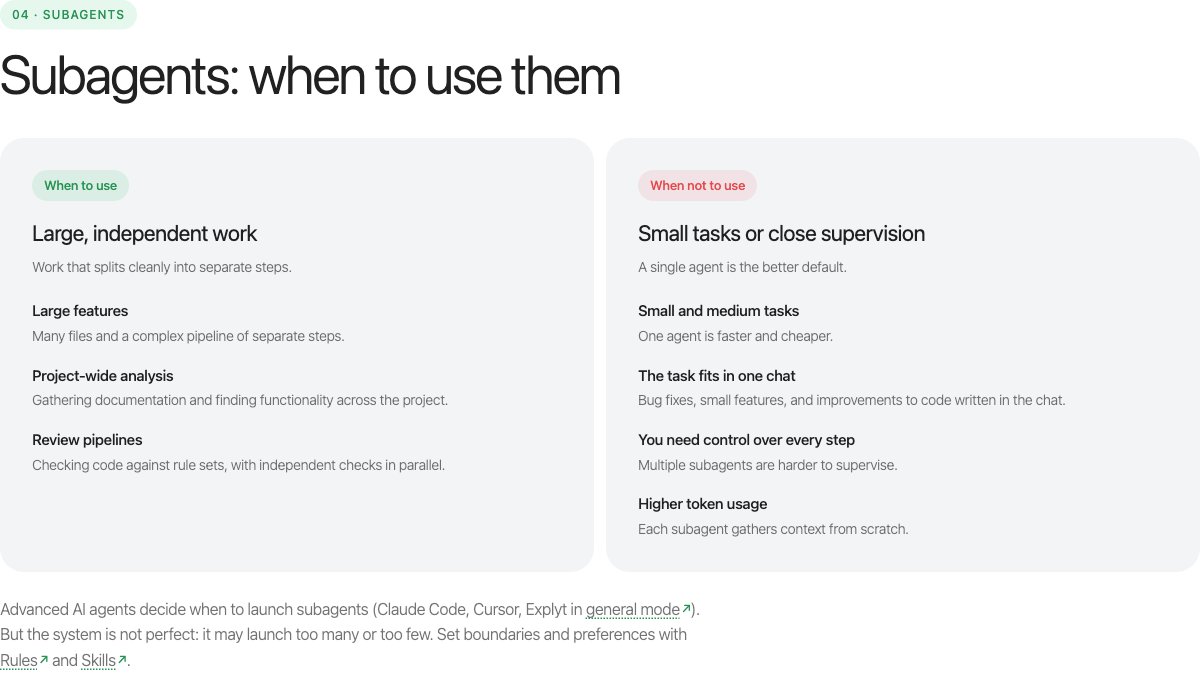
Sergey followed that slide with a line attributed to Anthropic on his next one: teams spend months on multi-agent architectures and then discover that better prompting of a single agent gives the same result. His reading: a single agent with a precise request is the default, and subagents are for work that is too large or too spread out for one context. A bug fix does not qualify, and neither does a feature that fits in one chat or anything you want to watch step by step. The cost is also easy to underestimate: each subagent rebuilds context from zero, so a pipeline of five is noticeably more expensive than one agent doing the same job.
For several unrelated tasks at the same time the tool is different: git worktree. You keep one repository with several checkouts in separate directories, each on its own branch with its own agent. The agents do not step on each other’s files, and the history stays shared.
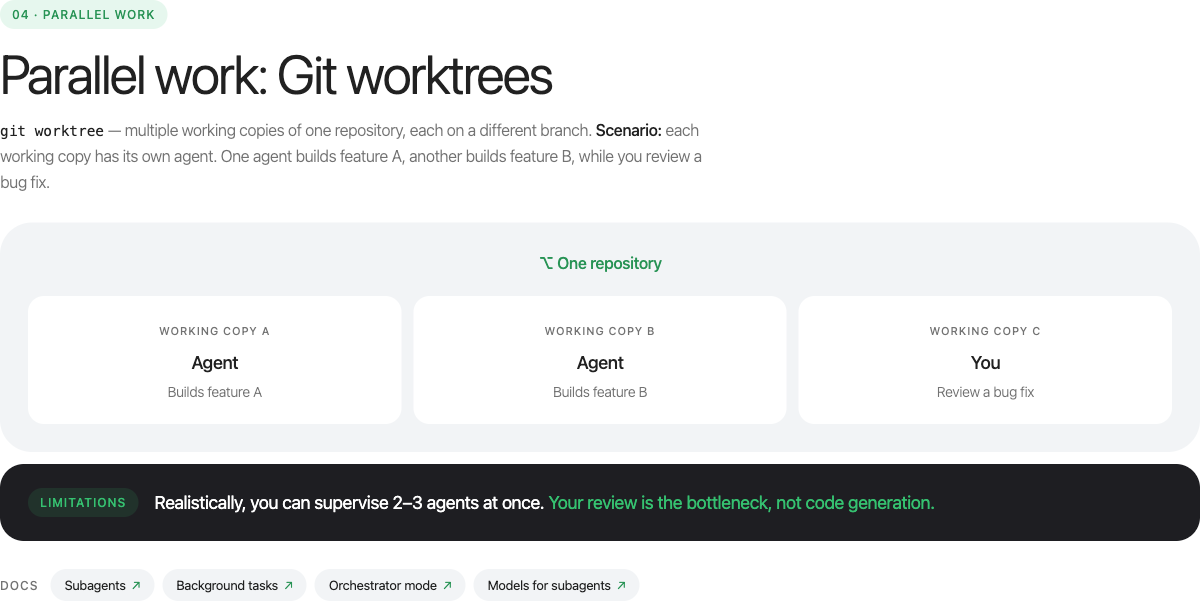
The slide puts the realistic limit at two or three agents in parallel; the Explyt team’s own experience stretches that to four on a good day. Generating code scales without much trouble, while reading the diffs and switching between them stays a human-sized job.
Rules, skills, MCP: which file for which job
Personal settings live in your home directory and never reach the repository: response language, how much autonomy you want, your preferred format for a stack-trace analysis. Team settings live in the repository: AGENTS.md, project rules and skills, the agent’s access boundaries, the MCP server list, project memory. Most agents follow some version of this split; the directory names differ.
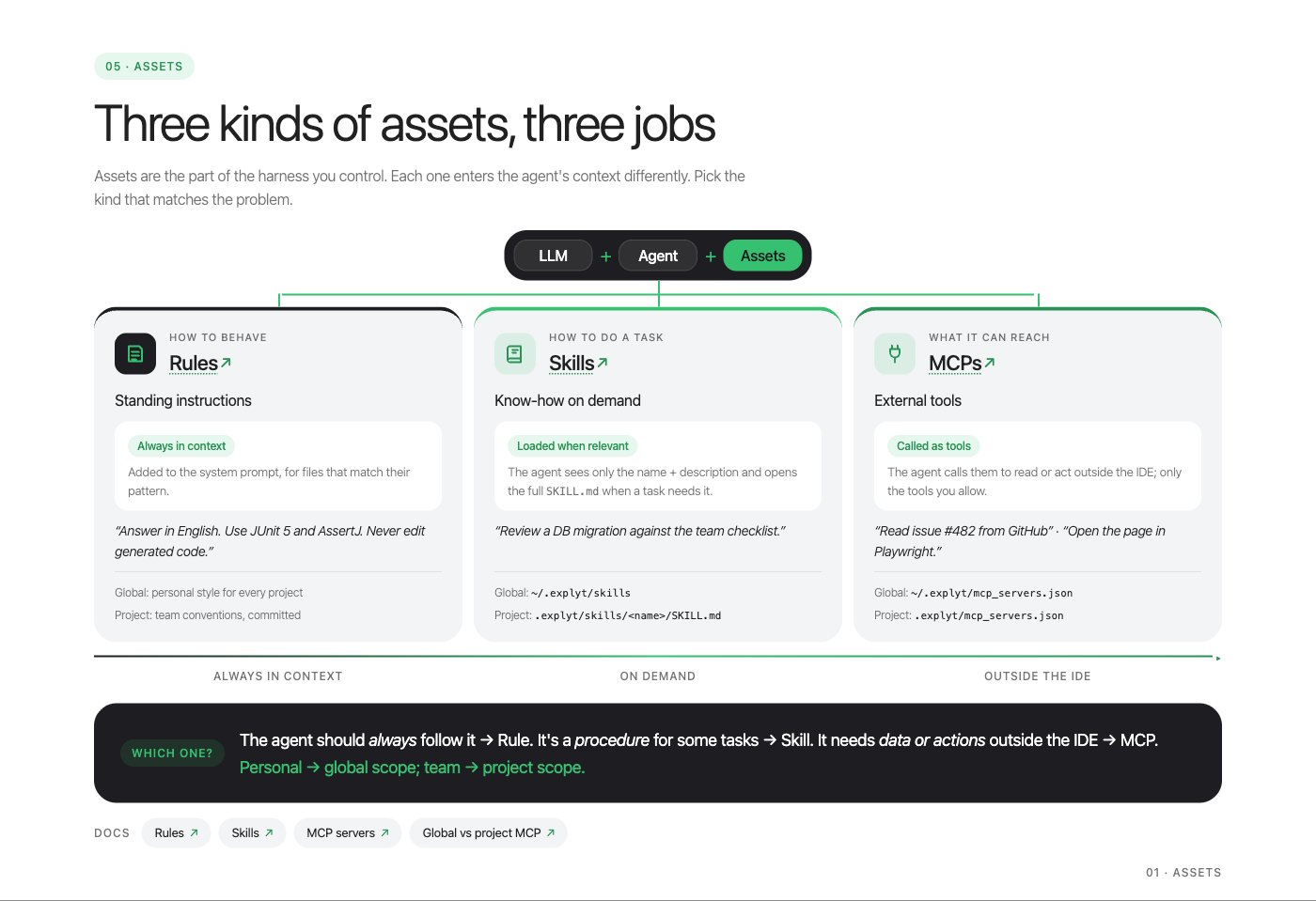
A rule is a standing instruction that goes into the system prompt: “JUnit 5 and AssertJ. Never edit generated sources.” Scope it to a file pattern so a rule about tests does not follow you into production code, and remember that a rule repeated on every turn costs tokens on every turn.
A skill is know-how loaded on demand: a Markdown file with a description the agent sees and a body it opens when the description matches the task. There is an open Agent Skills format, and agents that read it can pick up a skill written for another tool, which spares a team on two agents from keeping two copies. The live demo showed why the description matters. Sergey generated a skill for testing Spring controllers, deleted a test class, asked for it back, and the agent ignored the skill. The frontmatter was missing the field that lists which agents may pick it up automatically. He added it, asked again, and the chat showed the skill in use. Generate the skill, then iterate on the description until the agent reliably picks it up.
An MCP server is the agent’s reach outside the IDE: GitHub, Jira, a browser. If a server exposes fifty tools, their descriptions alone eat context; some agents can park such a server behind a subagent so the main chat only sees a summary.
Sergey’s rule for choosing between them: if it should always apply, write a rule; if it is a procedure for some tasks, write a skill; if it needs data or actions outside the editor, connect an MCP server.
Project memory is the newest piece. Non-obvious facts (why the build uses a forked plugin, which module is off limits) go into a Markdown file per entry, with an index, inside the repository. The agent writes them during conversations and reads the index at the start of the next one. Class locations and method signatures do not belong there; the agent can see those in the code.
A checklist you can run with any agent
The guide’s setup checklist adds up to thirty minutes:
- Global rules: which language to answer in, code style, how much to ask before acting, how to report. Ten minutes.
- A personal skill or two, for the tasks that come back every week. Check the public skill registries first. Ten minutes each.
- Project memory switched on, if your agent has it. Five minutes.
- One real ticket, then adjust the wording of whatever misfired. Five minutes.
And the reviewer’s list, the one I would print:
- Does the spec name the classes, the issue and what is out of scope?
- Does every acceptance criterion have a test, and does every test trace to a criterion or a requirement?
- Is the test directory read-only for the agent during implementation?
- Did the review loop have a round limit, and what was still open when it stopped?
- Did any assertion get weaker, any test get disabled, any mock replace the thing under test?
- Can you explain the diff to a colleague without the agent’s summary?
Disclosure and where the rest lives
I work at Explyt, which makes an AI agent for JetBrains IDEs, and the webinar was ours, so read the above with that in mind. Everything in this post is agent-agnostic on purpose: the spec, the locked tests, the review cap and the worktree layout work with Claude Code, Codex, Cursor or an agent inside IntelliJ IDEA. The parts I left out are the product-specific ones: the demo of rules, skills and memory inside our plugin, and the wizard that generates AGENTS.md. The full set of slides, the spec template and the prompts are in the webinar’s extended guide; the recording goes up on our YouTube channel, and I will add the link in the comments once it is there.
If you try the six steps on one ticket and the agent still edits the test instead of the code, I would like to hear how it got around the lock. That is the failure mode I am collecting.
Sources
- Webinar “Working with AI Tools at the User Level”, September 28, 2026, speaker Sergey Pospelov, and its extended guide (linked above)
- Bucket4j, the token-bucket library named in the spec example
- git worktree documentation
- Agent Skills, the open skill format
Found a mistake, or something to add? Edit this page on GitHub

Viktoria Evdokimova
PM working on AI coding agents for the Java/JVM ecosystem. She focuses on how AI agents integrate with IDEs to support debugging, refactoring, and code navigation, and is passionate about developer productivity, JVM tooling, and helping specialists find …