# Integrate executable Java code in your blog posts
> Thanks to JDoodle you can now also add executable code to your Foojay content!
- URL: https://foojay.io/today/integrate-executable-java-code-in-your-blog-posts/
- Published: 2023-11-07
- Authors: Frank Delporte
- Categories: Foojay, Java Beginner, Tutorials
While developing the [Foojay Quickstart Java Tutorial](https://foojay.io/java-quick-start/), I was looking for an easy way to integrate runnable Java code examples into the Foojay pages and blogs. That's when I discovered [jdoodle.com](https://www.jdoodle.com/). I started by using their online editor, but with this blog I want to show you an even easier method to integrate runnable code here on Foojay.
## Integration examples
### Single file code
To integrate "plain" Java code in your post or page, wrap it in the `jdoodle` shortcode:
```
{{}}
// This is the place to put the code
{{}}
```
Nothing else is needed: the page loads the JDoodle script by itself when it finds the shortcode.
For example, this:
```
{{}}
public class MainArguments {
public static void main (String[] args) {
System.out.println("Number of arguments: " + args.length);
if (args.length > 0) {
System.out.println("First argument: " + args[0]);
}
for (int i = 0; i < args.length; i++) {
System.out.println("Argument " + (i + 1) + ": " + args[i]);
}
}
}
{{}}
```
Will produce the following output. Hit the "Execute" button to run the code.
{{< jdoodle >}}
public class MainArguments {
public static void main (String[] args) {
System.out.println("Number of arguments: " + args.length);
if (args.length > 0) {
System.out.println("First argument: " + args[0]);
}
for (int i = 0; i < args.length; i++) {
System.out.println("Argument " + (i + 1) + ": " + args[i]);
}
}
}
{{< /jdoodle >}}
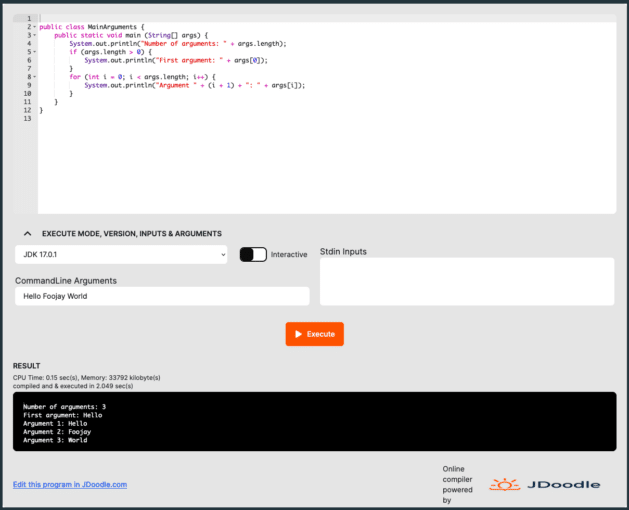
As you can see, the reader of your Foojay post can modify the code, execute it, and even add CommandLine Arguments to change the behavior of the code as you can see in this screenshot:
Code with external data files
In one of the more advanced tutorial steps, I wanted to read data from a text file. This can also be done with JDoodle. Put the data file itself in
assets/jdoodle/ in the Foojay repository, name it in the shortcode's
files parameter, and open it from /uploads/:
```
{{}}
// This is the place to put the code
{{}}
```
Foojay's own JDoodle client id is what allows the use of external files, and the shortcode adds it for you. Create your own account on the JDoodle site if you want to use this functionality on another website.
This is a simple example to read data from a CSV file:
```
{{}}
import java.io.File;
import java.io.FileNotFoundException;
import java.util.Scanner;
public class ReadTextFile {
public static void main (String[] args) {
File file = new File("/uploads/testdata.csv");
try (Scanner scanner = new Scanner(file)) {
while (scanner.hasNextLine()) {
System.out.println(scanner.nextLine());
}
} catch (FileNotFoundException ex) {
System.err.println("Could not find the file to be loaded");
}
}
}
{{}}
```
A full example with this approach can be found in the tutorial: "Reading a Text File".
Conclusion
JDoodle allows to experiment with code in the browser and provides many other easy tools. Thanks to JDoodle you can now also add executable code to your Foojay content!
In a next post that will be published soon, we'll talk with the creator of JDoodle, Gokul Chandrasekaran.