Introduction to Error Prone: How to Catch Bugs at Compile Time

The Java compiler’s job is to check whether code follows the rules of the language. Trying to remove an element from a collection that can never contain it, or using the wrong letter in a date pattern, does not break those rules, so nothing stops the code from compiling. In short, any code that follows the rules compiles, even when it does not do what its author intended.
What is Error Prone?
Error Prone is an open source static analysis tool that Google built to fill this gap. Unlike most static analysis tools, it does not run as a separate step; it plugs into javac as a plugin. Using the information the compiler produces while analyzing the code, it looks for patterns that follow the rules of the language but are most likely wrong, and reports them as compiler warnings or errors.
The idea behind the tool is simple: a bug costs the least to fix at the moment the code is written. Error Prone catches bugs while the code compiles, before they reach code review, CI or production.
Google has used the tool on its huge Java codebase for years, but its use is not limited to Google. NullAway, the null safety tool developed by Uber, runs as an Error Prone plugin. Spring Framework 7 checks its own codebase with NullAway during the build. Popular libraries such as Caffeine also use Error Prone in their builds.
The examples in this article, which aims to introduce you to Error Prone, are available in this repository.
How it differs from other static analysis tools
The Java world has well-established tools such as SpotBugs, PMD, Checkstyle and SonarQube. Three key features set Error Prone apart from them:
- It runs inside the compiler. It needs no separate build step or server. Because it is a plugin for javac, it works with any build tool that calls javac (Maven, Gradle, Bazel, Ant).
- It knows everything the compiler knows. The analysis runs on the AST that javac builds, after the type attribution and flow analysis phases. This gives Error Prone access to all symbol and type information. For example, it knows exactly what the generic type argument of an expression is, or which overload was chosen.
- It does not stop at a diagnosis; it suggests a fix. Most checks come with a suggested fix, which can be applied to the source code with a single command.
How does Error Prone help developers?
The strength of Error Prone is that it can stop code that compiles but behaves incorrectly, right at compile time. Let’s take a closer look at the following example from the official documentation:
Set<Short> s = new HashSet<>();
for (short i = 0; i < 100; i++) {
    s.add(i);
    s.remove(i - 1);
}
System.out.println(s.size());
This code seems to remove the previous element at each step, so you would expect it to print 1. It prints 100 instead, because the expression i - 1 is an int and is boxed to Integer. Since the Set<Short> contains no Integer, remove removes nothing. And because the remove(Object) signature accepts any type, the compiler does not complain either.
Error Prone, however, refuses to compile this code:
[ERROR] ShortSet.java:[22,21] [CollectionIncompatibleType] Argument 'i - 1' should not be passed
        to this method; its type int is not compatible with its collection's type argument Short
Now let’s look at the following code:
private static final DateTimeFormatter FORMATTER = DateTimeFormatter.ofPattern("YYYY-MM-dd");

String reportName(LocalDate date) {
    return "report-" + FORMATTER.format(date) + ".csv";
}
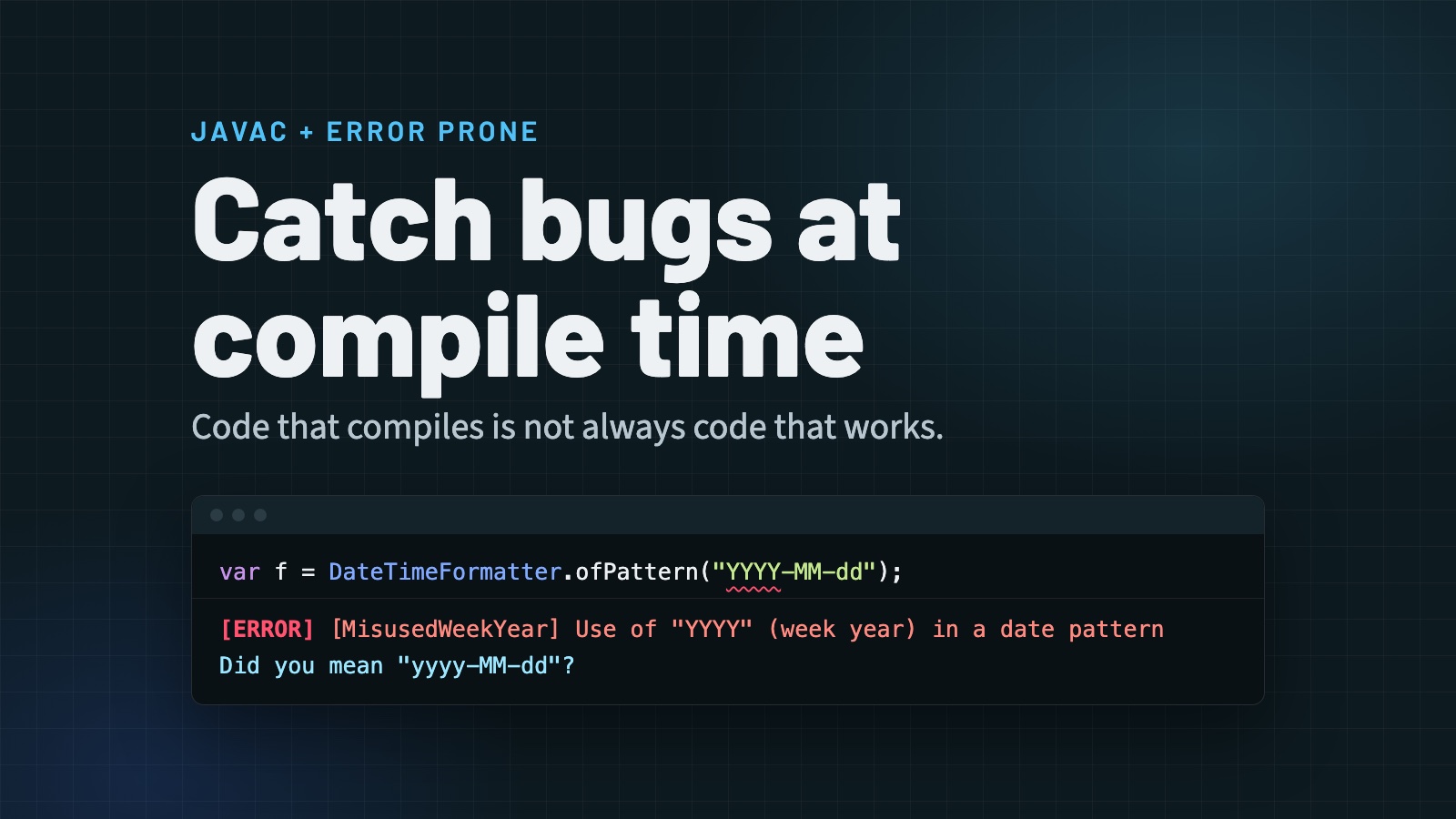
The code looks right when you read it, and it even works correctly for most of the year. However, Y in the pattern does not mean the calendar year; it means the week-based year. The calendar year is written with a lowercase y. When the last days of the year fall into the first week of the next year, the two values diverge. For example, for LocalDate.of(2025, 12, 29) the result is report-2026-12-29.csv, so the date jumps a year ahead.
When the bug shows up also depends on the locale. The same code starts producing the wrong year on December 28 in the en-US locale, and on December 29 in the tr-TR locale. For the rest of the year the tests pass, and in code review the difference between YYYY and yyyy is easy to miss.
Error Prone recognizes this pattern, stops the compilation and suggests the fix as well:
[ERROR] ReportDate.java:[16,83] [MisusedWeekYear] Use of "YYYY" (week year) in a date pattern without "ww"
        (week in year). You probably meant to use "yyyy" (year) instead.
  Did you mean 'private static final DateTimeFormatter FORMATTER = DateTimeFormatter.ofPattern("yyyy-MM-dd");'?
Note that in both examples the code is valid Java and compiles without any problem. At best, your IDE shows a warning; the build does not break. Since the code can also pass the tests, the bug can live unnoticed for a long time. With Error Prone, you do not have to rely on anyone’s attention to catch these subtle bugs: the build fails, the error message explains the problem, and it often suggests the fix as well.
Extending Error Prone
Error Prone is not a closed set of rules. Where the built-in checks fall short, you can add your own rules on the same infrastructure they use. There are two ways to do this:
- Writing transformation rules with Refaster. Rules of the form “when you see this code, replace it with that” are written as plain Java templates.
- Writing your own BugChecker. Team-specific bug patterns are defined with the same API that Error Prone uses for its own checks.
Refaster
Refaster is a refactoring tool that is part of Error Prone, built for large-scale transformations across big codebases. You do not write the rule against an AST API, but in plain Java: “when you see this, replace it with that.”
A Refaster rule is an ordinary Java class with at least two methods. @BeforeTemplate defines the pattern to look for, and @AfterTemplate defines the code to put in its place:
class StringIsEmpty {
    @BeforeTemplate
    boolean before(String s) {
        return s.length() == 0;
    }

    @AfterTemplate
    boolean after(String s) {
        return s.isEmpty();
    }
}
The template is matched with type information, not as text. That is why both name.length() == 0 and user.getEmail().length() == 0 are caught, while the same expression on a type other than String that also has a length() method is not. By writing more than one @BeforeTemplate, you can combine different patterns that lead to the same result in a single rule.
Using a rule takes two steps:
- The rule class is compiled with the
RefasterRuleCompilerplugin, which produces a.refasterfile. The plugin lives in theerror_prone_refasterartifact and is passed to the compiler with the-Xplugin:RefasterRuleCompiler --out rules.refasterargument. - The generated
.refasterfile is passed to Error Prone with-XepPatchChecks:refaster:<file>. Error Prone writes the matches to a patch file, or applies them directly to the source code with-XepPatchLocation:IN_PLACE.
Refaster is ideal for tasks such as migrating from one API to another, removing a deprecated method, or standardizing an idiom within a team. Picnic’s open source Error Prone Support project also offers a way to run Refaster rules on every build, like a regular Error Prone check.
Custom BugCheckers
Error Prone’s built-in checks do not cover every rule. Alongside widely shared rules such as “sensitive data like national ID numbers, credit card numbers and email addresses must not be written to logs” or “do not use new BigDecimal(double) for monetary calculations”, each team may also have its own rules, such as “this internal API must no longer be called”. Error Prone lets you write these rules on the same infrastructure as its built-in checks.
A custom check is a Java class that extends BugChecker. It declares which AST nodes it is interested in through the *TreeMatcher interfaces it implements. Error Prone calls the check for each such node, and the check returns a match and an optional fix.
The following example implements the sensitive data rule. Although the rule is general, only the team knows which data is sensitive. That is why the team marks fields such as national ID numbers or email addresses with its own @SensitiveData annotation:
public record Customer(
        String name,
        @SensitiveData String nationalId,
        @SensitiveData String email,
        @SensitiveData String cardNumber) {}
The check reports an error when a log call is given a marked field, or an object whose toString() would print marked fields:
@AutoService(BugChecker.class)
@BugPattern(summary = "Sensitive data must not be written to logs", severity = ERROR)
public final class SensitiveDataLogging extends BugChecker implements MethodInvocationTreeMatcher {

    private static final String SENSITIVE_DATA = "org.jugistanbul.SensitiveData";

    private static final Matcher<ExpressionTree> LOGGER_CALL =
            instanceMethod()
                    .onDescendantOfAny(
                            "java.lang.System.Logger", "java.util.logging.Logger", "org.slf4j.Logger");

    @Override
    public Description matchMethodInvocation(MethodInvocationTree tree, VisitorState state) {
        if (!LOGGER_CALL.matches(tree, state)) {
            return Description.NO_MATCH;
        }
        tree.getArguments().stream()
                .flatMap(argument -> stringifiedValues(argument, state)) // "..." + x → "...", x
                .filter(value -> isSensitive(value, state))
                .forEach(value -> state.reportMatch(
                        buildDescription(value)
                                .setMessage("'%s' contains sensitive data and must not be written to logs"
                                        .formatted(state.getSourceForNode(value)))
                                .build()));
        return Description.NO_MATCH;
    }

    private static boolean isSensitive(ExpressionTree value, VisitorState state) {
        // customer.email(): the field or accessor itself is annotated
        var symbol = ASTHelpers.getSymbol(value);
        if (symbol != null && ASTHelpers.hasAnnotation(symbol, SENSITIVE_DATA, state)) {
            return true;
        }
        // customer: the class, or one of its fields, is annotated, so toString() leaks it
        var type = ASTHelpers.getType(value);
        if (type == null || type.isPrimitive() || !(type.tsym instanceof ClassSymbol valueClass)) {
            return false;
        }
        return ASTHelpers.hasAnnotation(valueClass, SENSITIVE_DATA, state)
                || valueClass.getEnclosedElements().stream()
                        .anyMatch(member -> member.getKind() == ElementKind.FIELD
                                && ASTHelpers.hasAnnotation(member, SENSITIVE_DATA, state));
    }

    // stringifiedValues(...) splits a string concatenation into its operands; see the repo
}
In the demo’s CheckoutService, the first line passes because it only logs the customer’s name, while the other two do not compile:
LOG.log(Level.INFO, "Order " + orderId + " placed by " + customer.name());
LOG.log(Level.DEBUG, "Order " + orderId + " placed by " + customer);
LOG.log(Level.INFO, "Receipt for order " + orderId + " sent to " + customer.email());
[ERROR] CheckoutService.java:[25,67] [SensitiveDataLogging] 'customer' contains sensitive data and must not be written to logs
[ERROR] CheckoutService.java:[28,90] [SensitiveDataLogging] 'customer.email()' contains sensitive data and must not be written to logs
The check looks at the expression passed to the logger, so a value first copied into a local variable (String email = customer.email();) is not tracked; following it would need data-flow analysis.
This short class shows all the parts of a custom check:
@BugPattern: Defines the rule’s name, description and severity (ERRORorWARNING). The rule can be turned off, or its severity changed, by its class name (-Xep:SensitiveDataLogging:WARN), and it can be suppressed with@SuppressWarnings.- Matchers: Ready-made building blocks such as
MethodMatchersexpress conditions like “any method of aSystem.Logger,java.util.loggingor SLF4J logger” with type information, in a single expression. - Type and symbol information:
ASTHelpersgives access to the symbol and type of the logged value. Annotations are resolved by their fully qualified names, so an annotation with the same name in another package does not get mixed in. A text search cannot do this. @AutoService: Makes the check discoverable throughServiceLoader. Adding the jar that contains the checks to the annotation processor path is enough.
This check only reports the error, but checks can also suggest fixes with SuggestedFix. BigDecimalDoubleConstructor in the repository is a short example that suggests BigDecimal.valueOf(double) instead of new BigDecimal(double).
Checks are tested with CompilationTestHelper. // BUG: Diagnostic contains: comments in the test source mark the line where an error is expected. For checks that suggest fixes, BugCheckerRefactoringTestHelper compares the output of the fix with the expected source code; BigDecimalDoubleConstructorTest in the repository is an example.
Refaster or BugChecker?
| Refaster | Custom BugChecker | |
|---|---|---|
| How a rule is written | Before/after Java templates | Error Prone API (AST, matchers) |
| Learning curve | Low | Medium |
| Expressiveness | “This expression instead of that one” | Any rule that looks at context |
| Typical use | API migration, idiom standardization | Team-specific bug patterns, bans |
As a rule of thumb: if you can describe the transformation as “replace this code with that”, Refaster is enough. If you describe it as “report an error in this case and under this condition”, you need a BugChecker.
Running the examples
All the examples in this article are available in runnable form in the error-prone-in-action repository: ShortSet and ReportDate, which trigger the built-in checks, three custom checks with their tests, and the StringIsEmpty Refaster rule. The repository’s README explains which command runs each example.
Conclusion
The Java compiler checks whether code follows the rules of the language, not what its author intended. Error Prone fills this gap from inside the compiler. Using javac’s type information, it catches code that compiles but is most likely wrong, and often suggests the fix as well. Where the built-in checks fall short, you can write transformation rules with Refaster and team-specific checks with the BugChecker API.
In my view, this approach is more valuable today than ever. As AI coding assistants speed up the pace of writing code, tools that catch bugs at their cheapest moment, at compile time, are turning from a luxury into a necessity.
Found a mistake, or something to add? Edit this page on GitHub

Hüseyin Akdoğan
Since 2005, Huseyin Akdogan has been developing enterprise applications with Java, holding training, writing articles, and consultancy services about Java runtimes such as Spring, Quarkus, and some big data technologies. Also, he is one of the leaders of JUG …