Paging DTO Projections in Spring Data JPA: Three Approaches Compared

A typical list screen shows five columns from two tables, takes three optional filters from the request, and pages through the results. This is ordinary read-side work in a Spring Boot application, and it’s surprisingly easy to do badly with JPA.
Loading entities for a screen like that brings in the whole entity graph: lazy proxies, a persistence context tracking objects nobody will modify, and the occasional N+1 select when a template touches a relationship. A DTO projection avoids all of that, because the database returns only the columns the screen shows. The question is how you write the projection, and what happens once you add paging and filters.
This article walks through three ways to do it in Spring Data JPA, using the same screen each time: orders, with their status, total, creation time and customer name, filtered by status, customer country and a date range, ordered newest first.
1. A constructor expression in @Query
The classic JPA answer is a JPQL constructor expression:
public record OrderRow(Long id, OrderStatus status, BigDecimal total, Instant createdAt, String customerName) {}

public interface OrderRepository extends JpaRepository<OrderEntity, Long> {

    @Query(value = """
            select new com.acme.orders.OrderRow(o.id, o.status, o.total, o.createdAt, c.name)
            from OrderEntity o left join o.customer c
            where (:status is null or o.status = :status)
              and (:country is null or c.country = :country)
              and (:from is null or o.createdAt >= :from)
              and (:to is null or o.createdAt < :to)
            order by o.createdAt desc, o.id desc""",
           countQuery = """
            select count(o)
            from OrderEntity o left join o.customer c
            where (:status is null or o.status = :status)
              and (:country is null or c.country = :country)
              and (:from is null or o.createdAt >= :from)
              and (:to is null or o.createdAt < :to)""")
    Page<OrderRow> findRows(@Param("status") OrderStatus status, @Param("country") String country,
                            @Param("from") Instant from, @Param("to") Instant to, Pageable pageable);
}
It works, and it’s efficient: one statement for the page, one for the count, and only the columns you listed.
The costs show up later:
- The projection lives in a string. The fully qualified class name, the constructor argument order and the property paths are checked only when the repository starts, or worse, when the query first runs, depending on your setup. Reorder two record components of the same type and nothing complains at all.
- The count query is often a copy. Recent Spring Data versions derive a count query from most JPQL, constructor
expressions included, but when the derived count is wrong or slow for a query with joins, the fix is a
hand-written
countQuery. Every filter then lives in two places, and they drift. - Optional filters become
:x is null or .... It’s the usual workaround, but the planner sees one statement for every combination of filters, and on some databases that stops it from using the index you added for the common case. - Each screen gets its own query. A detail screen that needs two more columns means another record and another
@Query, with the joins written again.
2. Interface projections
Spring Data’s interface projections remove the string projection:
public interface OrderSummary {
    Long getId();
    OrderStatus getStatus();
    BigDecimal getTotal();
    Instant getCreatedAt();
    CustomerSummary getCustomer();

    interface CustomerSummary {
        String getName();
    }
}

Page<OrderSummary> findByStatus(OrderStatus status, Pageable pageable);

// newest first, with the id as a tie-breaker
orderRepository.findByStatus(status, PageRequest.of(0, 20, Sort.by(Sort.Direction.DESC, "createdAt", "id")));
For a closed projection over the root’s own properties, Spring Data selects just those columns, and the derived count query comes for free. This is the nicest option when the filters are fixed.
It gets harder from there:
- Optional filters don’t fit derived queries.
findByStatusalways filters by status. Three optional filters mean either a method per combination or a move toSpecifications, with the repository also extendingJpaSpecificationExecutor<OrderEntity>.findBy(spec, q -> q.as(OrderSummary.class).page(pageable))projects as well as a derived query does, but the filters are now Criteria API code, with attribute names as strings unless you generate the JPA metamodel. - Nested projections are where the column list stops being obvious. On both Spring Boot 3.5 and 4.1, a nested
projection such as
getCustomer()selects every column of the customer, not just its name. Using@Value("#{target.customer.name}")instead makes it an open projection, and then, in the words of the Spring Data reference, it “cannot apply query execution optimizations”: the whole order entity is loaded, and the lazy customer comes in with a query of its own. Check the SQL your versions actually generate. - Interfaces are proxies. The rows are backed by generated proxies or maps, which is fine inside the service but a surprise when you serialize them or compare them in tests.
3. A generated read model
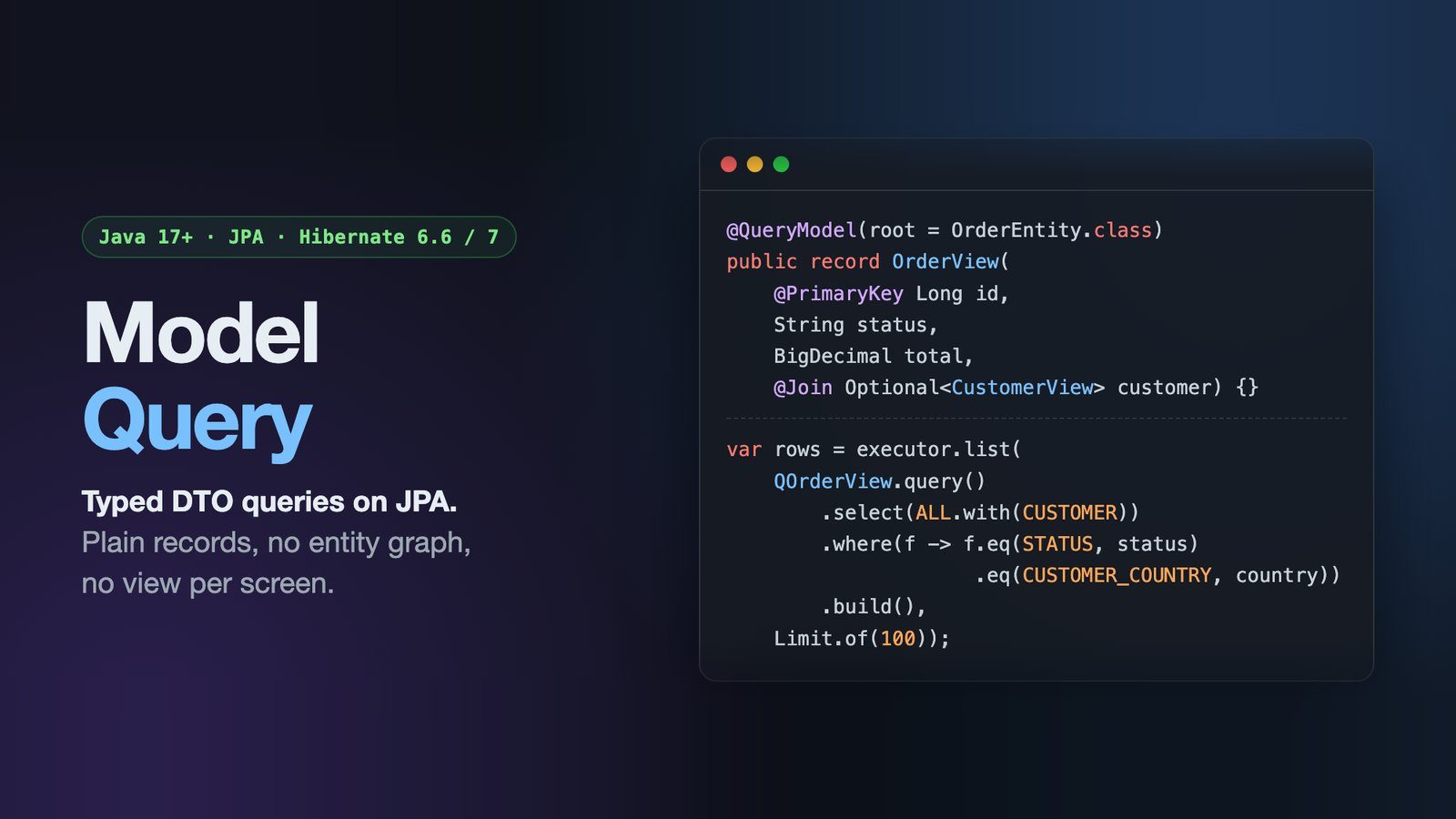
The third approach is what I ended up building, after writing the first two for the same kind of screen one time too many. Model Query is an open-source library (Apache 2.0) that declares the projection once, as a plain record, and generates typed constants for it with an annotation processor:
@QueryModel(root = OrderEntity.class)
public record OrderView(
        @PrimaryKey Long id,
        OrderStatus status,
        BigDecimal total,
        Instant createdAt,
        @Join(attribute = "customer") Optional<CustomerView> customer) {}

@QueryModel(root = CustomerEntity.class)
public record CustomerView(@PrimaryKey Long id, String name, String country) {}
The processor checks each component against the entity at compile time, so a renamed attribute breaks the build, not a request. The repository gets one extra fragment:
public interface OrderRepository extends JpaRepository<OrderEntity, Long>, ModelQueryRepository<OrderEntity> {}The query for the screen:
// status, country, from and to are Optionals built from the request parameters
var query = QOrderView.query()
        .select(QOrderView.DEFAULT.with(QOrderView.CUSTOMER))
        .where(f -> f.eq(QOrderView.STATUS, status)
                     .eq(QOrderView.CUSTOMER_COUNTRY, country)
                     .range(QOrderView.CREATED_AT, from, to))
        .orderBy(QOrderView.CREATED_AT.desc())
        .build();

ModelPage<OrderView> page = orderRepository.findPage(query, PageRequest.of(0, 20), CountMode.COUNT);
What changes compared with the first two approaches:
- An empty
Optionaladds no predicate. There is no:x is null or ...: a filter the request didn’t send isn’t in the SQL at all, so each combination of filters gets a statement the planner can optimise on its own terms. - The count is derived from the same query. There is no second copy of the filters.
CountMode.NO_COUNTskips the count and fetches one extra row to work out whether there is a next page, which is what an infinite-scroll screen wants.ModelPageis a Spring DataSlicethat also reports the total when one was counted. - The join is added only when the query uses it.
QOrderView.DEFAULTwith no customer filter reads only the order table. A filter onCUSTOMER_COUNTRYadds the join, and.with(QOrderView.CUSTOMER)also adds the customer columns. A detail screen and a list screen can use the same model and select different column sets instead of declaring a second DTO. - The order is made stable for you. Offset paging over a non-unique order (many orders share a
createdAt) can skip or repeat rows between pages. The library appends the primary key to the order as a tie-breaker. - The rows are your records. They’re plain Java objects, so they serialize, compare and test like any other record.
Deep pages: keyset paging
All three approaches above use offset paging, which gets slower as the offset grows, because the database still
reads and discards every row before the page. Spring Data has had keyset scrolling since 3.1, through Window and
ScrollPosition, and it’s a good option for derived queries.
In Model Query, keyset paging is a flag on the same query:
var query = QOrderView.query()
        .select(QOrderView.DEFAULT.with(QOrderView.CUSTOMER))
        .where(f -> f.eq(QOrderView.STATUS, status)
                     .eq(QOrderView.CUSTOMER_COUNTRY, country)
                     .range(QOrderView.CREATED_AT, from, to))
        .orderBy(QOrderView.CREATED_AT.desc())
        .keyset()
        .build();

KeysetSlice<OrderView> first = orderRepository.findKeysetPage(query, KeysetSpec.first(50), Sort.unsorted());
if (first.hasNext()) {
    KeysetSlice<OrderView> next = orderRepository.findKeysetPage(query,
            KeysetSpec.after(first.nextCursor().orElseThrow(), 50), Sort.unsorted());
}
Keyset paging fails in quiet ways, so the library refuses the risky cases rather than guessing. The cursor is an
opaque string bound to the order that issued it, and reusing it under a different orderBy fails instead of returning
the wrong page. A NULL in a keyset column fails unless the column says nullsFirst() or nullsLast(), because
otherwise that row would silently drop out of the results. A page that comes back holding the cursor’s own row fails
instead of looping. A stateless page can’t see other rows move between requests, though, so keyset paging is only
exact while the order columns don’t change under it, which a creation time usually doesn’t.
Which one should you use?
- A handful of fixed queries: a constructor expression or a closed interface projection is enough, and it adds nothing to the project.
- Fixed filters and simple shapes: interface projections with derived queries, and
Windowwhen the table is large. - Many list screens, optional filters, several shapes of the same data: that’s where declaring the projection once starts to pay off, whether with Model Query or with Blaze-Persistence entity views. Blaze-Persistence is the more mature of the two. I tried it after the first version of Model Query, which had no annotation processor yet, and came back for two reasons: a view interface per screen instead of one record with selectable column sets, and mappings and query expressions written as strings, checked when the application starts rather than when it compiles.
To be clear about where it stands: Model Query is at 0.11.1, it runs on Hibernate 6.6 and 7.4 with tests against H2,
PostgreSQL and MySQL, and every public type is still marked @Incubating until the 1.0 freeze. That’s the point of
writing this now. If you try it on a real codebase, the issue tracker
is where the API can still change. The user guide covers the rest.
Found a mistake, or something to add? Edit this page on GitHub

Rey Pham
Rey Pham is a Java developer who works on Spring Boot and JPA applications and maintains Model Query, an open-source library for typed DTO queries on top of JPA.