# Putting JFR into Context
> Have you ever wanted to bring your JFR events into context? Adding information on sessions, user IDs, and more can improve your ability to make sense of all the events in your profile.
- URL: https://foojay.io/today/putting-jfr-into-context/
- Published: 2023-11-02
- Authors: Johannes Bechberger
- Categories: Java Core, Performance
**Have you ever wanted to bring your JFR events into context? Adding information on sessions, user IDs, and more can improve your ability to make sense of all the events in your profile.**
Currently, we can only add context by creating custom JFR events, as I presented in my [Profiling Talks](https://mostlynerdless.de/profiling-talks/):
More here: https://mostlynerdless.de/profiling-talks/
We can use these custom events to store away the information and later relate them to all the other events by using the event's time, duration, and thread. This works out-of-the-box but has one major problem: Relating events is quite fuzzy, as time stamps are not as accurate (see JFR Timestamps and System.nanoTime), and we do all of this in post-processing.
But couldn't we just attach some context to every JFR event we're interested in? Not yet, but [Jaroslav Bachorik](https://jbachorik.github.io/) from DataDog is working on it. Recently, he wrote three blog posts ([1](https://jbachorik.github.io/posts/seeing-in-context_1), [2](https://jbachorik.github.io/posts/seeing-in-context_2), [3](https://jbachorik.github.io/posts/seeing-in-context_3)). The following is a different take on his idea, showing how to use it in a small file server example.
The main idea of Jaroslav's approach is to store a context in thread-local memory and attach it to every JFR event as configured. But before I dive into the custom context, I want to show you the example program, which you can find, as always, MIT-licensed on [GitHub](https://github.com/parttimenerd/jfr-context-example).
## Example
We create a simple file server via [Javalin](https://javalin.io), which allows a user to
* Register (URL schema `register/{user}`)
* Store data in a file (`store/{user}/{file}/{content}`)
* Retrieve file content (`load/{user}/{file}`)
* Delete files (`delete/{user}/{file}`)
The URLs are simple to use, and we don't bother about error handling, user authentication, or large files, as this would complicate our example. I leave it as an exercise for the inclined reader. The following is the most essential part of the application: the [server declaration](https://github.com/parttimenerd/jfr-context-example/blob/main/src/main/java/me/bechberger/server/Main.java):
```java
FileStorage storage = new FileStorage();
try (Javalin lin = Javalin.create(conf -> {
conf.jetty.server(() ->
new Server(new QueuedThreadPool(4))
);
})
.exception(Exception.class, (e, ctx) -> {
ctx.status(500);
ctx.result("Error: " + e.getMessage());
e.printStackTrace();
})
.get("/register/{user}", ctx -> {
String user = ctx.pathParam("user");
storage.register(user);
ctx.result("registered");
})
.get("/store/{user}/{file}/{content}", ctx -> {
String user = ctx.pathParam("user");
String file = ctx.pathParam("file");
storage.store(user, file, ctx.pathParam("content"));
ctx.result("stored");
})
.get("/load/{user}/{file}", ctx -> {
String user = ctx.pathParam("user");
String file = ctx.pathParam("file");
ctx.result(storage.load(user, file));
})
.get("/delete/{user}/{file}", ctx -> {
String user = ctx.pathParam("user");
String file = ctx.pathParam("file");
storage.delete(user, file);
ctx.result("deleted");
})) {
lin.start(port);
Thread.sleep(100000000);
} catch (InterruptedException ignored) {
}
```
This example runs on Jaroslav's OpenJDK fork (commit 6ea2b4f), so if you want to run it in its complete form, please build the fork and make sure that you're `PATH` and `JAVA_HOME` environment variables are set accordingly.
You can build the server using `mvn package` and
start it, listening on the port `1000`, via:
```bash
java -jar target/jfr-context-example.jar 1000
```
You can then use it via your browser or `curl`:
```bash
# start the server
java -XX:StartFlightRecording=filename=flight.jfr,settings=config.jfc \
-jar target/jfr-context-example.jar 1000 &
pid=$!
# register a user
curl http://localhost:1000/register/moe
# store a file
curl http://localhost:1000/store/moe/hello_file/Hello
# load the file
curl http://localhost:1000/load/moe/hello_file
-> Hello
# delete the file
curl http://localhost:1000/delete/moe/hello_file
kill $pid
# this results in the flight.jfr file
```
To make testing easier, I created the `test.sh script`, which starts the server, registers a few users and stores, loads, and deletes a few files, creating a JFR file along the way. We're using a custom JFR configuration to enable the IO events without any threshold. This is not recommended for production, but is required in our toy example to get any such event:
```xml
truetrue0 mstruetrue0 ms
```
We can use the [jfr tool](https://docs.oracle.com/en/java/javase/17/docs/specs/man/jfr.html) to easily print all the [jdk.FileRead](https://sap.github.io/SapMachine/jfrevents/#fileread) events from the created `flight.jfr` file in JSON format.
```bash
jfr print --events jdk.FileRead --json flight.jfr
```
This prints a list of events like:
```json
{
"type": "jdk.FileRead",
"values": {
"startTime": "2023-10-18T14:31:56.369071625+02:00",
"duration": "PT0.000013042S",
"eventThread": {
"osName": "qtp2119992687-32",
...
},
"stackTrace": {
"truncated": false,
"frames": [...]
},
"path": "\/var\/folders\/nd\/b8fyk_lx25b1ndyj4kmb2hk403cmxz\/T\/tmp13266469351066000997\/moe\/test_1",
"bytesRead": 8,
"endOfFile": false
}
}
```
You can find more information on this and other events in my [JFR Event Collection](https://sap.github.io/SapMachine/jfrevents):
[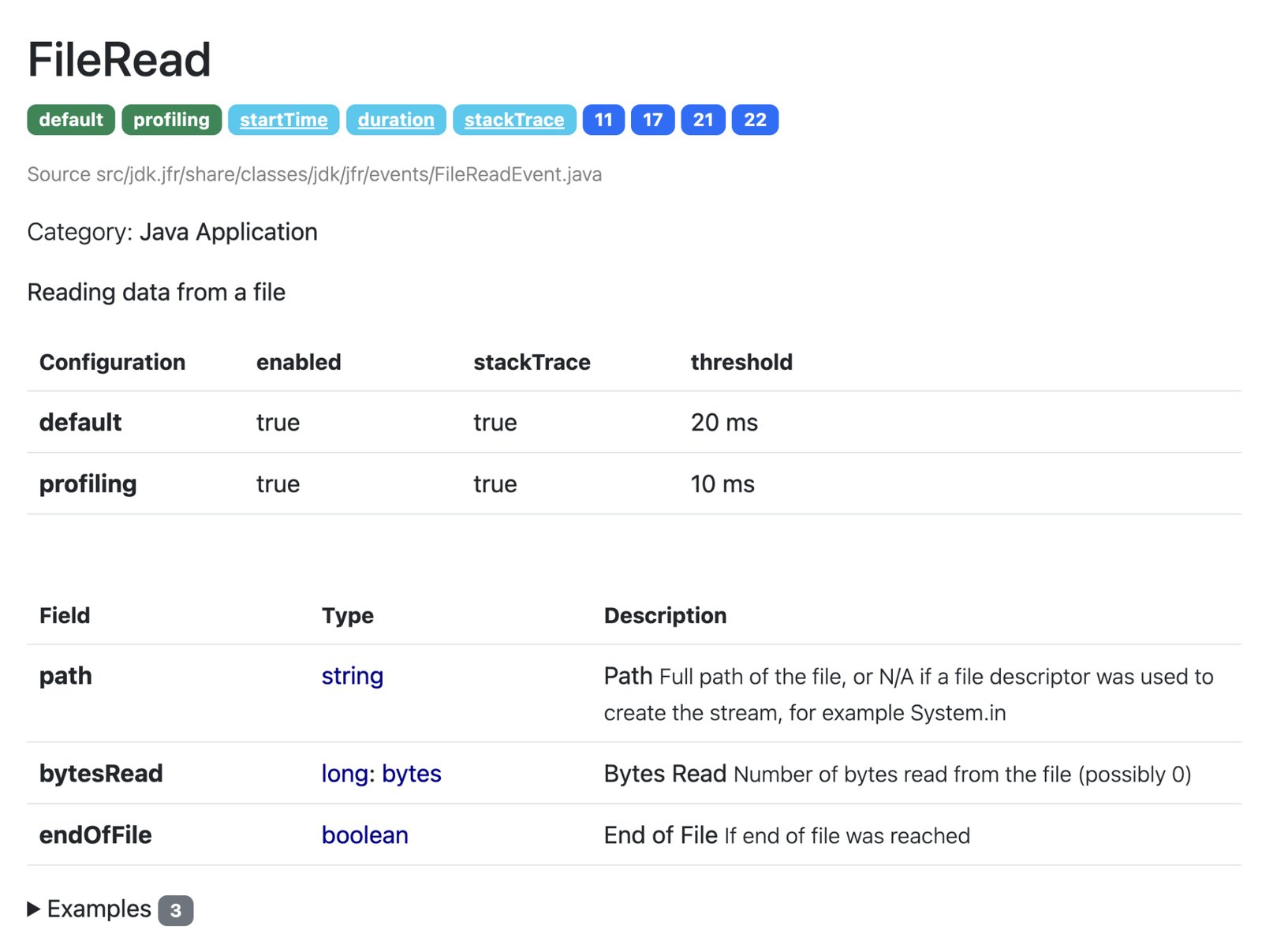](https://sap.github.io/SapMachine/jfrevents/#fileread)
There are, of course, other events, but in our file server example, we're only interested in file events for now (this might change as Jaroslav adds more features to his fork).
Now, we can start bringing the events into context.
## Adding Custom Context
Before we can add the context, we have to define it, as described in [Jaroslav's blog post](https://jbachorik.github.io/posts/seeing-in-context_2). We [create a context](https://github.com/parttimenerd/jfr-context-example/blob/e055b39a38fa7ee9dc4cf903d5d2b4fce9e2ac8d/src/main/java/me/bechberger/server/TracerContextType.java) that stores the current user, action, trace ID, and optional file:
```java
@Name("tracer-context")
@Description("Tracer context type tuple")
public class TracerContextType extends ContextType implements AutoCloseable {
private static final AtomicLong traceIdCounter = new AtomicLong(0);
// attributes are defined as plain public fields annotated by at least @Name annotation
@Name("user")
@Description("Registered user")
public String user;
@Name("action")
@Description("Action: register, store, load, delete")
public String action;
@Name("file")
@Description("File if passed")
public String file;
// currently no primitives allowed here
@Name("trace")
public String traceId;
public TracerContextType(String user, String action, String file) {
this.user = user;
this.action = action;
this.file = file;
this.traceId = "" + traceIdCounter.incrementAndGet();
this.set();
}
public TracerContextType(String user, String action) {
this(user, action,"");
}
@Override
public void close() throws Exception {
unset();
}
}
```
A context has to be set and then later unset, which can be cumbersome in the face of exceptions. Implementing the `AutoClosable` interface solves this by allowing us to wrap code in a try-with-resources statement:
```
try (var t = new TracerContextType(/* ... */)) {
// ...
}
```
All JFR events with enabled context that happen in the body of the statement are associated with the `TracerContextType` instance. We can use the code of all request handlers in our server with such a construct, e.g.:
```java
.get("/store/{user}/{file}/{content}", ctx -> {
String user = ctx.pathParam("user");
String file = ctx.pathParam("file");
try (var t = new TracerContextType(user, "store", file)) {
storage.store(user, file, ctx.pathParam("content"));
ctx.result("stored");
}
})
```
One last thing before we can analyze the annotated events: JFR has to know about your context before the recording starts. We do this by creating a registration class registered as a service.
```java
@AutoService(ContextType.Registration.class)
public class TraceContextTypeRegistration implements ContextType.Registration {
@Override
public Stream> types() {
return Stream.of(TracerContextType.class);
}
}
```
We use the [auto-service](https://github.com/google/auto/tree/main/service) project by Google to automatically create the required build files (read more in this [blog post](https://pedrorijo.com/blog/java-service-loader/) by Pedro Rijo.
## Using the Custom Context
After adding the context, we can see it in the `jdk.FileRead` events:
```json
{
"type": "jdk.FileRead",
"values": {
"startTime": "2023-10-18T14:31:56.369071625+02:00",
"duration": "PT0.000013042S",
"eventThread": {
"osName": "qtp2119992687-32",
...
},
"stackTrace": {
"truncated": false,
"frames": [...]
},
"tracer-context_user": "moe",
"tracer-context_action": "load",
"tracer-context_file": "test_1",
"tracer-context_trace": "114",
"path": "\/var\/folders\/nd\/b8fyk_lx25b1ndyj4kmb2hk403cmxz\/T\/tmp13266469351066000997\/moe\/test_1",
"bytesRead": 8,
"endOfFile": false
}
}
```
We clearly see the stored context information (`tracer-context_*`).
Using the [`jq`](https://jqlang.github.io/jq/) tool, we can analyze the events, like calculating how many bytes the server has read for each user:
```
➜ jfr print --events jdk.FileRead --json flight.jfr |
jq -r '
.recording.events
| group_by(.values."tracer-context_user")
| map({
user: .[0].values."tracer-context_user",
bytesRead: (map(.values.bytesRead) | add)
})
| map([.user, .bytesRead])
| ["User", "Bytes Read"]
, .[]
| @tsv
'
User Bytes Read
3390101
bob 80
curly 100
frank 100
joe 80
john 90
larry 100
mary 90
moe 80
sally 100
sue 80
```
The empty user is for all the bytes read unrelated to any specific user (like class files), which is quite helpful.
## Conclusion
This small example is just a glimpse of what is possible with JFR contexts. Jaroslav's prototypical implementation is still limited; it, e.g., doesn't support contexts at method sampling events, but it is already a significant improvement over the status quo. I'll be creating follow-up blog posts as the prototype evolves and matures.
Thanks for coming so far, and see you next week for another blog post and maybe at a meet-up or conference (see [Talks](https://mostlynerdless.de/talks/)).
*This article is part of my work in the [SapMachine](https://sapmachine.io/) team at [SAP](https://sap.com/), making profiling and debugging easier for everyone.* *This blog post first appeared on my personal blog [mostlynerdless.de](https://mostlynerdless.de/blog/2023/10/19/putting-jfr-into-context/).*