# Understanding Apache Maven (Part 5): Dependencies in Maven
> In this, part 5 of the series on Apache Maven, a walkthrough of the topic of Apache Maven dependencies is covered!
- URL: https://foojay.io/today/understanding-apache-maven-part-5-dependencies-in-maven/
- Published: 2021-10-22
- Authors: Chandra Guntur
- Categories: Maven
- Originally published at: https://cguntur.me/2020/06/03/understanding-apache-maven-part-5/
In this, [part 5 of the series](https://foojay.io/today/author/c-guntur/), a walkthrough of the topic of Maven dependencies is covered!
## What are dependencies
Dependencies are the basic building blocks of a Maven project.
Imagine writing code that requires logging output or using String utilities or parsing JSON text. The logic can be coded into the project... or a library can be used. Most of the time, it makes sense to harness an existing library to minimize the amount of code needed. This also encourages reuse.
**The libraries, required to compile, run, and test the project in a Maven ecosystem are referred to as dependencies.**
The project in question could potentially be a library used as a dependency in some other consumer POM.
### How are dependencies located?
In [Part 3](https://foojay.io/today/understanding-apache-maven-part-3-maven-coordinates-pom-inheritance/) of the series, dependency coordinates and distinguishers were covered. As a recap: a dependency location can be reached via its **groupId** , **artifactId** and **version** (G-A-V or GAV) coordinates and furthermore the **type** and **classifier** can be specified to pinpoint the exact dependency needed in the project. Together these can be referred to as ***location coordinates***.
A future article will be dedicated to a walkthrough of the POM file, while this article is focused on a deep dive on dependencies specifically.
An sample of a dependency block in an XML format POM file is listed below:
```xml
...
a.group-id
an-artifact
1.0
transitive.group-id
excluded-artifact
true
another.group.id
another-artifact
1.0.0-SNAPSHOT
zip
runtime
```
This excerpt is **not exhaustive** in how a dependency excerpt can look. Time to dig in!
## A dependency in a POM
Dependencies for a project are declared in a **dependencies** element. This element represents a set of unique **dependency** elements. As exemplified above and described in earlier blogs, a **dependency** can contain the G-A-V coordinates and additional optional distinguishers as needed. In addition to the location coordinates, a dependency can contain **exclusions** , a **scope** and an **optional** tag.
### Transitive dependencies
As mentioned earlier, a POM has **dependencies** . The project itself can be a dependency for some other consumer project. The current project's dependencies are then considered ***transitive dependencies*** for the other project. When Maven pulls in a dependency from the location coordinates, it also attempts to pull in the transitive dependencies for it. Put in different words, if project A depends on dependency (another project) B and this B depends on dependencies C and D, then
Maven attempts to resolve and pull in B, C and D when creating an ***effective POM*** for project A. More on this in a bit.
The depth of transitive dependencies is not limited. Traversal continues until the level where there are no further transitives for each dependency listed. This entire structure of a dependency and its complete transitive graph is known as its ***dependency tree***.
### Exclusions
In some cases, it may not be necessary to pull one or more transitive dependencies (and their entire further depth). A means to instruct
Maven to ignore certain "branches" of the tree is via an ***exclusion*** . As the excerpt suggests, **exclusions** are a set of rejection criteria. An exclusion requires a **groupId** and **artifactId** (more on this in a bit). It is possible to use a *wildcard* (\*) in the exclusion elements (functional since Apache Maven 3.2.1).
A dependency element can have one or more **exclusion** elements nested within an **exclusions** element.
### Scope
A dependency may be required to compile a project or to run a project or to only run the project's tests. A **scope** instructs
Maven on how the said dependency is used in the project lifecycle. There are a few scopes enumerated for usage in dependencies. A tabulated summary:
| scope | notes |
|----------|----------------------------------------------------------------------------------------------------------------------------------------------------------------------------------------------------------------------------------------------------------------------------------------------------------------------------------------------------------------------------------------------------------------------------------------------------------------------------------|
| compile | the **default** scope. These dependencies will be **available on the classpath of the project** . Also, any project that identifies this project as a dependency will find **compile scope dependencies propagated** in the ***dependency tree***. |
| provided | a scope that determines that the dependency will be **made available for use external to the project's build artifacts** . For instance a container or server will furnish the dependency at runtime and is available on the classpath during execution or tests. These dependency is **not propagated as** **transitive**. |
| runtime | a scope that determines that a dependency is **only required at runtime** and **not at compile time** . Typical usecases are when an API and its implementation are produced as separate dependencies. The compilation may only need the API dependency while the execution at runtime will require an actual implementation as well. The dependency is **propagated as a runtime transitive dependency** when the project artifact itself becomes another project's dependency. |
| test | a scope that determines that a dependency is **only required for compiling and running tests** and **not during a normal compilation nor execution** of the project. the dependency is **not propagated as a transitive**. |
| system | a scope that stops Maven from resolving a dependency from a repository. The scope requires an additional `systemPath` element which specifies the location of the dependency. While the dependency is available on the classpath. The dependency is **not propagated as a transitive**. |
| import | a special scope used exclusively in a `dependencyManagement` section that will be covered later in this blog. As a preview, the dependencies are an instruction for replacement and are **not propagated as transitive**. |
Tabulated scope values with notes on each
### Optional
The project may need some dependencies that need not be passed on to any other projects that use the current project as a dependency. Such dependencies can be of any scope. An element in the dependency structure is **optional** that marks the said dependency as only needed for the current project's
Maven executions.
An anecdotal example of depending on a ***metrics*** library: The current project may need a metrics library for execution and testing, however when the project is used as a dependency, there may be no need for the consumer project to rely on this metrics library. Such a dependency can be tagged as **optional**.
### A graphical representation
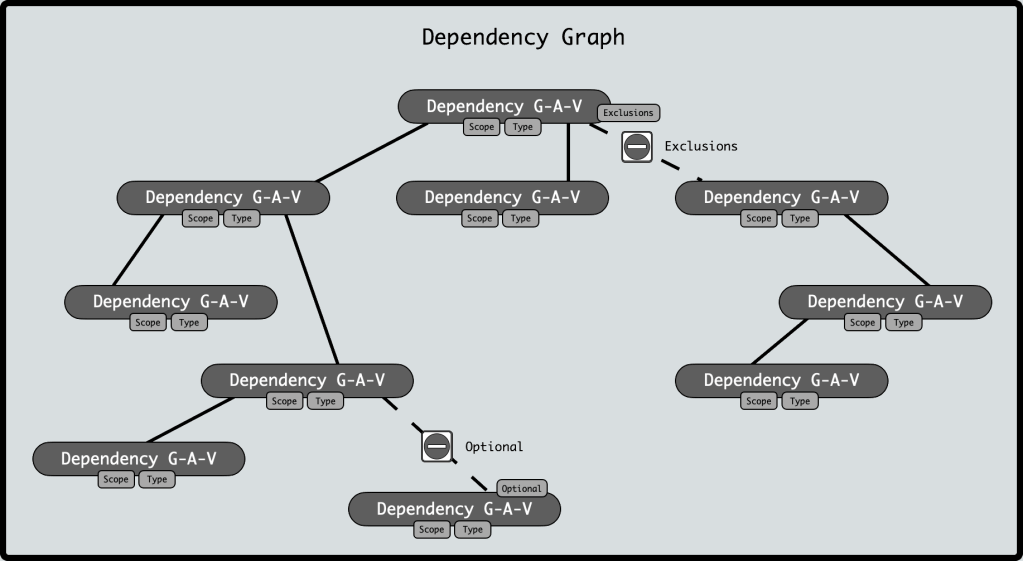 Basic dependency graph example
## How to view the dependency tree
It is possible to view the dependency tree of the project POM via a command line as well as via most modern IDEs. Command line options for viewing the dependency tree:
#### View full dependency tree of the POM
`mvn dependency:tree`
#### View a verbose dependency tree of the POM
`mvn dependency:tree -Dverbose=true`
OR
`mvn dependency:tree -Dverbose`
**NOTE:** The verbose flag is true if the option is mentioned, so an "=true" can be removed.
**PERSONAL OPINION** : Prefer the usage of -D*\* =*\* over -D*\* .
**CAUTION:** This produces a lot of output !
#### View a verbose dependency tree of the POM for a specific dependency
`mvn dependency:tree -Dverbose=true -Dincludes=`
OR
`mvn dependency:tree -Dverbose=true -Dincludes=:`
## How Maven resolves transitive dependency versions
A project POM can include several dependencies, which may further have varying depths of transitive dependencies. It is very possible that a few dependencies share transitive dependencies but depend on different versions. Maven is thus tasked with electing the right transitive dependency to use for its effective POM, to avoid duplication. Since ***Maven cannot sort version strings*** (*versions are arbitrary strings and may not follow a strict semantic sequence* ), Maven takes the approach of ***nearest transitive dependency in the tree depth***. This is very similar to how Java picks up the first jar in the class path when looking for a fully qualified class name.
to illustrate with an example, let us look at the transitive dependency Dx in the example below.
POM **P1** has a few dependencies listed below **(** with dummy **Group** , **Artifact** and **Version** numbers**)** with transitive dependencies shown as **->**.
* Dependency D1 (G1:A1:V1) `->` D11 (G11:A11:V11) `->`**Dx (Gx:Ax:V1.0.0)**.
* Dependency D2 (G2:A2:V2) `->` **Dx (Gx:Ax:V1.2.0)**.
* Dependency D3 (G3:A3:V3) `->` D33 (G33:A33:V33) `->` D34 (G34:A34:V34) `->` **Dx (Gx:Ax:V1.3.0)**.
* Dependency D4 (G4:A4:V4) `->` **Dx (Gx:Ax:V1.5.0)**.
Maven creates a dependency tree during its ***effective POM*** generation that is illustrated below:
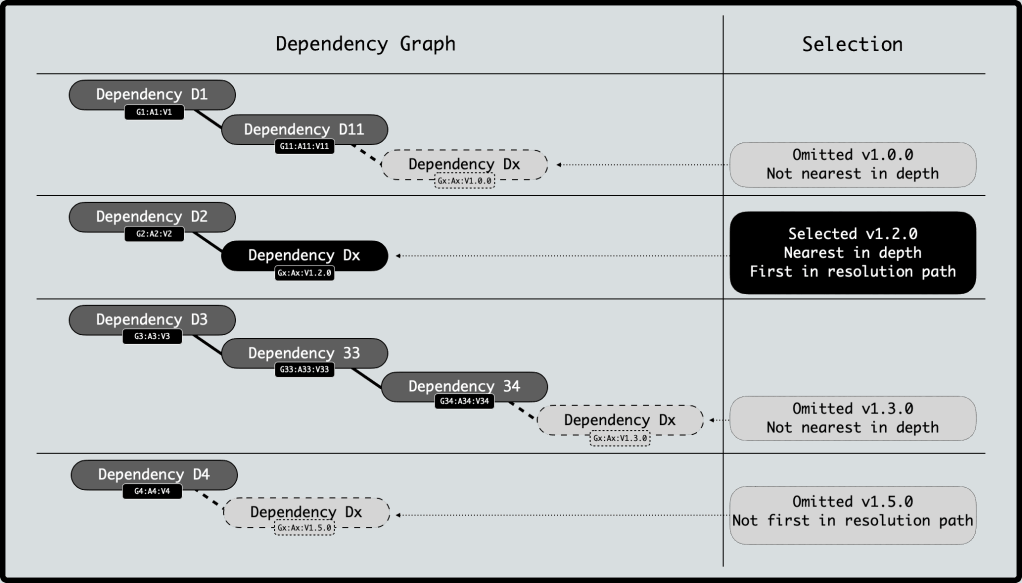
the above example shows V1.2.0 of Dx as the transitive dependency of choice since it is ***nearest in depth and first in resolution in this dependency tree***.
## Helping Maven pick a different version
### Add a direct dependency
Adding the desired transitive dependency version as a direct dependency in the project POM will result in such a dependency being the nearest in depth, and thus the dependency version to be selected. In the above example, if the desired version to be used was v1.3.0, then adding a dependency **D5 (Gx:Vx:V1.3.0)** would ensure its selection.
### Use `dependencyManagement`
A project may contain several modules as was highlighted in [Part 3](https://cguntur.me/2020/05/26/understanding-apache-maven-part-3/) of this series. Often times, both for compatibility enforcement and POM hygiene, it is necessary to ensure the same version of the dependency be used across all child modules. In addition, the ability to override the nearest depth selection by selecting a specific version requires a ***lookup section*** in the POM. A **dependencyManagement** section in a POM is such a lookup.
Adding dependencies in a **dependencyManagement** *does not include them in the dependency graph*, rather provides a lookup table for Maven to help determine the selected or chosen version of the transitive dependency that is listed.
A dependencyManagement section contains a **dependencies** element. Each **dependency** listed under is a lookup reference used either in the current POM or in any POM that inherits (***either*** any POM that identifies the current POM as a **parent** ***or*** any POM that **imports** the project POM as a **bill-of-materials**).
Inheriting a **dependencyManagement** implies a few items:
1. Once a dependency is listed in the section, any inheriting POMs can ***skip the version attribute when declaring the dependency*** . A version is no longer required, since the dependencyManagement provides one. *Deliberately adding a version will override what the managed section defines, so standard Maven version nearest depth kicks in*.
2. A project POM can acquire the a managed dependency version by ***either*** declaring parentage ***or*** by importing a bill-of-materials.
3. Maven uses the dependencyManagement during the ***effective POM*** generation phase.
4. Declaring a dependency in the **dependencyManagement** structure **is** **just for a lookup reference**.
5. If a dependency defined in the dependencyManagement is never encountered in the actual dependency tree for the current project, it is ignored when generating the **effective POM**.
6. A **bill-of-materials POM** is typically a large **dependencyManagement** block of compatible versions of several ***potential*** transitive dependencies that may (or may not) be required in the current project.
7. A bill-of-materials (**BOM** ) **POM** is a special POM of **packaging** type of `pom`. The BOM POM is `import`ed into the project POM as a **dependency** with a **scope** of `import`.
An amazing resource to find out more about best practices for Maven can be found at: .
That is a wrap on this article! There is a lot more to cover on this topic including **version ranges** and **enforcing** **version rules**. These topics will be covered as separate upcoming articles in the series!