# Understanding Apache Maven (Part 8): Maven Plugins
> Maven is a plugin-execution framework: plugins are an assembly of goals, code written as MOJOs (Maven’s plain Old Java Objects).
- URL: https://foojay.io/today/understanding-apache-maven-part-8-maven-plugins/
- Published: 2021-11-12
- Authors: Chandra Guntur
- Categories: Maven
In Part 8 of the series, below, a deeper dive on Maven Plugins is covered.
In [Part 4](https://foojay.io/today/understanding-apache-maven-part-4-maven-lifecycle/), Maven Lifecycles and Phases were introduced. A brief overview of Plugins and Goals were also included.
A quick recap:
* Apache Maven provides standard **lifecycles**.
* **Lifecycles** have **phases** that execute sequentially.
* Execution of maven is done via **plugins** which define **goals**.
* **Goals** can be associated with **phases** (or may simply be run independent of phases).
## What are plugins?
Maven is a plugin-execution framework. Plugins are an assembly of goals, code written as MOJOs (*Maven's plain Old Java Objects, Modern MOJOs are not restricted to being written in Java*). Goals have names and can be bound to phases. A MOJO declares its goal name and optionally, a phase association, which binds the class to a part of a lifecycle.
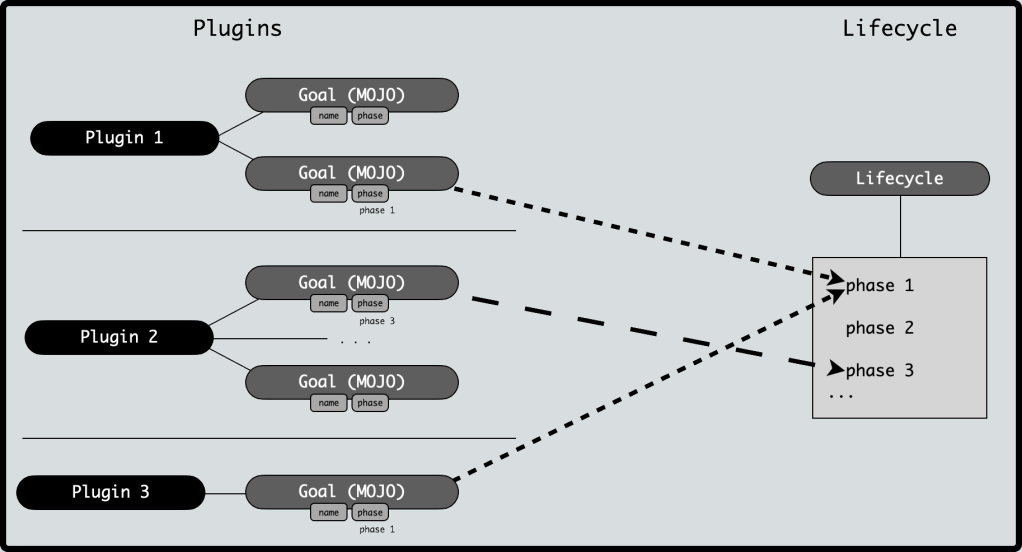 Plugins define goals. Goals can be bound to phases. Goals from multiple plugins can be bound to a single phase.
A plugin is typically a `.jar` file which contains the MOJO classes and a `META-INF/maven/plugins.xml`. This `plugins.xml` is generated as a part of the maven execution of the plugin code.
## Types of plugins
Broadly, plugins are of two types:
>
>
> **build** plugins – configured in a project POM under the `` element. Such plugins are executed as a part of the **default** (**build** ) lifecycle.
>
> **reporting** plugins – configured in a project POM under the `` element. Such plugins are executed as a part of **site** lifecycle.
Furthermore, plugins can be classified as:
>
>
> **core plugins** – Plugins where goals are bound to core phases (clean, compile, install, resources etc.)
>
> **packaging plugins** – Plugins related to output artifact packaging. Examples include plugins for `ear`, `jar`, `war` etc.
>
> **reporting plugins** – Plugins related to the **site** lifecycle and used to generate reports. Examples include `checkstyle`, `javadoc`, `project-info-reports` etc.
>
> **tooling plugins** – Plugins related to general tooling during the maven execution. Examples include `assembly`, `help`, `enforcer` `toolchains` etc.
### Plugins from Maven – versus – custom plugins
Official Maven plugins developed as a part of Apache Maven have a standard naming convention: `maven-`****`-plugin`. This naming convention is reserved and **SHOULD NOT** be used by plugins which do not have a **groupId** of `org.apache.maven.plugins` and are not found on a maven repository under `ord/apache/maven/plugins` directory.
Plugins developed with other **groupId** s typically have a name of ****`-maven-plugin`.
## How to learn about a plugin
Standard plugins from Apache Maven have a consistent site structure under a common site: .
Each plugin landing page has a few menu items under its navigation panel. An **Introduction** page, which provides an overview of the plugin. A **Goals** page which lists all goals defined by the plugin and a deeper explanation of goal's intent. A **Usage** page that provides configuration options and any relevant information regarding constraints for the plugin. An **FAQ** page for responses to frequently asked questions. There are additional pages for License and Download of the plugin as well.
In addition to the standard menu items, a plugin landing page can provide links to **Examples** and **Project Documentation**.
The plugin site is the best way to start understanding a plugin provided by Apache Maven. Plugins developed external to Apache Maven should attempt to follow similar conventions to ensure easier comprehension by the users.
## How to use plugins in a project POM
Plugins are configured in a POM under ***either*** the `` ***or*** the `` ***or*** the ` -> ` element. A plugin can be *located* using the standard maven G-A-V (GroupId-ArtifactId-Version) coordinates. In addition to the location coordinates, a plugin has a few other elements that are optional.
### Extensions
The **extensions** is a flag to determine if Maven extensions from the plugin should be loaded. The value is a `true` or `false`, however, the current datatype in the schema is a `String` (for some technical reasons). The default value is `false` and it is rarely enabled. Typical use cases for enabling this is when defining a ***custom lifecycle*** or ***packaging types***.
### Inherited
Will be covered in a section below, but **inherited** is a boolean flag that is `true` by default. As with **extensions** the datatype in the schema is a `String`. Setting **inherited** to `false` prevents propagation of the configuration to any child POM of the current one.
### Executions
The **executions** is a complex element and contains a set of **execution** elements. At its core, maven executes such definitions. An **execution** specified the set of goals to execute during the lifecycle. An **execution** is a complex element that has a unique **id** , a **phase** to bind one or more **goal** s to, an **inherited** flag (*similar to the one defined for a plugin, also set as a `String` datatype* ), a **goals** element which is a set of `String` **goal** elements that are bound to the phase, and a generic **configuration** element.
### Dependencies
The **dependencies** is a complex element and contains a set of **dependency** elements. The **dependency** definitions listed here are used by the plugin and loaded by the plugin classloader.
### Configuration
The **configuration** is a complex element which allows for a free-form DOM configuration used by the plugin. The configuration specifics are typically listed (*and recommended, in case of custom plugins*) in the Usage page for a given plugin.
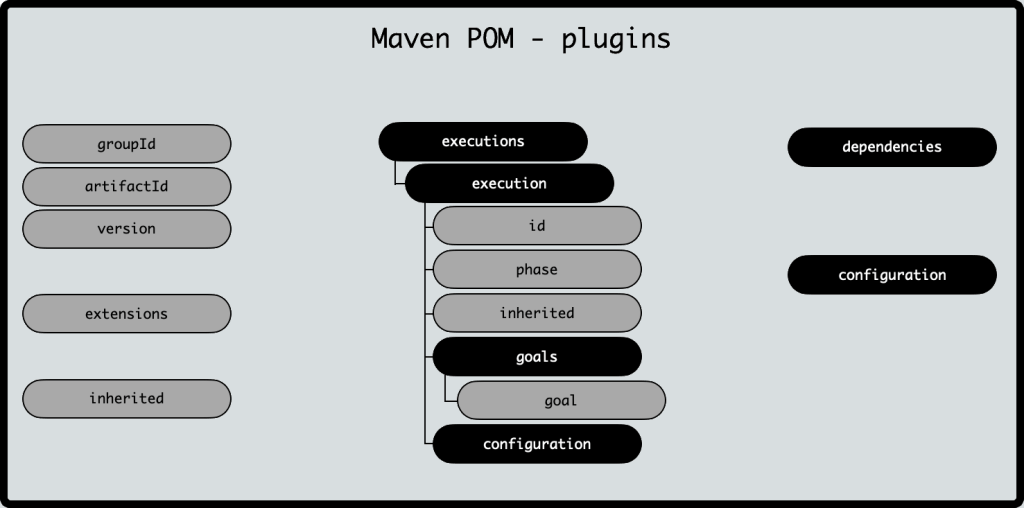 A visual of the plugin element
## Plugin Inheritance
Plugins have a inheritance logic similar to dependencies. A **plugin** declared in a parent POM is inherited into the child POM unless the parent declares the **inherited** flag to `false`. Setting the **inherited** flag to `false` breaks the inheritance.
In addition, a **pluginManagement** section in a POM functions the same way a **dependencyManagement** works for a **dependency**.
There is currently no equivalent in a **bill-of-materials** for a plugin, although, there is an open issue for introducing such a facility. Link:
### Mixin Maven Plugin
Not officially an Apache Maven plugin, but the `mixin-maven-plugin` deserves a special mention. The plugin allows for including multiple pluginManagement sections without needing to inherit the plugins from a single parent. Using this plugin allows for a build behavior to be made more modular.
More about the mixin-maven-plugin:
## Links to learn more
Introduction to Plugins:
Maven Plugins:
Guide to configuring plugins:
Guide to developing plugins:
Maven MOJO API:
Plugin descriptor (Apache Maven 3.6.3):