


Discover Your Ideal Airbnb: Implementing a Spring Boot & MongoDB Search With Kotlin Sync Driver
- April 09, 2026
- 8 min read
One of my favorite activities is traveling and exploring the world. You know that feeling of discovering a new place and thinking, "How have I not been here before?" It's with that sensation that I'm always motivated to seek out new places to discover. Often, when searching for a place to stay, we're not entirely sure what we're looking for or what experiences we'd like to have. For example, we might want to rent a room in a city with a view of a castle. Finding something like that can seem difficult, right? However, there is a way to search for information accurately using MongoDB Search.
In this tutorial, we will learn to build an application in Kotlin that utilizes full-text search in a database containing thousands of Airbnb listings. We'll explore how we can find the perfect accommodation that meets our specific needs.
Demonstration
To achieve our goal, we will create a Kotlin Spring Boot application that communicates with MongoDB Atlas using the Kotlin Sync Driver.
The application will use a pre-imported database in Atlas called sample_airbnb, utilizing the listingsAndReviews collection, which contains information about various Airbnbs.
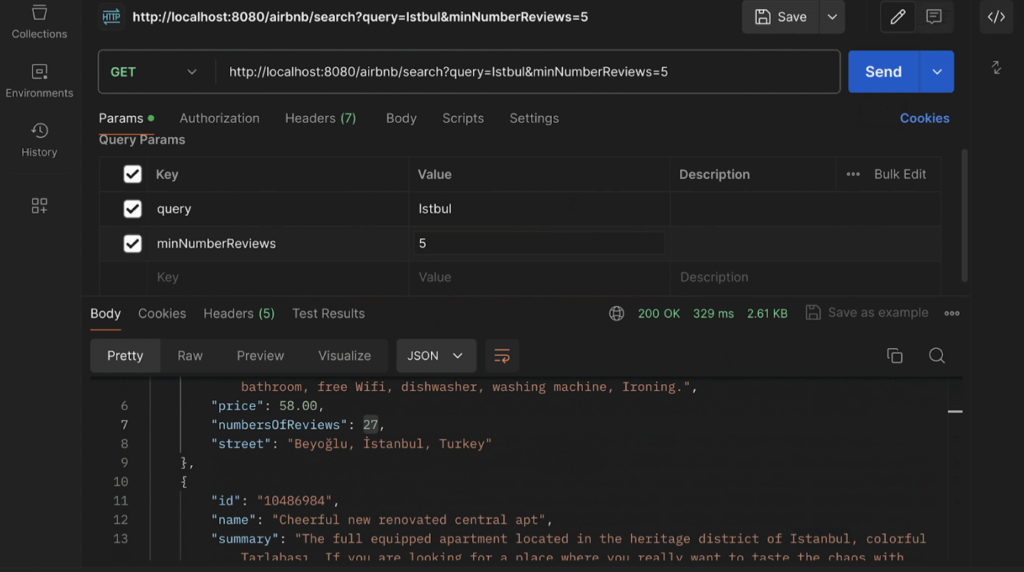
To identify the best Airbnb listings, we will create an endpoint that returns information about these listings. This endpoint will use the summary field from the collection to perform a full-text search with the fuzzy parameter in text operator. Additionally, we will filter the documents based on a minimum number of reviews, utilizing the search functionalities provided by MongoDB Search.
Pre-requisites
- MongoDB Atlas account
- Get started with MongoDB Atlas for free! If you don’t already have an account, MongoDB offers a free-forever Atlas cluster.
- Java 21+
- Gradle 8.8+
- IDE of your choice
What is MongoDB Search?
MongoDB Search is a feature in MongoDB Atlas that provides powerful and flexible search capabilities for your data. It integrates with Apache Lucene, enabling advanced text analysis, custom scoring, and result highlighting. This allows you to build sophisticated search functionality directly within your MongoDB applications.
To utilize MongoDB Search effectively, we will focus on three key operators: text, range, and compound. Although there are various operators available, our exploration will concentrate on these to illustrate their practical applications.
- Text: This operator will be used to perform text searches within our endpoint, allowing for approximate matching and handling variations in the search terms.
- Range: We will explore the range operator specifically with the gte (greater than or equals) condition for the number_of_reviews field. This will enable us to query and filter based on review counts effectively.
- Compound: The compound operator will be used to combine the text fuzzy and range queries into a more complex and refined search. This will demonstrate how to merge multiple criteria for more sophisticated search functionality.
While this article will not delve deeply into all available operators, those interested in a more comprehensive exploration can refer to the MongoDB Atlas Search documentation for further details.
Load sample dataset
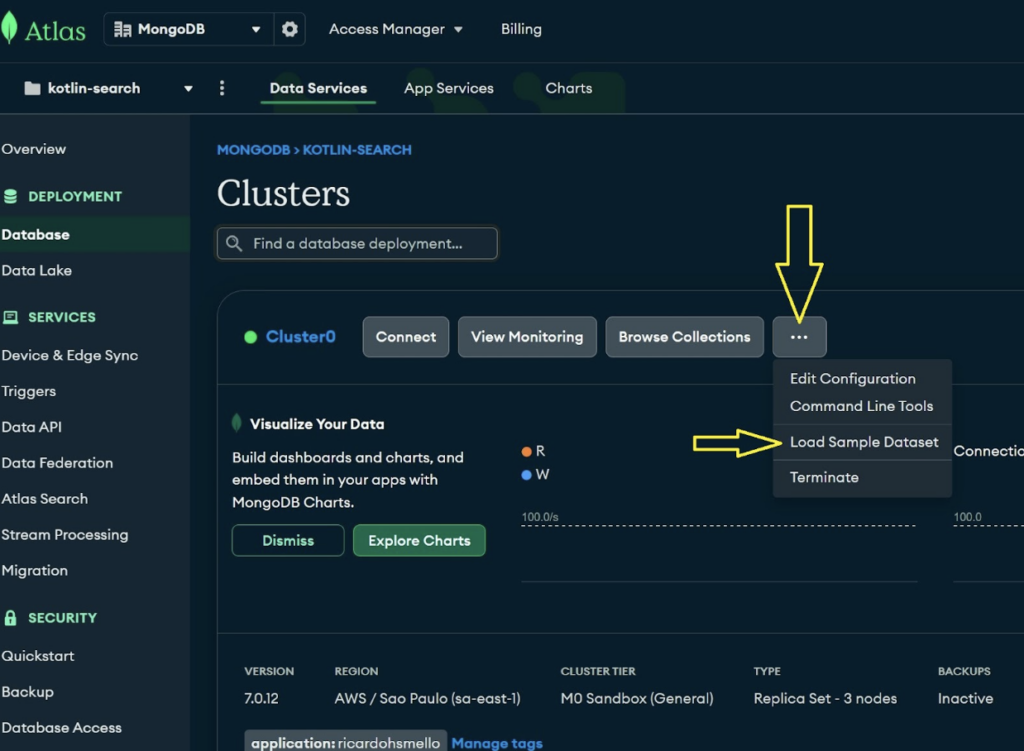
Before starting, you'll need to import the sample dataset, which includes several databases and collections, like the Airbnb list. After setting up your cluster, just click on "Database" in the left menu and choose "Load sample dataset," as shown in the image:
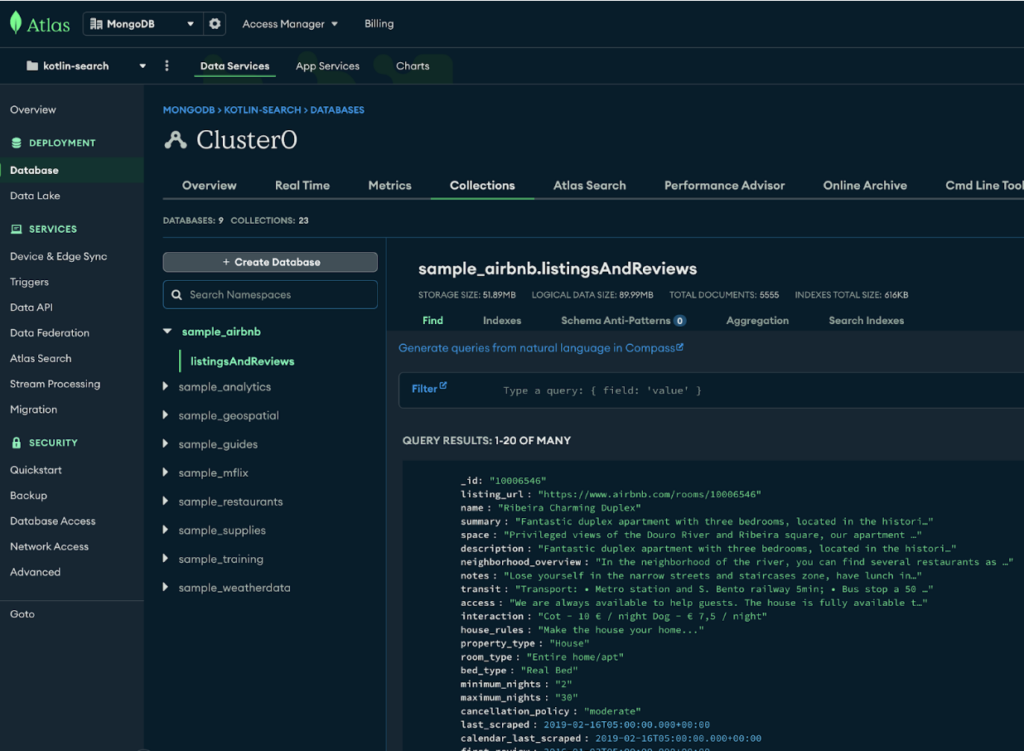
If everything goes smoothly, after the import, you will see our databases and collections displayed as shown in the image.
Creating the MongoDB Search index
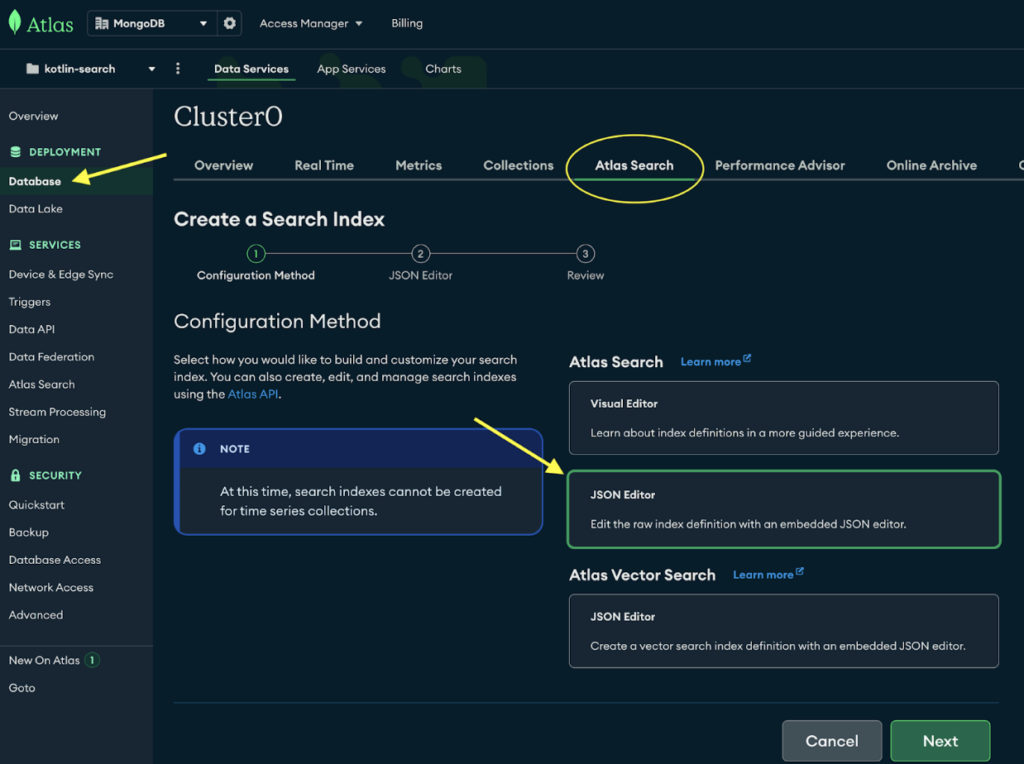
After importing the collections, the next step is to create an index for the Airbnb collection. To do this, select "Database" from the side menu under “Deployment,” go to the "MongoDB Search" tab, and click on "JSON Editor," as shown in the image.
In the next step, select the sample_airbnb database and the listingsAndReviews collection (the Airbnb collection). Then, name your index "searchPlaces":
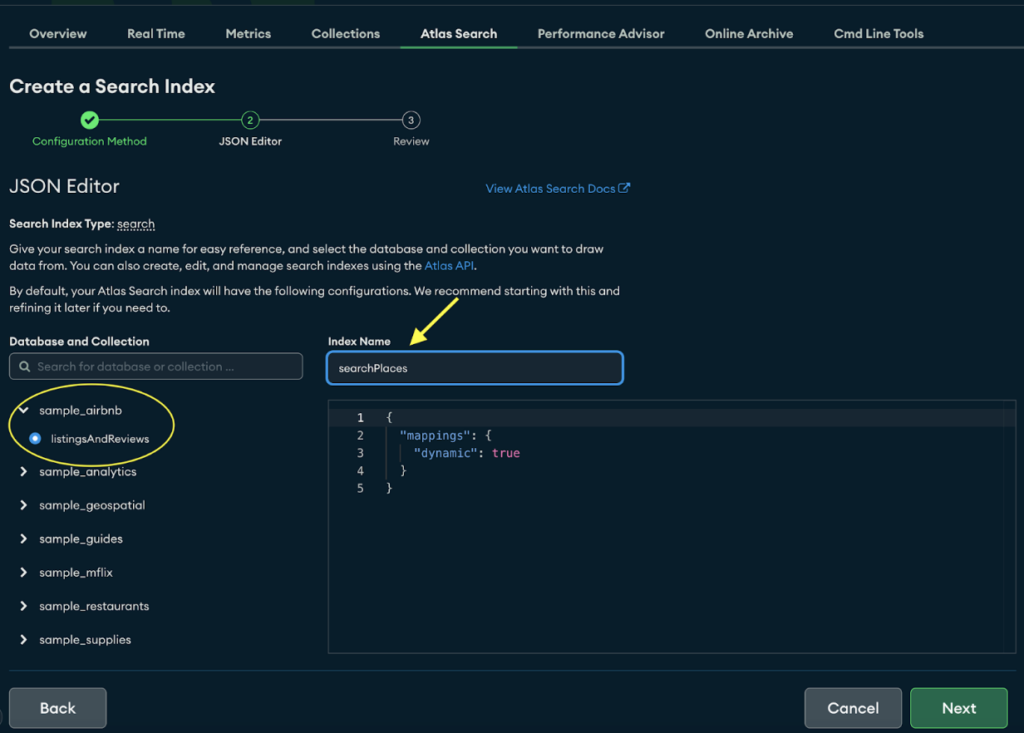
Note that we are using Dynamic Mappings for simplicity, which allows MongoDB Search to automatically index the fields of supported types in each document. For more details, I suggest checking out Define Field Mappings.
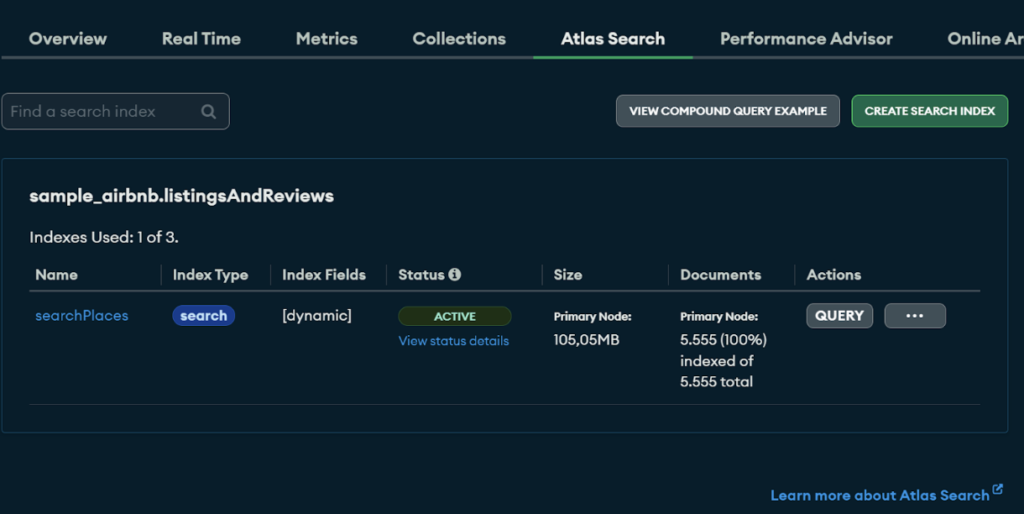
If everything goes well, the "searchPlaces" index will be created successfully, and you can view it here.
Testing our index in MongoDB Compass
To test our index, we need to create an aggregation pipeline. While there are various methods to test this, we will use MongoDB Compass for convenience. MongoDB Compass is a powerful GUI tool that facilitates managing and analyzing MongoDB data. It provides features to visualize schemas, build queries, and manage data through an intuitive interface.
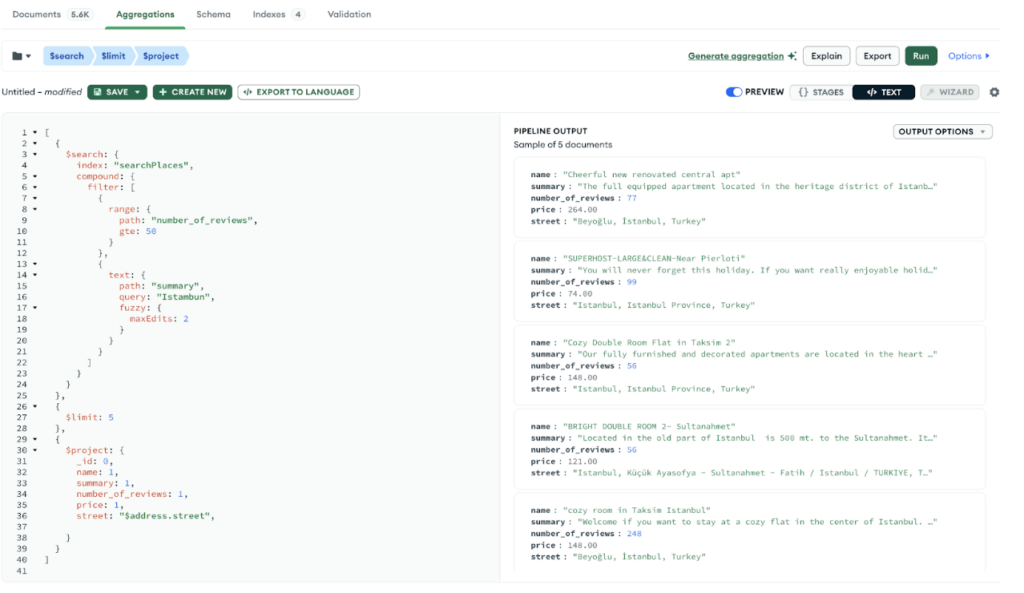
We need to set up an aggregation pipeline to meet the following requirements: Filter the summary field by text and ensure a minimum number of reviews. Here’s the aggregation pipeline we will use for testing:
[
  {
    $search: {
      index: "searchPlaces",
      compound: {
        filter: [
          {
            range: {
              path: "number_of_reviews",
              gte: 50
            }
          },
          {
            text: {
              path: "summary",
              query: "Istambun",
              fuzzy: {
                maxEdits: 2
              }
            }
          }
        ]
      }
    }
  },
  {
    $limit: 5
  },
  {
    $project: {
      _id: 0,
      name: 1,
      summary: 1,
      number_of_reviews: 1,
      price: 1,
      street: "$address.street",
    }
  }
]
Let’s break down each stage:
- $search: The $search stage uses the MongoDB Search capabilities to perform a full-text search with additional filtering.
- index: "searchPlaces": This specifies the search index to use. If the index name were "default," we would not need to specify it here.
- compound: This allows you to combine multiple search criteria. The compound query here is used to filter the search results based on both text and range criteria.
- filter: This contains an array of filter criteria applied to the search results.
- range: This filters documents where the number_of_reviews field is greater than or equal to 50.
- text: Text performs a full-text search on the summary field with the query "Istambun." The fuzzy option with maxEdits: 2 allows for fuzzy matching, meaning it can match terms that are similar to "Istambun" with up to two character edits (insertions, deletions, or substitutions).
- $limit: This limits the number of documents returned by the query to 5. Using a limit is essential to maintain performance.
- $project: This specifies which fields to include or exclude in the final result.
Simply run this pipeline to obtain the results. See:
Building a Kotlin application
Our application will be developed in Kotlin with Spring. It’s important to note that we will not be using Spring Data. Instead, we will use the Kotlin Sync Driver, which is specialized for communication between the application and MongoDB. The goal of our application is simple: to provide an endpoint that allows us to make requests and communicate with MongoDB Atlas.
Creating the project
To do this, we'll use the Spring Initializer official page to create our project:
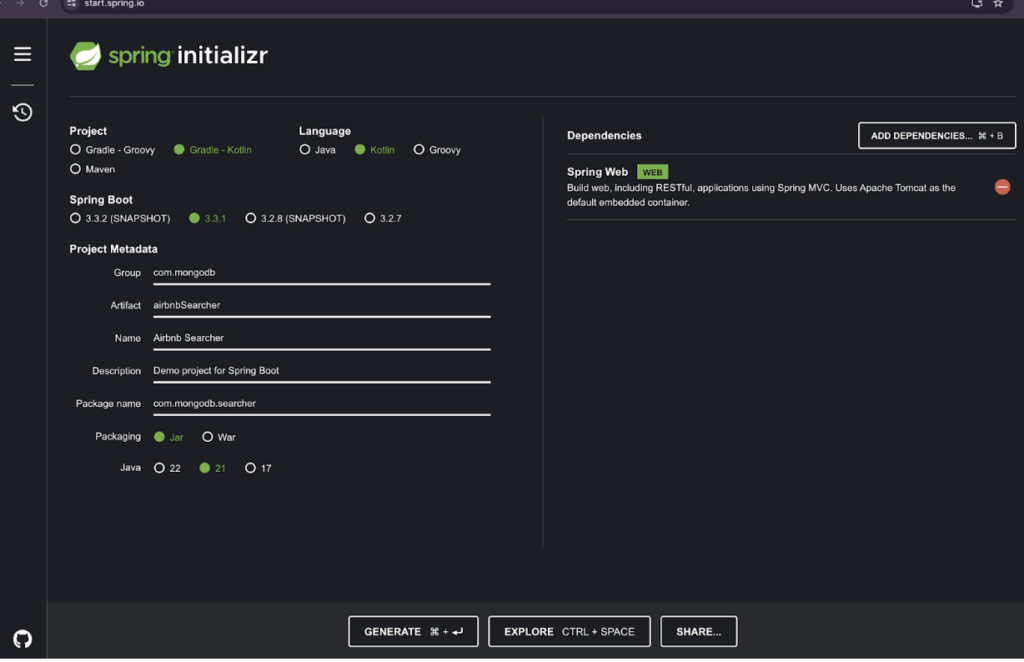
As you can see, I have only added the Spring Web dependency.
Adding MongoDB driver dependency
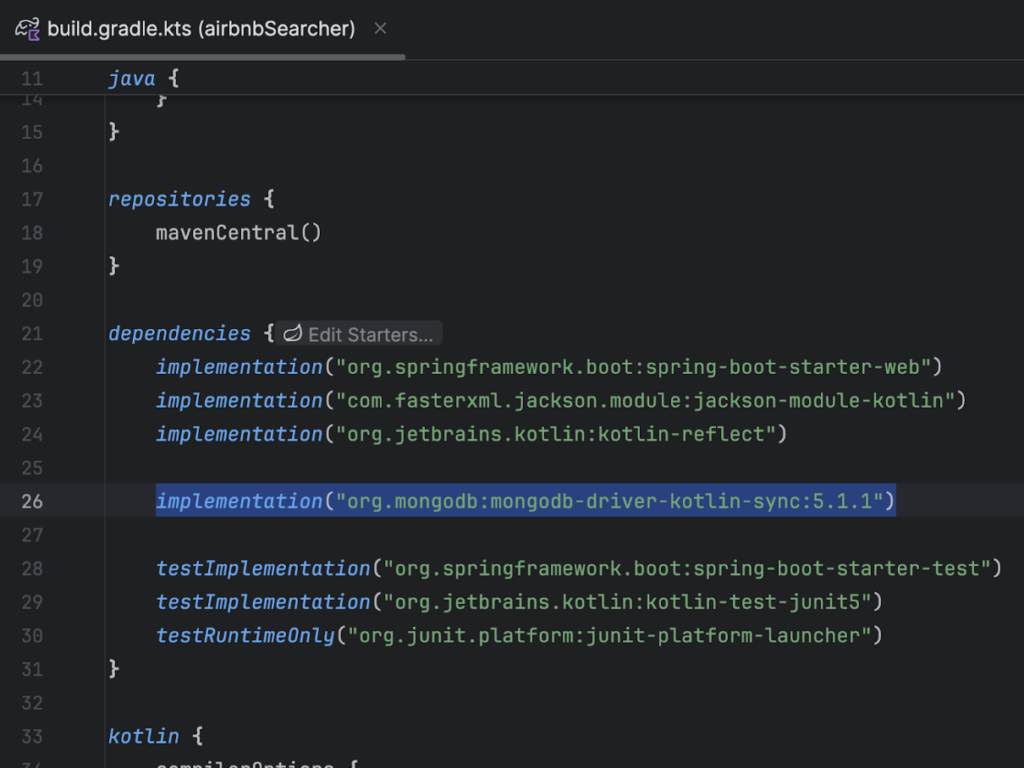
The first thing we’ll do is open the build.gradle.kts file and add the mongodb-driver-kotlin-sync dependency.
dependencies {
 implementation("org.mongodb:mongodb-driver-kotlin-sync:5.1.1")
}
Establishing a connection
To establish our connection, we need to follow these steps. First, update the application.properties file with the required values.
spring.application.name=Airbnb Searcher

spring.data.mongodb.uri=mongodb+srv://user:[email protected]/

spring.data.mongodb.database=sample_airbnb

Notice: Don't forget to change your MongoDB string connection.
Next, we will create a MongoConfig class within the config directory to set up the connection when our application starts.
package com.mongodb.searcher.application.config
import com.mongodb.kotlin.client.MongoClient
import com.mongodb.kotlin.client.MongoDatabase
import org.springframework.beans.factory.annotation.Value
import org.springframework.context.annotation.Bean
import org.springframework.context.annotation.Configuration

@Configuration
class MongoConfig {
   @Value("\${spring.data.mongodb.uri}")
   lateinit var uri: String
   @Value("\${spring.data.mongodb.database}")
   lateinit var databaseName: String

   @Bean
   fun getMongoClient(): MongoClient {
       return MongoClient.create(uri)
   }

   @Bean
   fun mongoDatabase(mongoClient: MongoClient): MongoDatabase {
       return mongoClient.getDatabase(databaseName)
   }
}
Great, we have defined our MongoConfig class, which will use the values from application.properties. Create the class AirbnbEntity within the resources package:
package com.mongodb.searcher.resources
import com.mongodb.searcher.domain.Airbnb
import org.bson.codecs.pojo.annotations.BsonId
import org.bson.codecs.pojo.annotations.BsonProperty
import org.bson.types.Decimal128

data class AirbnbEntity(
   @BsonId val id: String,
   val name: String,
   val summary: String,
   val price: Decimal128,
   @BsonProperty("number_of_reviews")
   val numbersOfReviews: Int,
   val address: Address
) {

   data class Address(
       val street: String,
       val country: String,
       @BsonProperty("country_code")
       val countryCode: String
   )

   fun toDomain(): Airbnb {
       return Airbnb(
           id = id,
           name = name,
           summary = summary,
           price = price,
           numbersOfReviews = numbersOfReviews,
           street = address.street
       )
   }
}
Creating the repository
Now, let’s create our class that will utilize the MongoDB Search index. To do this, create the AirbnbRepository class within the resources package.
package com.mongodb.searcher.resources

import com.mongodb.client.model.Aggregates
import com.mongodb.client.model.Projections
import com.mongodb.client.model.search.FuzzySearchOptions
import com.mongodb.client.model.search.SearchOperator
import com.mongodb.client.model.search.SearchOptions
import com.mongodb.client.model.search.SearchPath
import com.mongodb.kotlin.client.MongoDatabase
import org.slf4j.LoggerFactory
import org.springframework.stereotype.Repository

@Repository
class AirbnbRepository(
   private val mongoDatabase: MongoDatabase
) {
   companion object {
       private val logger = LoggerFactory.getLogger(AirbnbRepository::class.java)
       private const val COLLECTION = "listingsAndReviews"
   }

   fun find(query: String, minNumberReviews: Int): List<AirbnbEntity> {
       val collection = mongoDatabase.getCollection<AirbnbEntity>(COLLECTION)
       return try {
           collection.aggregate(
               listOf(
                   createSearchStage(query, minNumberReviews),
                   createLimitStage(),
                   createProjectionStage()
               )
           ).toList()
       } catch (e: Exception) {
           logger.error("An exception occurred when trying to aggregate the collection: ${e.message}")
           emptyList()
       }
   }

   private fun createSearchStage(query: String, minNumberReviews: Int) =
       Aggregates.search(
           SearchOperator.compound().filter(
               listOf(
                   SearchOperator.numberRange(SearchPath.fieldPath("number_of_reviews"))
                       .gte(minNumberReviews),
                   SearchOperator.text(SearchPath.fieldPath(AirbnbEntity::summary.name), query)
                       .fuzzy(FuzzySearchOptions.fuzzySearchOptions().maxEdits(2))
               )
           ),
           SearchOptions.searchOptions().index("searchPlaces")
       )

   private fun createLimitStage() =
       Aggregates.limit(5)
   private fun createProjectionStage() =
       Aggregates.project(
           Projections.fields(
               Projections.include(
                   listOf(
                       AirbnbEntity::name.name,
                       AirbnbEntity::id.name,
                       AirbnbEntity::summary.name,
                       AirbnbEntity::price.name,
                       "number_of_reviews",
                       AirbnbEntity::address.name
                   )
               )
           )
       )
}
Let's analyze the find method.
As you can see, the method expects a query string and an int (minNumberReviews) and returns a list of AirbnbEntity. This list is generated through an aggregation pipeline, which consists of three stages:
- Search stage: Utilizes the $search operator to filter documents based on the query and the minimum number of reviews
- Limit stage: Restricts the result set to a maximum number of documents
- Projection stage: Specifies which fields to include in the returned documents (this stage is optional and included here just to illustrate how to use it)
Notice: Depending on the scenario, adding stages after the $search stage can drastically impact the application's performance. For more details, refer to our docs on performance considerations.
Creating a service
To continue with our project, let's create a domain package with two classes. The first will be our Airbnb.
package com.mongodb.searcher.domain

import org.bson.codecs.pojo.annotations.BsonId
import org.bson.codecs.pojo.annotations.BsonProperty
import org.bson.types.Decimal128

data class Airbnb(
   @BsonId val id: String,
   val name: String,
   val summary: String,
   val price: Decimal128,
   @BsonProperty("number_of_reviews")
   val numbersOfReviews: Int,
   val street: String
)
Next, our service:
package com.mongodb.searcher.domain

import com.mongodb.searcher.resources.AirbnbRepository
import org.springframework.stereotype.Service

@Service
class AirbnbService(
   private val airbnbRepository: AirbnbRepository
) {
   fun find(query: String, minNumberReviews: Int): List<Airbnb> {
       require(query.isNotEmpty()) { "Query must not be empty" }
       require(minNumberReviews > 0) { "Minimum number of reviews must not be negative" }
      return airbnbRepository.find(query, minNumberReviews).map { it.toDomain() }
   }
}
Notice that this class is responsible for validating our inputs and accessing the repository.
Creating a controller
To enable REST communication, create the AirbnbController class within the application.web package:
package com.mongodb.searcher.application.web

import com.mongodb.searcher.domain.Airbnb
import com.mongodb.searcher.domain.AirbnbService
import org.springframework.web.bind.annotation.GetMapping
import org.springframework.web.bind.annotation.RequestParam
import org.springframework.web.bind.annotation.RestController

@RestController
class AirbnbController(
   private val airbnbService: AirbnbService
) {
   @GetMapping("/airbnb/search")
   fun find(
       @RequestParam("query") query: String,
       @RequestParam("minNumberReviews") minNumberReviews: Int
   ): List<Airbnb> {
       return airbnbService.find(query, minNumberReviews)
   }
}
Final application structure
Great. If all the steps have been followed, our folder structure should look similar to the one in the image:
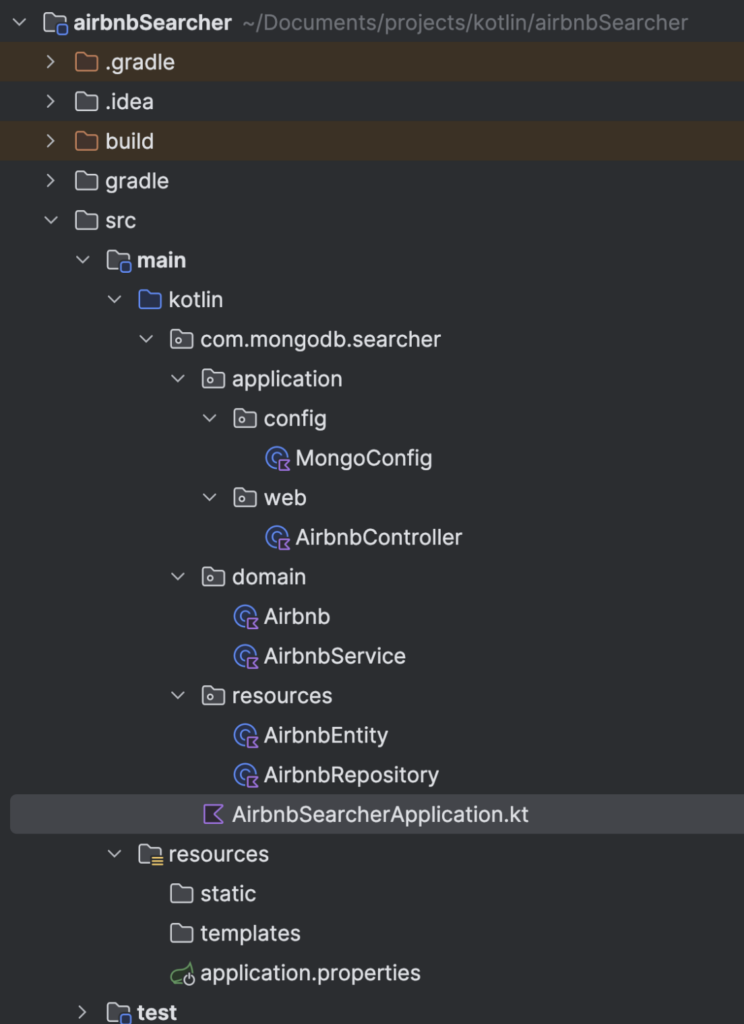
Application structure
Running the application
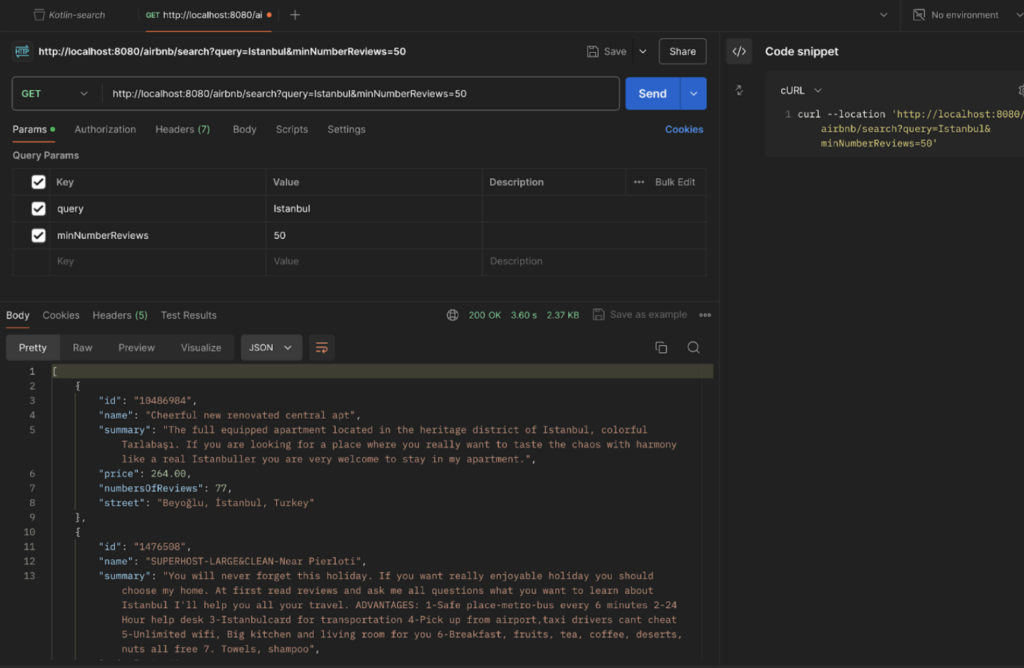
Simply run the application and access the endpoint provided at 'http://localhost:8080/airbnb/search'. Below is an example of how to use it:
curl --location 'http://localhost:8080/airbnb/search?query=Istambun&minNumberReviews=50'
Conclusion
In this tutorial, we built a Kotlin-based Spring Boot application that uses MongoDB Search to find Airbnb listings efficiently. We demonstrated how to set up MongoDB Atlas, create a search index, and implement an aggregation pipeline for filtering and searching data.
While we focused on fuzzy matching and review count filtering, MongoDB Search offers many other powerful features, such as custom scoring and advanced text analysis.
Exploring these additional capabilities can further enhance your search functionality and provide even more refined results. The example source code used in this series is available on GitHub.
For more details on MongoDB Search, you can refer to the Exploring Search Capabilities With MongoDB Search article.
- April 09, 2026
- 8 min read

Ricardo is a Senior Software Engineer, focused on Java, Kotlin, and MongoDB, helping developers build secure, scalable, and cloud-native applications.









Comments (0)
No comments yet. Be the first.