


Event-Driven Architecture in Java and Kafka
- March 10, 2026
- 14 min read
Reactive Java is well suited to modern streaming, event driven applications. In this article, we'll walk through an example of such an application using Reactive Java with MongoDB. Specifically, we're going to cover:
- Why Reactive Java was introduced and how it differs from more traditional Java programming.
- Details of some of the key elements of Reactive Java - Mono, Flux and flatMap.
- A walk through of a sample application, comparing a Reactive version of the code using the Reactive Streams MongoDB driver, with a more traditional version of the code using the synchronous MongoDB driver.
Streaming Data - The Air Traffic Control Example.
As a key part of global initiatives to modernize national airspace systems, many national aviation authorities have introduced mandates requiring most non-military aircraft transmit GPS based location data using a system known as Automatic Dependent Surveillance Broadcast, or "ADS-B".
The data is used both by ground based air-traffic controllers, and by pilots to display the location, direction, speed and altitude of nearby aircraft on moving map displays, providing a level of situational awareness that wasn't available with older, ground radar based systems.
One of the coolest things for me, the pilot of a small private propeller aircraft, about the rollout of ADS-B has been that I have more location data of nearby aircraft than most commercial jet pilots had just 10 years ago, and I am only using an iPad app and a cheap data receiver (built using a Raspberry Pi, a USB radio receivers ordered from Amazon, and software from the excellent Stratux open-source project). This has been a huge boost for safety, helping to avoid aircraft collisions both in the air and on the ground at airports.
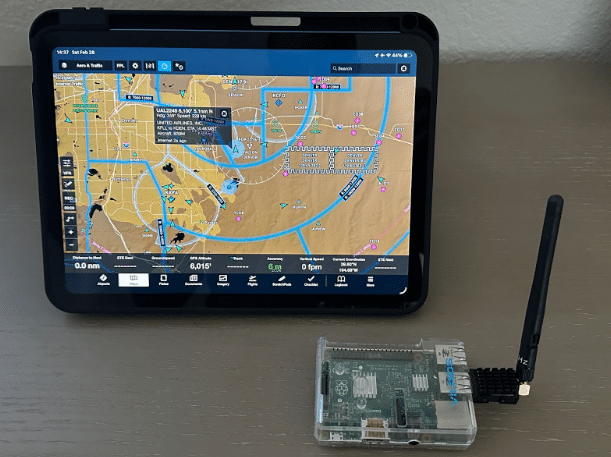
From a data processing standpoint, ADS-B data is typical of modern streaming, event-driven systems. The messages themselves are relatively small and simple in structure, and are typically translated to JSON by most receiver systems, making MongoDB ideally suited to working with them. The following is an example message:
| { "_id": { "$oid": "699fd7673ab2c79dfe6666b0" }, "lastgnssdiffalt": 8700, "lastextrapolation": { "$date": { "$numberLong": "-62135594185300" } }, "ageextrapolation": 88.86000061035156, "distance": 3566.14013671875, "addrtype": 0, "track": 2, "lastseen": { "$date": { "$numberLong": "-62135594096360" } }, "onground": false, "nacp": 10, "age": 0.46000000834465027, "lastgnssdiff": { "$date": { "$numberLong": "-62135594096140" } }, "lastspeed": { "$date": { "$numberLong": "-62135594096190" } }, "bearingdistvalid": true, "distanceestimated": 1804.67041015625, "squawk": 1732, "lastalt": { "$date": { "$numberLong": "-62135594096140" } }, "bearing": 28.342145919799805, "vvel": -64, "tail": "UAL401", "emittercategory": 3, "alt": 8700, "gnssdifffrombaroalt": 500, "distanceestimatedlastts": { "$date": "2025-08-22T14:36:20.868Z" }, "targettype": 1, "agelastalt": 0.07000000029802322, "extrapolatedposition": false, "altfix": 9725, "receivedmsgs": 2751, "icaoaddr": 10561259, "nic": 8, "timestamp": { "$date": "2026-02-26T05:17:27.328Z" }, "prioritystatus": 0, "latfix": 39.53397750854492, "signallevel": -6.158007621765137, "lat": 39.62754821777344, "lng": -104.66268920898438, "speed": 254, "speedvalid": true, "lastsource": 1, "lngfix": -104.6051025390625, "reg": "N17315", "positionvalid": true, "altisgnss": false, "turnrate": 0 } |
While the structure of the ADS-B messages are unremarkable, the velocity with which they are transmitted and received can, in some cases, provide challenges. Each aircraft broadcasts a position update every 500ms. In the vicinity of a large airport, that could result in low hundreds of messages per second - typically not a problem by modern standards - but in my role as a developer advocate at MongoDB, I was recently asked to assist a national aggregator of ADS-B data in optimizing some MongoDB aggregation operations they were performing on ADS-B data streamed to them by a national network of receivers. At peak times, they were handling around 20,000 messages per second.
During that discussion, it occurred to me that MongoDB's Reactive Streams driver for Java might be ideally suited for handling streaming data of this nature. I decided to investigate just how much of a difference using it might make over using the standard synchronous driver.
Reactive Java - a brief history
Reactive Java emerged as a solution to the limitations of traditional, synchronous, and blocking I/O models in Java, particularly in highly concurrent, event-driven, and streaming applications. The conventional thread-per-request model often leads to excessive resource consumption due to threads being blocked while waiting for I/O operations (such as database queries or API calls) to complete.
The framework was created to address this "blocking problem" and improve system responsiveness and scalability. It does this by implementing the Reactive Streams specification, which enables non-blocking asynchronous programming. This paradigm manages data as a stream of events, with the concept of data "publishers" and data "subscribers" that implement a version of the "observer" design pattern described in the seminal "Gang of Four" book over 30 years ago.
A key element of the framework is that threads can handle activities asynchronously, allowing them to move on to other tasks immediately rather than blocking when waiting for long-running activities to complete. This can, in some use cases, help reduce overall resource usage and inefficient use of both memory and CPU.
In the code examples in this article, we'll be working with the Project Reactor implementation of the reactive streams specifications. Project Reactor has two primary publisher types, implementing the Reactive Streams Publisher<T> interface:
A Mono is a data stream (publisher) that is designed to emit at most one item, and then terminate (either successfully with a value or with an error). It is used for operations that return zero or one result, such as finding a single user record by ID or saving an entity to a database, and is the reactive equivalent of Future or Optional.
A Flux is a data stream (publisher) that is designed to emit zero or more items, and then optionally complete with a successful completion or an error. It is used for operations that can return multiple results over time, such as a database query returning a collection of records or a stream of real-time events (such as received ADS-B messages), and is the reactive equivalent of a standard collection or an infinite stream.
To demonstrate how Reactive Java can benefit application performance, take a look at the following traditional, synchronous code example:
| private void run(RestTemplate restTemplate, String serviceUrl, int sleepSeconds, int piDecimalPlaces) { Instant start = Instant.now(); String url = serviceUrl + "/sleep/" + sleepSeconds; Map response = restTemplate.getForObject(url, Map.class); String status = (String) response.get("status"); BigDecimal pi = PiCalculator.calculate(piDecimalPlaces); Duration elapsed = Duration.between(start, Instant.now()); System.out.println("Sleep service response: " + status); System.out.println("Pi calculated to " + piDecimalPlaces + " decimal places"); System.out.printf("Total time: %.3f seconds%n", elapsed.toMillis() / 1000.0); } |
This function does two things:
- It calls a web service that simply sleeps for a specified number of seconds before returning a "success" message.
- It calls a function to generate pi to a specified number of decimal places.
The output of the function includes the time required to complete both operations.
The important thing to note with this implementation is that it must wait for the web service call to return before it can start the calculation of pi. The web service call is blocking, and the executing thread is unable to do any other work until the call completes.
Now take a look at equivalent code written using Project Reactor:
| private void run(String serviceUrl, int sleepSeconds, int piDecimalPlaces) { WebClient webClient = WebClient.create(serviceUrl); Instant start = Instant.now(); Mono<String> sleepMono = webClient.get() .uri("/sleep/{seconds}", sleepSeconds) .accept(MediaType.APPLICATION_JSON) .retrieve() .bodyToMono(Map.class) .map(response -> (String) response.get("status")); Mono<BigDecimal> piMono = Mono.fromCallable(() -> PiCalculator.calculate(piDecimalPlaces)); Mono.zip(sleepMono, piMono) .doOnSuccess(tuple -> { String status = tuple.getT1(); BigDecimal pi = tuple.getT2(); Duration elapsed = Duration.between(start, Instant.now()); System.out.println("Sleep service response: " + status); System.out.println("Pi calculated to " + piDecimalPlaces + " decimal places"); System.out.printf("Total time: %.3f seconds%n", elapsed.toMillis() / 1000.0); }) .block(); } |
This code uses a non-blocking version of the WebClient class and wraps its call to the sleep web service in a reactive pipeline:
| Mono<String> sleepMono = webClient.get() .uri("/sleep/{seconds}", sleepSeconds) .accept(MediaType.APPLICATION_JSON) .retrieve() .bodyToMono(Map.class) .map(response -> (String) response.get("status")); |
| Stage | Method | Input Types(s) | Output Type | Purpose |
| 1 | webClient.get() | — | RequestHeadersUriSpec | defines a GET request |
| 2 | .uri("/sleep/{seconds}", sleepSeconds) | RequestHeadersUriSpec | RequestBodySpec | sets the URL path and fills in the {seconds} parameter to the web service call |
| 3 | .accept(MediaType.APPLICATION_JSON) | RequestBodySpec | RequestBodySpec | sets the accept: application/json header |
| 4 | .retrieve() | RequestBodySpec | ResponseSpec | performs the request |
| 5 | .bodyToMono(Map.class) | ResponseSpec | Mono<Map> | parses the JSON response body into a Map and wraps it in a Mono |
| 6 | .map(response -> (String) response.get("status")) | Mono<Map> | Mono<String> | extracts the "status" value and converts the output to Mono<String> |
The reactive pipeline is similar in concept to MongoDB aggregation operations, in that the output of each stage becomes the input to the subsequent stage. The final stage emits the defined (Mono<String>) mono type.
Two important things to note are that execution of the pipeline is lazy and so nothing happens until it is later subscribed to, and that subscribers to the pipeline are not blocked waiting for the pipeline to complete - they are free to carry out other tasks and only 'react' when the resulting Mono either emits a successful completion event, or emits an error event.
The second Mono definition wraps the call to the pi calculator, using fromCallable to again use lazy execution, deferring execution of the pi calculation until the Mono is subscribed to:
| Mono<BigDecimal> piMono = Mono.fromCallable(() -> PiCalculator.calculate(piDecimalPlaces)); |
The third mono definition (Mono.zip) is used to subscribe to and execute the two prior monos, combining their respective outputs:
| Mono.zip(sleepMono, piMono) .doOnSuccess(tuple -> { String status = tuple.getT1(); BigDecimal pi = tuple.getT2(); Duration elapsed = Duration.between(start, Instant.now()); System.out.println("Sleep service response: " + status); System.out.println("Pi calculated to " + piDecimalPlaces + " decimal places"); System.out.printf("Total time: %.3f seconds%n", elapsed.toMillis() / 1000.0); }) .block(); |
- Mono.zip(sleepMono, piMono) – Subscribes to both Monos and runs them concurrently. When both are complete, it emits a Tuple2<String, BigDecimal>.
- .doOnSuccess(tuple -> { ... }) – executes when the combined result is ready:
- tuple.getT1() – gets the status returned by the sleep web service.
- tuple.getT2() – gets the number of decimal places to which pi was computed.
- Duration.between(start, Instant.now()) – calculates the total elapsed time.
- Finally, the web service call status, the number of decimal places to which pi was computed, and total execution time are output.
- .block() – Subscribes to the pipeline and blocks the current thread until completion. This is what actually triggers both the HTTP call and the pi calculation.
The key thing with this version of the code is that both the call to the sleep web service and the calculation of pi are executed concurrently.
Looking at the output of the two versions of the application, with a specified 'sleep' of 5 seconds and calculating pi to 10,000 decimal places:
- The blocking version ran for 11.805 seconds.
- The reactive version ran for 6.85 seconds.
The difference in execution time, being almost exactly 5 seconds, is what we would expect given the sequential versus concurrent execution of the two versions of the code, and demonstrates exactly the type of slow IO operation (in this case, the call to the sleep web service) that Reactive Java was designed to address.
By not waiting for the web service call to complete before starting the non-dependent pi calculation, we reduced overall completion time and avoided a possibly idle CPU core and definitely an idle thread.
Reactive Java with MongoDB and Kafka
To test the impact of using Reactive Java when working with streams of ADS-B data, I created an application to:
- Sequentially read a previously captured set of ADS-B messages from a MongoDB collection.
- Place the messages onto a Kafka topic for consumption by downstream applications.
I chose this approach over reading live messages from the receiver as I wanted to be able to;
- Control the rate at which messages are placed on the Kafka topic.
- Allow tests to be repeatable.
- Make the data and application available in GitHub for use by anyone to use, without the need to have an ADS-B receiver.
I chose to use Kafka to make the scenario more realistic as it is one of the most common ways to distribute messages in modern streaming / event-driven applications, adding high availability, delivery guarantees, and flexible distribution. To keep things simple, the app uses a Kafka Docker image provided by Confluent.
To handle receiving and processing the stream of messages from the Kafka topic, I created two equivalent Java applications - one using traditional blocking code, and the other using Project Reactor and reactive streams drivers for Kafka and MongoDB.
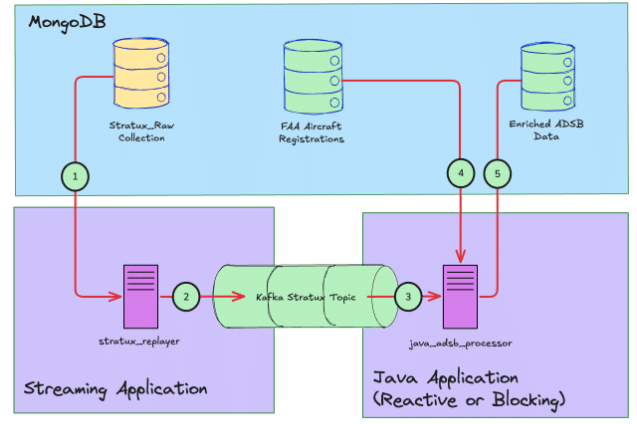
With the Java applications added, the overall application flow is:
- The streaming application reads ADS-B messages from MongoDB.
- The streaming application pushes each message to Kafka at a specified rate defined in messages per second. Each message has its original timestamp updated to the current data/time. When all messages have been read from MongoDB, the application restarts from the first ADS-B message in the collection.
- The Java applications read each message in turn from the Kafka topic.
- For each received message, the Java applications do a lookup of the aircraft's registration (tail) number against registration data downloaded from the Federal Aviation Authority and saved in a second MongoDB collection. Where a matching registration is found, the Java applications enrich the original ADS-B message by adding the aircraft manufacturer and model from the FAA data.
- Finally, the Java applications save the updated/enriched ADS-B message into a new MongoDB collection.
Blocking Code Version
In the blocking application, a simple polling mechanism is used to retrieve ADS-B messages from Kafka. The main section of this code looks like this:
| try (MongoClient mongoClient = MongoClients.create(config.getMongoUri())) { //Get a reference to the MongoDB database MongoDatabase database = mongoClient.getDatabase(config.getMongoDatabase()); //Get a reference to the collection with the FAA registration data MongoCollection<Document> registeredAircraft = database.getCollection(REGISTERED_AIRCRAFT_COLLECTION); //Get a reference to the output collection for decorated messages MongoCollection<Document> outputCollection = database.getCollection(config.getOutputCollection()); //Drop the output collection if it already exists - it'll be automatically //recreated when we write to it. outputCollection.drop(); AircraftEnricher enricher = new AircraftEnricher(registeredAircraft); MongoMessageWriter writer = new MongoMessageWriter(outputCollection); try (KafkaConsumer<String, String> consumer = new KafkaConsumer<>(props)) { consumer.subscribe(Collections.singletonList(config.getKafkaTopic())); try { while (true) { //Repeatedly poll Kafka for ADS-B messages ConsumerRecords<String, String> records = consumer.poll(Duration.ofMillis(500)); for (ConsumerRecord<String, String> record : records) { try { //Convert each received message to a POJO equivalent AdsbMessage msg = AdsbMessage.fromJson(record.value()); //Lookup the aircraft manufacturer and model enricher.enrich(msg); //Write the enriched message to MongoDB writer.write(msg); //Maintain a count of the number of documents written to MongoDB written.incrementAndGet(); } catch (Exception e) { log.warn("Failed to process message: {}", e.getMessage()); } } } } catch (org.apache.kafka.common.errors.WakeupException e) { // Expected on shutdown } } } |
This code creates a KafkaConsumer instance that polls the Kafka topic for 500ms, then processes each received message before polling again. This continues until the application is interrupted, with a count of the number of messages written to MongoDB maintained.
The AircraftEnricher and MongoMessageWritter classes handle the interactions with MongoDB, using the standard synchronous MongoDB driver. The AircraftEnricher class' enrich method looks like this:
| public void enrich(AdsbMessage message) { //Get the aircraft's registration number from the ADS-B message String reg = message.getReg(); if (reg == null) { return; } //registeredAircraft is a reference to the MongoDB collection containing //FAA registration data Document aircraft = registeredAircraft //US aircraft registrations are all prefixed with the letter 'N', hence 'n_number' //This query returns the first document found where the 'n_number' field matches //the ADS-B message reg field. .find(Filters.eq("n_number", reg)) .first(); if (aircraft == null) { return; } Object manufacturer = aircraft.get("manufacturer"); Object model = aircraft.get("model"); if (manufacturer != null) { message.setManufacturer(manufacturer.toString()); } if (model != null) { message.setModel(model.toString()); } } |
The MongoMessageWriter class' write method does a simple MongoDB 'insertOne' operation, writing the enriched ADS-B message to the target output collection:
| public void write(AdsbMessage message) { collection.insertOne(message.toDocument()); } |
Reactive Code Version
The Reactive code version uses Project Reactor, including its reactive KafkaReceiver class, along with MongoDB's Reactive Streams Java driver. The main function of this version looks like this:
| public static void main(String[] args) { //Connect to MongoDB MongoClient mongoClient = MongoClients.create(config.getMongoUri()); //Get a reference to the MongoDB database MongoDatabase database = mongoClient.getDatabase(config.getMongoDatabase()); //Get a reference to the collection with the FAA registration data MongoCollection<Document> registeredAircraft = database.getCollection(REGISTERED_AIRCRAFT_COLLECTION); //Get a reference to the output collection for decorated messages MongoCollection<Document> outputCollection = database.getCollection(config.getOutputCollection()); //Drop the output collection for enriched messages - it'll be automatically //recreated when we write to it. Mono.from(outputCollection.drop()).block(); AircraftEnricher enricher = new AircraftEnricher(registeredAircraft); MongoMessageWriter writer = new MongoMessageWriter(outputCollection); ReceiverOptions<String, String> receiverOptions = ReceiverOptions.<String, String>create(consumerProps) .subscription(Collections.singleton(config.getKafkaTopic())); //Subscribe to the Kafka topic and run the following pipeline //of operations: Disposable pipeline = KafkaReceiver.create(receiverOptions) //Receive a message from Kafka .receive() //Convert the JSON message to a POJO equivalent. mapNotNull will //filter out any messages that throw an error during parsing rather than //return null. .mapNotNull(record -> { try { return AdsbMessage.fromJson(record.value()); } catch (Exception e) { log.warn("Failed to parse message: {}", e.getMessage()); return null; } }) //Lookup and add aircraft manufacturer and model to the ADS-B Message .flatMap(enricher::enrich) //Write the decorated message to the output MongoDB collection .flatMap(msg -> writer.write(msg).thenReturn(msg)) //Maintain a count of the number of decorated messages written to MongoDB .doOnNext(msg -> { written.incrementAndGet(); }) .subscribe(); try { //The following will block until the main JVM thread is interrupted. //The reactive pipeline continues asynchronously //Without this, the application would immediately terminate. Thread.currentThread().join(); } catch (InterruptedException e) { Thread.currentThread().interrupt(); } } |
The interesting thing with Reactive pipelines like this is that the output of each stage becomes the input to the following stage. In the case of our pipeline, each stage produces a flux allowing asynchronous, non-blocking processing of each message in the stream:
| Stage | Input type | Output type |
| receive() | — | Flux<ReceiverRecord<String, String>> |
| mapNotNull() | Flux<ReceiverRecord<String, String>> | Flux<AdsbMessage> |
| flatMap (enrich) | Flux<AdsbMessage> | Flux<AdsbMessage> |
| flatMap (write) | Flux<AdsbMessage> | Flux<AdsbMessage> |
| doOnNext () | Flux<AdsbMessage> | Flux<AdsbMessage> |
| subscribe() | Flux<AdsbMessage> | Disposable |
The use of the .flatMap() operator when enriching messages with the aircraft manufacturer and model, and then writing the enriched message to MongoDB, is worth explaining.
Reactive pipelines often include operators implementing map / reduce type semantics, with map-style operators producing Flux outputs, and reduce-style operators producing Monos.
In our pipeline, the .flatMap() operator is used when carrying out MongoDB database operations. Compared with the synchronous versions of the AircraftEnricher.enrich() and MongoMessageWriter.write() methods, the reactive versions perform the same operations, but have different return types:
| public Mono<AdsbMessage> enrich(AdsbMessage message) |
| public Mono<Void> write(AdsbMessage message) |
The enrich() method returns Mono<AdsbMessage> whilst write() returns Mono<Void>. In our call to write(), we map that to Mono<AdsbMessage> by chaining it with .thenReturn(msg).
Map type operations always return a flux, but had we called these methods using map, rather than flatMap, the output would have been:
Flux<Mono<AdsbMessage>>
This would cause two issues:
- As the map operation never subscribes to those Monos, the MongoDB operations would never actually be executed - most Reactive producers use lazy execution, meaning execution only starts when they are subscribed to.
- The downstream operations expect Flux<AdsbMessage>, not Flux<Mono<AdsbMessage>>
In contrast to .map(), .flatMap() does the following:
- It takes each AdsbMessage emitted by the input Flux
- It executes the MongoDB operations - enricher.enrich(msg), or writer.write(msg).thenReturn(msg) to get a Mono<AdsbMessage>
- It subscribes to that Mono
- When the Mono emits, that AdsbMessage is further emitted on the output Flux, passing it on to the downstream operations.
As you would no doubt now expect, all of these operations are handled asynchronously, allowing the stream of messages arriving from Kafka to be processed without any blocking operations.
Blocking Versus Reactive Application Performance.
With both versions of the application completed, test runs of each were carried out with the following parameters:
- Testing was carried out on my MacBook Pro M4 Pro with 48GB of memory.
- The message streaming application was set to push 1000 messages per second onto the Kafka topic.
- Each application was run for 2 minutes, and the number of documents written to MongoDB was measured.
- Kafka was deployed in a Docker container running locally using Docker Desktop.
- MongoDB was deployed locally as a single-node replica set, running Community Edition version 8.2.3
- The applications were run using openjdk 21.0.7 2025-04-15 LTS
After each version of the application had run for two minutes, we observed:
- The blocking application processed 17,172 messages
- The reactive application processed 119,211 messages
This indicated the Reactive application was able to process messages essentially as fast as they were being pushed into Kafka, while the blocking version was unable to keep up with the stream of messages.
Final Thoughts
Although the metrics from testing both versions of the application would suggest Reactive Java has a significant performance advantage over traditional Java techniques when working with streaming data, no doubt many of you will have observed that the blocking version of the code was single-threaded and thus at a disadvantage. Indeed, when I tested a version of the blocking code that explicitly used multiple threads, the performance difference between the two versions of the code was negligible due to the inherently sequential nature of the two databases operations - the ADS-B message could not be written to MongoDB before the enrich operation had completed. This highlights a key consideration when considering a Reactive approach:
- Asynchronous Reactive programs provide the most benefit when there are tasks that can be performed asynchronously while IO bound tasks are blocked.
As we saw with the pi calculation in our initial example, the advantage of the Reactive approach, where tasks can be executed asynchronously, can be substantial.
In addition to performance considerations, the other advantage of the Reactive approach for streaming applications is that it allows for an elegant, declarative coding style. By contrast, adding thread handling to the blocking code added complexity and required a more verbose, imperative code style.
If you are working with streaming data in Java, especially data from Kafka or similar messaging systems, MongoDB with its Reactive Streams driver is a compelling database option. Be sure also to check out Atlas Stream Processing, which offers message stream processing directly within the MongoDB Atlas DBAAS service using familiar MongoDB aggregation semantics.
All of the code used in this article is available on GitHub.
- March 10, 2026
- 14 min read

Senior Staff Developer Advocate at MongoDB











Comments (2)
yury
3 weeks agoJust use PostgreSQL! It's free, open-source, and has no vendor lock-in.
David Grunwald
2 weeks agoVery cool, thanks for sharing!