


Fixed Window Counter Rate Limiter (Redis & Java)
- January 20, 2025
- 9 min read
Likes
...
Comments
...
Table of Contents
How It WorksHow to Implement It with Redis and Java
- 1. Use the INCR command to increment the counter in Redis each time a request is allowed
- 2. Set the key to expire in one minute if it’s newly created
- 3. Check the counter for each new request
- Start by adding the Jedis library to your Maven file:
- Create a FixedWindowRateLimiter class:
- Validate the Requests
- Complete Implementation
- Adding Dependencies
- Setting Up the Test Class
- Preparing the Environment Before Each Test
- Cleaning Up After Each Test
- Full Setup
- Verifying Requests Within the Limit
- Verifying Requests Beyond the Limit
- Verifying Requests After Window Reset
- Verifying Independent Handling of Multiple Clients
- Verifying Requests Are Denied Until Fixed Window Resets
- Verifying Denied Requests Are Not Counted
- GitHub Repo
- Stay Curious!
This article is also available on YouTube!The Fixed Window Counter is the simplest and most straightforward rate-limiting algorithm. It divides time into fixed intervals (e.g., seconds, minutes, or hours) and counts the number of requests within each interval. If the count exceeds a predefined threshold, the requests are rejected until the next interval begins.
Looking for a more precise algorithm? Take a look at the Sliding Window Log implementation.
How It Works
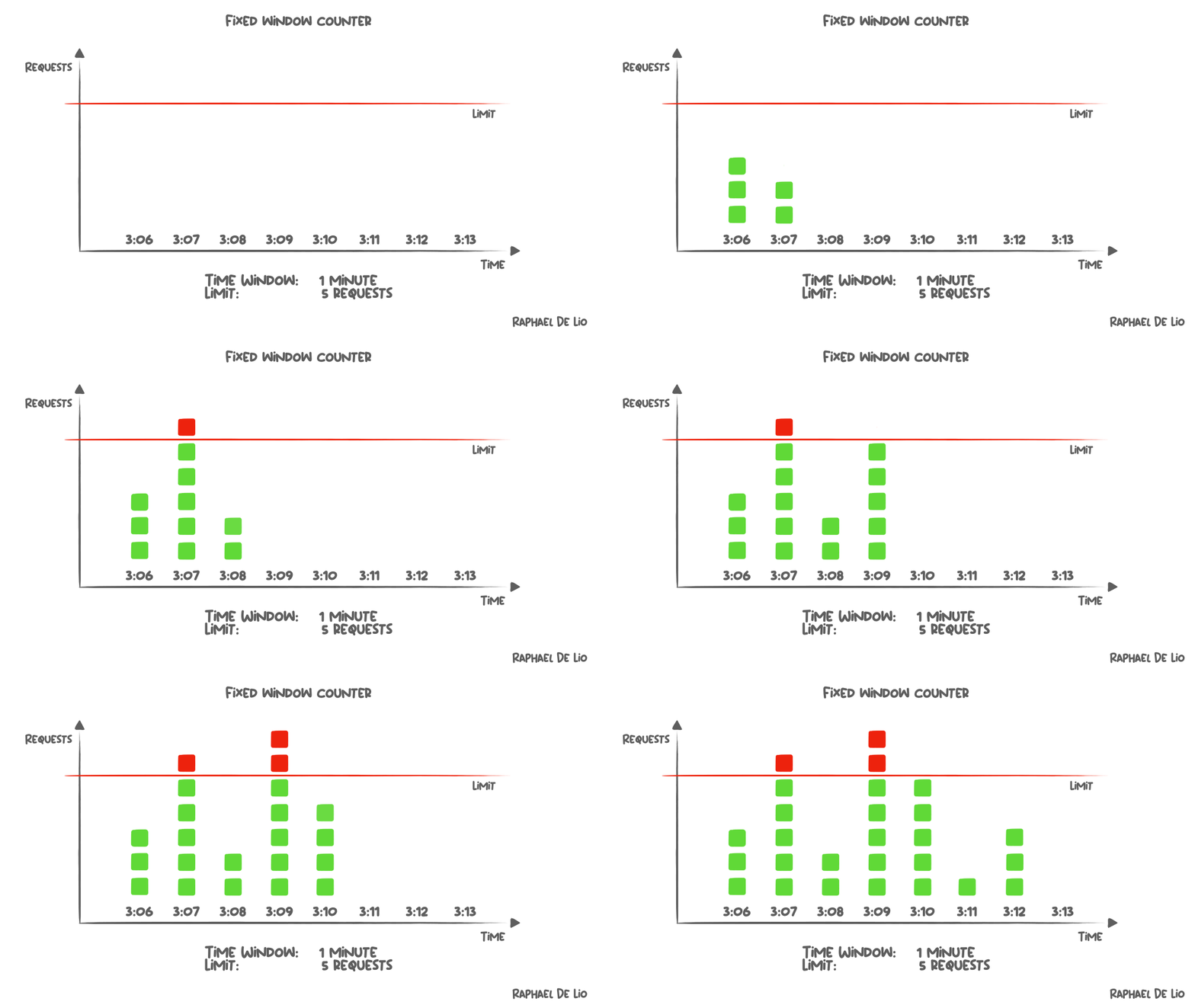
1. Define a Window Interval
Choose a time interval, such as 1 second, 1 minute, or 1 hour.2. Track Requests
Use a counter to track the number of requests made during the current window.3. Reset Counter:
At the end of the time window, reset the counter to zero and start counting again for the new window.4. Rate Limit Check:
Compare the counter against the allowed limit. If it exceeds the limit, reject further requests until the next window.How to Implement It with Redis and Java
There are two ways to implement the Fixed Rate Limiter with Redis. The simplest way is by:1. Use the INCR command to increment the counter in Redis each time a request is allowed
INCR my_counterIf there's no counter set yet, the INCR command will create one as zero and then increment it to one. If the counter is already set, the INCR commany will simply increment it by one.
2. Set the key to expire in one minute if it’s newly created
If the counter doesn’t exist, we need to set a time-to-live to ensure the time window lasts only for the specified period. But we should only set an expiration if it doesn’t already exist. Otherwise, Redis would reset the expiration, and older requests could be counted beyond the allowed time. We’ll use the EXPIRE command with the NX flag on the key. The NX flag ensures the expiration is only set if the key doesn’t already have one. This approach is smart because the counter will only track requests during the key’s lifespan. Once the key expires and is removed, the counter resets, ensuring we only account for requests within the intended time window.EXPIRE my_counter 60 NX
3. Check the counter for each new request
When a new request comes in, check the counter to see how many requests have been made. If it’s below the threshold, allow the process and increment the counter. If not, block the process from proceeding.If the key doesn’t exist, assume the counter starts at 0.
GET my_counterCool! Now that we understand the basics of our implementation, let’s implement it in Java with Jedis.
Implementing it with Jedis
Jedis is a popular Java library used to interact with Redis and we will use it for implementing our rate because it provides a simple and intuitive API for executing Redis commands from JVM applications.Start by adding the Jedis library to your Maven file:
Check the latest version here.redis.clients jedis 5.2.0
Create a FixedWindowRateLimiter class:
The class will take:- A Jedis instance.
- A time window size (e.g., 60 seconds).
- The maximum number of allowed requests.
package io.redis;

import redis.clients.jedis.Jedis;
import redis.clients.jedis.Transaction;
import redis.clients.jedis.args.ExpiryOption;

public class FixedWindowRateLimiter {

    private final Jedis jedis;
    private final int windowSize;
    private final int limit;

    public FixedWindowRateLimiter(Jedis jedis, long windowSize, int limit) {
        this.jedis = jedis;
        this.limit = limit;
        this.windowSize = windowSize;
    }
}
Validate the Requests
The main job of this rate limiter is to check if a client is within their allowed request limit. If yes, the request is allowed, and the counter is updated. If not, the request is blocked. Step 1: Generate a key We’ll store each client’s request count as a Redis key. To make keys unique for each client, we’ll format them like this:public boolean isAllowed(String clientId) {
String key = "rate_limit:" + clientId;
}
For example, if the client ID is user123, their key would be rate_limit:user123.
Step 2: Fetch the Current Counter
We’ll use Redis’s GET command to check how many requests the client has made so far. If the key doesn’t exist, we assume the client hasn’t made any requests, so the counter is 0.
public boolean isAllowed(String clientId) {
    String key = "rate_limit:" + clientId;
    String currentCountStr = jedis.get(key);
    int currentCount = currentCountStr != null ? Integer.parseInt(currentCountStr) : 0;
}
Step 3: Check the Request Limit
Next, we compare the current count to the allowed limit. If the counter is less than the limit, the request is allowed. Otherwise, it’s blocked.
public boolean isAllowed(String clientId) {
    String key = "rate_limit:" + clientId;
    String currentCountStr = jedis.get(key);
    int currentCount = currentCountStr != null ? Integer.parseInt(currentCountStr) : 0;

    boolean isAllowed = currentCount   The first request marks the start of the time window. Any subsequent requests during this window’s lifespan will increment the counter.
Once the window expires, the key is automatically removed from Redis. The next request after that will define the start of a new window. If we didn’t set the NX flag, the expiration would be reset everytime the counter is incremented, increasing the lifespan of the window.
Complete Implementation
Here’s the full code for the FixedWindowRateLimiter class:package io.redis;
import redis.clients.jedis.Jedis;
import redis.clients.jedis.Transaction;
import redis.clients.jedis.args.ExpiryOption;
public class FixedWindowRateLimiter {
private final Jedis jedis;
private final int windowSize;
private final int limit;
public FixedWindowRateLimiter(Jedis jedis, long windowSize, int limit) {
this.jedis = jedis;
this.limit = limit;
this.windowSize = windowSize;
}
public boolean isAllowed(String clientId) {
String key = "rate_limit:" + clientId;
String currentCountStr = jedis.get(key);
int currentCount = currentCountStr != null ? Integer.parseInt(currentCountStr) : 0;
boolean isAllowed = currentCount < limit;
if (isAllowed) {
Transaction transaction = jedis.multi();
transaction.incr(key);
transaction.expire(key, windowSize, ExpiryOption.NX); // Set expire only if not set
transaction.exec();
}
return isAllowed;
}
}
And we’re ready to start testing it’s behavior!
Testing our Rate Limiter
To ensure our Fixed Window Rate Limiter behaves as expected, we’ll write tests for various scenarios. For this, we’ll use three tools:- Redis TestContainers: This library spins up an isolated Redis container for testing. This means we don’t need to rely on an external Redis server during our tests. Once the tests are done, the container is stopped, leaving no leftover data.
- JUnit 5: Our main testing framework, which helps us define and structure tests with lifecycle methods like @BeforeEach and @AfterEach.
- AssertJ: A library that makes assertions readable and expressive, like assertThat(result).isTrue().
Adding Dependencies
Here’s what you’ll need in your Maven pom.xml file:org.junit.jupiter
junit-jupiter-engine
5.10.0
test
com.redis
testcontainers-redis
2.2.2
test
org.assertj
assertj-core
3.11.1
test
Once you’ve added these dependencies, you’re ready to start writing your test class.
Setting Up the Test Class
The first step is to create a test class named FixedWindowRateLimiterTest. Inside, we’ll define three main components:- Redis Test Container: This launches a Redis instance in a Docker container.
- Jedis Instance: This connects to the Redis container for sending commands.
- Rate Limiter: The actual FixedWindowRateLimiter instance we’re testing.
public class FixedWindowRateLimiterTest {

    private static final RedisContainer redisContainer = new RedisContainer("redis:latest")
            .withExposedPorts(6379);

    private Jedis jedis;
    private FixedWindowRateLimiter rateLimiter;

    // Start Redis container once before any tests run
    static {
        redisContainer.start();
    }
}
Preparing the Environment Before Each Test
Before running any test, we need to ensure a clean Redis environment. Here’s what we’ll do:- Connect to Redis: Use a Jedis instance to connect to the Redis container.
- Flush Data: Clear any leftover data in Redis to ensure consistent results for each test.
@BeforeEach
public void setup() {
    jedis = new Jedis(redisContainer.getHost(), redisContainer.getFirstMappedPort());
    jedis.flushAll();
}
FLUSHALL is an actual Redis command that deletes all the keys of all the existing databases. Read more about it in the official documentation.
Cleaning Up After Each Test
After each test, we need to close the Jedis connection to free up resources. This ensures no lingering connections interfere with subsequent tests.@AfterEach
public void tearDown() {
jedis.close();
}
Full Setup
Here’s how the complete test class looks with everything in place:public class FixedWindowRateLimiterTest {
private static final RedisContainer redisContainer = new RedisContainer("redis:latest")
.withExposedPorts(6379);
private Jedis jedis;
private FixedWindowRateLimiter rateLimiter;
static {
redisContainer.start();
}
@BeforeEach
public void setup() {
jedis = new Jedis(redisContainer.getHost(), redisContainer.getFirstMappedPort());
jedis.flushAll();
}
@AfterEach
public void tearDown() {
    jedis.close();
}
}
Verifying Requests Within the Limit
This test ensures the rate limiter allows requests within the defined limit. We configure it with a limit of 5 requests and a 10-second window, then call isAllowed(“client-1”) 5 times. Each call should return true, confirming the rate limiter correctly tracks and permits requests under the limit.@Test
public void shouldAllowRequestsWithinLimit() {
rateLimiter = new FixedWindowRateLimiter(jedis, 10, 5);
for (int i = 1; i <= 5; i++) {
assertThat(rateLimiter.isAllowed("client-1"))
.withFailMessage("Request " + i + " should be allowed")
.isTrue();
}
}
Verifying Requests Beyond the Limit
This test ensures the rate limiter correctly denies requests once the defined limit is exceeded. Configured with a limit of 5 requests in a 60-second window, we call isAllowed(“client-1”) 5 times and expect all to return true. On the 6th call, it should return false, verifying the rate limiter blocks requests beyond the allowed limit.@Test
public void shouldDenyRequestsOnceLimitIsExceeded() {
rateLimiter = new FixedWindowRateLimiter(jedis, 60, 5);
for (int i = 1; i <= 5; i++) {
assertThat(rateLimiter.isAllowed("client-1"))
.withFailMessage("Request " + i + " should be allowed")
.isTrue();
}
assertThat(rateLimiter.isAllowed("client-1"))
.withFailMessage("Request beyond limit should be denied")
.isFalse();
}
Verifying Requests After Window Reset
This test ensures the rate limiter resets correctly after the fixed window expires. Configured with a limit of 5 requests and a 1-second window, the first 5 requests (isAllowed(“client-1”)) return true, while the 6th request is denied (false). After waiting for the window to expire, the next request is allowed (true), confirming the reset behavior works as expected.@Test
public void shouldAllowRequestsAgainAfterFixedWindowResets() throws InterruptedException {
int limit = 5;
String clientId = "client-1";
int windowSize = 1;
rateLimiter = new FixedWindowRateLimiter(jedis, windowSize, limit);
for (int i = 1; i <= limit; i++) {
assertThat(rateLimiter.isAllowed(clientId))
.withFailMessage("Request " + i + " should be allowed")
.isTrue();
}
assertThat(rateLimiter.isAllowed(clientId))
.withFailMessage("Request beyond limit should be denied")
.isFalse();
Thread.sleep((windowSize + 1) * 1000);
assertThat(rateLimiter.isAllowed(clientId))
.withFailMessage("Request after window reset should be allowed")
.isTrue();
}
Verifying Independent Handling of Multiple Clients
This test ensures the rate limiter handles multiple clients independently. Configured with a limit of 5 requests and a 10-second window, the first 5 requests from client-1 are allowed (true), while the 6th is denied (false). Simultaneously, all 5 requests from client-2 are allowed (true), confirming the rate limiter maintains separate counters for each client.@Test
public void shouldHandleMultipleClientsIndependently() {
int limit = 5;
String clientId1 = "client-1";
String clientId2 = "client-2";
int windowSize = 10;
rateLimiter = new FixedWindowRateLimiter(jedis, windowSize, limit);
for (int i = 1; i <= limit; i++) {
assertThat(rateLimiter.isAllowed(clientId1))
.withFailMessage("Client 1 request " + i + " should be allowed")
.isTrue();
}
assertThat(rateLimiter.isAllowed(clientId1))
.withFailMessage("Client 1 request beyond limit should be denied")
.isFalse();
for (int i = 1; i <= limit; i++) {
assertThat(rateLimiter.isAllowed(clientId2))
.withFailMessage("Client 2 request " + i + " should be allowed")
.isTrue();
}
}
Verifying Requests Are Denied Until Fixed Window Resets
This test ensures the rate limiter denies additional requests until the fixed window expires. Configured with a limit of 3 requests and a 5-second window, the first 3 requests (isAllowed(“client-1”)) are allowed (true), while the 4th is denied (false). After waiting for half the window duration (2.5 seconds), requests are still denied (false). Once the window fully resets (after another 2.5 seconds), the next request is allowed (true), confirming proper behavior during and after the fixed window.@Test
public void shouldDenyAdditionalRequestsUntilFixedWindowResets() throws InterruptedException {
int limit = 3;
int windowSize = 5;
String clientId = "client-1";
rateLimiter = new FixedWindowRateLimiter(jedis, windowSize, limit);
for (int i = 1; i <= limit; i++) {
assertThat(rateLimiter.isAllowed(clientId))
.withFailMessage("Request " + i + " should be allowed within limit")
.isTrue();
}
assertThat(rateLimiter.isAllowed(clientId))
.withFailMessage("Request beyond limit should be denied")
.isFalse();
Thread.sleep(2500);
assertThat(rateLimiter.isAllowed(clientId))
.withFailMessage("Request should still be denied within the same fixed window")
.isFalse();
Thread.sleep(2500);
assertThat(rateLimiter.isAllowed(clientId))
.withFailMessage("Request should be allowed after fixed window reset")
.isTrue();
}
Verifying Denied Requests Are Not Counted
This test ensures that requests denied by the rate limiter are not included in the request count. Configured with a limit of 3 requests and a 5-second window, the first 3 requests (isAllowed(“client-1”)) are allowed (true), while the 4th is denied (false). Afterward, the Redis key for the client is checked to confirm the stored count equals the limit (3), ensuring denied requests do not increase the counter.@Test
public void testRateLimitDeniedRequestsAreNotCounted() {
int limit = 3;
int windowSize = 5;
String clientId = "client-1";
rateLimiter = new FixedWindowRateLimiter(jedis, windowSize, limit);
for (int i = 1; i <= limit; i++) {
assertThat(rateLimiter.isAllowed(clientId))
.withFailMessage("Request " + i + " should be allowed")
.isTrue();
}
assertThat(rateLimiter.isAllowed(clientId))
.withFailMessage("This request should be denied")
.isFalse();
String key = "rate_limit:" + clientId;
int requestCount = Integer.parseInt(jedis.get(key));
assertThat(requestCount)
.withFailMessage("The count (" + requestCount + ") should be equal to the limit (" + limit + "), not counting the denied request")
.isEqualTo(limit);
}
Is there any other behavior we should verify? Let me know in the comments!
The Fixed Window Rate Limiter is a simple yet effective way to manage request rates, and Redis makes it incredibly fast and reliable.
By using commands like INCR and EXPIRE, we created a solution that tracks and limits requests while automatically resetting counters when the time window expires.
With Jedis, we built an easy-to-understand Java implementation, and thanks to thorough testing with Redis TestContainers, JUnit 5, and AssertJ, we can trust it works as expected.
This approach is a great starting point for handling request limits and can easily be adapted for more complex scenarios if needed.
GitHub Repo
You can find this implementation in Java and Kotlin:- Java (Implementation, Test)
- Kotlin (Implementation, Test)
Stay Curious!
Related Articles:- January 20, 2025
- 9 min read
Likes
...
Comments
...

Software Engineer | Developer Advocate | International Conference Speaker | Tech Content Creator | Working @ Redis














Comments (0)
No comments yet. Be the first.