
AI-Powered Code Review Assistant: Automated Code Analysis with Spring AI and MongoDB

Code reviews catch bugs before they ship, but they take time. Most teams rely on manual review or basic linters that flag syntax issues but miss deeper problems like subtle resource leaks, poor exception handling, or security anti-patterns. Static analysis tools help, but they work with rigid rules that cannot generalize across code variations. A rule that catches catch (Exception e) {} will miss catch (Throwable t) { return null; }, even though both are the same underlying problem.
In this article, you will build a code review assistant API. Developers submit code snippets through a REST endpoint. The system embeds the submitted code with Spring AI and searches a library of known anti-patterns stored as vectors in MongoDB Atlas. It then sends the code along with matched patterns to an LLM for structured review feedback. Every submission and its findings are stored in MongoDB, and aggregation pipelines surface trends over time.
The tech stack is Java 21+, Spring Boot 3.x, Spring AI, Spring Data MongoDB, and MongoDB Atlas. By the end, you will have a working review API that accepts code, finds relevant anti-patterns using Atlas Vector Search, gets structured feedback from an LLM, and tracks findings across submissions. The complete source code is available in the companion repository on GitHub.
Prerequisites
- Java 21 or later
- Spring Boot 3.x (use Spring Initializr with the
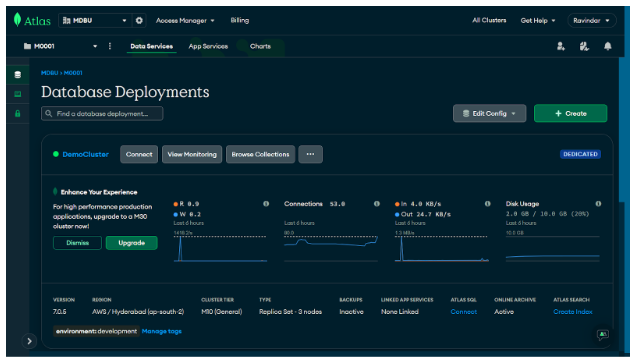
Spring Data MongoDBandSpring Webdependencies; you will add Spring AI manually later in the article) - A MongoDB Atlas cluster (the free tier is sufficient, and you will need it for Atlas Vector Search). You can set up one by following the MongoDB Atlas getting started guide.
- An OpenAI API key (used for both the embedding model and the chat model)
- Basic familiarity with Spring Boot (controllers, services, dependency injection)
1. Project setup
Go to Spring Initializr and generate a new project. I am using the following settings, feel free to use your own group name:
- Group:
dev.farhan - Artifact:
code-review-assistant - Java version: 21
- Dependencies:
Spring Web,Spring Data MongoDB
You will add Spring AI dependencies manually in section 3. For now, the project only needs web and MongoDB support.
Open application.properties and configure the MongoDB connection:
spring.data.mongodb.uri=mongodb+srv://<username>:<password>@<cluster>.mongodb.net/code-review-assistant?appName=devrel-article-java-springai-foojay
Replace the placeholders with your Atlas cluster credentials. The appName query parameter helps MongoDB track which application is connecting, which is useful for monitoring. If you are running MongoDB locally, use mongodb://localhost:27017/code-review-assistant?appName=devrel-article-java-springai-foojay instead.
The companion repository has the complete project structure. You can clone it and follow along, or build each piece from scratch as you read.
2. Storing and managing review patterns
The review assistant works by comparing submitted code against a library of known anti-patterns. Before you can do any comparison, you need a way to define what an anti-pattern looks like, store it in MongoDB, and expose endpoints for adding and listing patterns.
Defining the pattern model
Review findings will have severity levels, so start by defining those as a Java enum. An enum is a type that restricts a value to a fixed set of options, which prevents invalid severity strings from entering the system:
public enum Severity {
    CRITICAL, WARNING, INFO
}
CRITICAL is for issues that will cause bugs or security vulnerabilities. WARNING is for problems that may cause issues under certain conditions. INFO is for suggestions that improve code quality but are not urgent.
Next, define the ReviewPattern class. This is the document that represents a single anti-pattern in your library. The @Document annotation tells Spring Data MongoDB which collection this class maps to, and @Id marks the field that MongoDB will use as the document’s unique identifier:
@Document(collection = "review_patterns")
public class ReviewPattern {

    @Id
    private String id;
    private String name;
    private String description;
    private String language;
    private Severity severity;
    private String category;
    private String exampleBadCode;
    private String exampleGoodCode;
    private String explanation;

    // constructors, getters, and setters omitted for brevity
}
Each pattern has a name (like “empty catch block”), a description that explains the problem in plain language, and a language field so you can filter patterns by programming language. The category field groups related issues together (for example, “security” or “error-handling”). The exampleBadCode and exampleGoodCode fields show the problem and its fix side by side, and explanation describes why the bad code is problematic.
You will add an embedding field to this class later in section 3 when you set up vector search. For now, the text fields are enough to define the pattern library.
Each pattern’s id is a human-readable slug like unclosed-resources or hardcoded-credentials, set at creation time rather than auto-generated as an ObjectId. ObjectIds are useful when many writers insert records concurrently or when you want a time-ordered index, but neither is an issue with a small admin-curated pattern library. Slugs make findings easier to read in the shell and give the LLM a meaningful label to echo back in matchedPatternId.
To see what a pattern looks like as a JSON document, here are two examples. The first describes an empty catch block, a common error-handling problem:
{
  "_id": "empty-catch-block",
  "name": "Empty catch block",
  "description": "Catching an exception and doing nothing with it, silently swallowing errors",
  "language": "java",
  "severity": "CRITICAL",
  "category": "error-handling",
  "exampleBadCode": "try { connection.close(); } catch (SQLException e) { }",
  "exampleGoodCode": "try { connection.close(); } catch (SQLException e) { logger.warn(\"Failed to close: {}\", e.getMessage()); }",
  "explanation": "Empty catch blocks silently swallow errors. When something fails, there is no log entry and no way to diagnose the problem."
}
``````json
{
  "_id": "hardcoded-credentials",
  "name": "Hardcoded credentials",
  "description": "Storing passwords, API keys, or secrets as string literals in source code",
  "language": "java",
  "severity": "CRITICAL",
  "category": "security",
  "exampleBadCode": "private static final String DB_PASSWORD = \"s3cretP@ss!\";",
  "exampleGoodCode": "@Value(\"${db.password}\") private String dbPassword;",
  "explanation": "Hardcoded credentials end up in version control and build artifacts. Use environment variables or a secrets manager."
}
The second describes hardcoded credentials, a security anti-pattern:
{
  "_id": "hardcoded-credentials",
  "name": "Hardcoded credentials",
  "description": "Storing passwords, API keys, or secrets as string literals in source code",
  "language": "java",
  "severity": "CRITICAL",
  "category": "security",
  "exampleBadCode": "private static final String DB_PASSWORD = \"s3cretP@ss!\";",
  "exampleGoodCode": "@Value(\"${db.password}\") private String dbPassword;",
  "explanation": "Hardcoded credentials end up in version control and build artifacts. Use environment variables or a secrets manager."
}
Each JSON document maps directly to the fields in the ReviewPattern class. When you save one of these through the API, Spring Data MongoDB converts the Java object into a document with this same structure and stores it in the review_patterns collection.
Creating the repository
To read and write patterns from MongoDB, you need a repository interface. In Spring Data, a repository is an interface that provides database operations without requiring you to write implementation code. You declare methods with names that follow a specific naming convention, and Spring generates the query logic at runtime:
public interface ReviewPatternRepository extends MongoRepository<ReviewPattern, String> {

    List<ReviewPattern> findByLanguage(String language);

    List<ReviewPattern> findByCategory(String category);

    List<ReviewPattern> findByLanguageAndCategory(String language, String category);

    List<ReviewPattern> findBySeverity(Severity severity);
}
By extending MongoRepository<ReviewPattern, String>, this interface inherits standard operations like save(), findById(), findAll(), and deleteById(). The two generic parameters tell Spring that this repository manages ReviewPattern documents and that the ID field is a String.
The custom methods use Spring Data’s derived query feature. findByLanguage("java") translates to a MongoDB query that filters documents where the language field equals "java". findByLanguageAndCategory combines two filters with an AND condition. You do not need to write any MongoDB query syntax here. Spring parses the method name, identifies the field names and the operator (And), and builds the query for you.
Building the service layer
The service class contains the business logic for creating and retrieving patterns. The @Service annotation marks it as a Spring-managed component, which means Spring will create a single instance of this class and make it available for injection into other components:
@Service
public class ReviewPatternService {

    private final ReviewPatternRepository patternRepository;

    public ReviewPatternService(ReviewPatternRepository patternRepository) {
        this.patternRepository = patternRepository;
    }

    public ReviewPattern createPattern(CreatePatternRequest request) {
        ReviewPattern pattern = new ReviewPattern(
                request.id(), request.name(), request.description(), request.language(),
                request.severity(), request.category(),
                request.exampleBadCode(), request.exampleGoodCode(),
                request.explanation()
        );
        return patternRepository.save(pattern);
    }

    public List<ReviewPattern> listPatterns(String language, String category) {
        if (language != null && category != null) {
            return patternRepository.findByLanguageAndCategory(language, category);
        }
        if (language != null) {
            return patternRepository.findByLanguage(language);
        }
        if (category != null) {
            return patternRepository.findByCategory(category);
        }
        return patternRepository.findAll();
    }

    public Optional<ReviewPattern> getPattern(String id) {
        return patternRepository.findById(id);
    }
}
The constructor takes a ReviewPatternRepository as a parameter. Spring sees this and automatically injects the repository instance it created. This pattern is called constructor injection, and it is the recommended way to wire dependencies in Spring Boot.
The createPattern method builds a ReviewPattern from the incoming request and saves it to MongoDB.
The listPatterns method handles optional filtering. When both language and category are provided as query parameters, it calls the combined query. Without that first check, the method would silently ignore the category and filter by language only. When neither filter is provided, it falls back to findAll(), which returns every pattern in the collection.
The getPattern method returns an Optional<ReviewPattern>. An Optional is a container that may or may not hold a value. It forces the caller to handle the case where no pattern exists for the given ID, rather than risking a null pointer exception.
The CreatePatternRequest is a Java record that maps the incoming JSON request body. Records are a concise way to define immutable data carriers. The compiler automatically generates a constructor, getter methods, and equals/hashCode implementations from the field list:
public record CreatePatternRequest(
        String id, String name, String description, String language,
        Severity severity, String category,
        String exampleBadCode, String exampleGoodCode, String explanation
) {}
When a JSON body arrives at the endpoint, Spring deserializes it into this record by matching JSON field names to the record’s component names.
Exposing the REST endpoints
The controller class maps HTTP requests to service methods. The @RestController annotation tells Spring that this class handles web requests and that every method’s return value should be serialized directly as the response body (as JSON, by default). @RequestMapping("/api/patterns") sets the base URL path for all endpoints in this controller:
@RestController
@RequestMapping("/api/patterns")
public class ReviewPatternController {

    private final ReviewPatternService patternService;

    public ReviewPatternController(ReviewPatternService patternService) {
        this.patternService = patternService;
    }

    @PostMapping
    @ResponseStatus(HttpStatus.CREATED)
    public ReviewPattern createPattern(@RequestBody CreatePatternRequest request) {
        return patternService.createPattern(request);
    }

    @GetMapping
    public List<ReviewPattern> listPatterns(
            @RequestParam(required = false) String language,
            @RequestParam(required = false) String category) {
        return patternService.listPatterns(language, category);
    }

    @GetMapping("/{id}")
    public ReviewPattern getPattern(@PathVariable String id) {
        return patternService.getPattern(id)
                .orElseThrow(() -> new ResponseStatusException(HttpStatus.NOT_FOUND));
    }
}
@PostMapping handles POST requests to /api/patterns. The @RequestBody annotation tells Spring to deserialize the JSON request body into a CreatePatternRequest record. @ResponseStatus(HttpStatus.CREATED) changes the default response code from 200 to 201, which is the standard HTTP status for “resource created.”
@GetMapping without a path handles GET requests to /api/patterns. The @RequestParam(required = false) annotation binds query parameters from the URL. For example, GET /api/patterns?language=java&category=security passes "java" as language and "security" as category. Since both are marked as not required, omitting them results in null values, which the service handles by returning all patterns.
@GetMapping("/{id}") handles GET requests like /api/patterns/unclosed-resources. The @PathVariable annotation extracts the id value from the URL path. If the service returns an empty Optional, orElseThrow converts it into a 404 response.
You can test this by adding a pattern manually:
curl -X POST http://localhost:8080/api/patterns \
  -H "Content-Type: application/json" \
  -d '{
    "id": "empty-catch-block",
    "name": "Empty catch block",
    "description": "Catching an exception and doing nothing with it",
    "language": "java",
    "severity": "CRITICAL",
    "category": "error-handling",
    "exampleBadCode": "try { conn.close(); } catch (SQLException e) { }",
    "exampleGoodCode": "try { conn.close(); } catch (SQLException e) { logger.warn(\"Close failed\", e); }",
    "explanation": "Empty catch blocks silently swallow errors."
  }'
This works for adding patterns one at a time, but the system is more useful with a full library loaded. The next section adds the data seeder along with the embedding and vector search capabilities that make pattern matching work.
3. Embedding patterns with Spring AI and MongoDB Atlas Vector Search
Suppose a developer writes InputStream is = new FileInputStream(path); without a try-with-resources block. Your pattern library describes “unclosed resources in try blocks” with a different code example that uses FileReader. The underlying problem is identical, but the code looks different. Exact string matching will not connect the two. This is where embeddings help. By converting both the stored pattern and the submitted code into vectors, you can measure their semantic similarity regardless of superficial differences in syntax.
Adding Spring AI dependencies
Spring AI is managed through a Bill of Materials (BOM), which is a special dependency declaration that locks the versions of all Spring AI modules so they stay compatible with each other. Add the BOM and the OpenAI starter to your pom.xml:
<dependencyManagement>
    <dependencies>
        <dependency>
            <groupId>org.springframework.ai</groupId>
            <artifactId>spring-ai-bom</artifactId>
            <version>1.0.0</version>
            <type>pom</type>
            <scope>import</scope>
        </dependency>
    </dependencies>
</dependencyManagement>

<dependencies>
    <!-- existing dependencies -->
    <dependency>
        <groupId>org.springframework.ai</groupId>
        <artifactId>spring-ai-starter-model-openai</artifactId>
    </dependency>
</dependencies>
The spring-ai-starter-model-openai dependency does not have a <version> tag. The BOM provides the version, so you only need to specify it in one place. The starter auto-configures both an EmbeddingModel bean (for generating vectors) and a ChatClient.Builder bean (for calling the LLM), which you will use in later sections.
Then add the OpenAI configuration to application.properties:
spring.ai.openai.api-key=${OPENAI_API_KEY}
spring.ai.openai.embedding.options.model=text-embedding-3-small
spring.ai.openai.chat.options.model=gpt-4o-mini
spring.ai.openai.chat.options.temperature=0.2
The ${OPENAI_API_KEY} syntax reads the value from an environment variable, so you do not hardcode your key in the configuration file. The text-embedding-3-small model produces 1536-dimensional vectors, meaning each piece of text gets converted into an array of 1536 numbers that capture its semantic meaning. The low temperature setting (0.2) keeps code review output deterministic and consistent, which is what you want for a review tool that should give similar feedback for similar code. You can swap gpt-4o-mini for a different model if you want stronger results and do not mind higher API costs.
Generating embeddings
To generate an embedding for a pattern, you need to combine its most descriptive fields into a single text block and pass that to the embedding model. Add an embedding field and a helper method to the ReviewPattern class:
@Document(collection = "review_patterns")
public class ReviewPattern {

    // ... existing fields ...

    private float[] embedding;

    public float[] getEmbedding() { return embedding; }
    public void setEmbedding(float[] embedding) { this.embedding = embedding; }

    public String buildEmbeddingText() {
        return description + " " + exampleBadCode + " " + explanation;
    }
}
The embedding field stores the vector that the embedding model generates. It is a float[] because each dimension is a floating-point number.
buildEmbeddingText() concatenates the description, example bad code, and explanation into one string. This gives the embedding model enough context to understand what the pattern is about. The method lives on the model class because both the service and the data seeder need to build this text, and putting it here means the concatenation logic is defined in one place. If you later decide to include the pattern name or category in the embedding, you change this one method instead of updating it in multiple places.
Now update the ReviewPatternService to inject the EmbeddingModel and generate embeddings when creating patterns:
@Service
public class ReviewPatternService {

    private final ReviewPatternRepository patternRepository;
    private final EmbeddingModel embeddingModel;

    public ReviewPatternService(ReviewPatternRepository patternRepository,
                                EmbeddingModel embeddingModel) {
        this.patternRepository = patternRepository;
        this.embeddingModel = embeddingModel;
    }

    public ReviewPattern createPattern(CreatePatternRequest request) {
        ReviewPattern pattern = new ReviewPattern(
                request.id(), request.name(), request.description(), request.language(),
                request.severity(), request.category(),
                request.exampleBadCode(), request.exampleGoodCode(),
                request.explanation()
        );

        pattern.setEmbedding(embeddingModel.embed(pattern.buildEmbeddingText()));

        return patternRepository.save(pattern);
    }

    // listPatterns and getPattern remain unchanged
}
The EmbeddingModel is a Spring AI interface that the OpenAI starter auto-configures. Its embed() method sends the text to OpenAI’s embedding API and returns a float[] with 1536 values. Each value represents one dimension of the text’s meaning in the model’s vector space. Two pieces of text about similar topics will produce vectors that point in similar directions, which is what makes semantic search possible.
Seeding the pattern library
The companion repository includes a DataSeeder component that loads about 20 patterns on startup. It implements CommandLineRunner, which is a Spring Boot interface with a single run method. Spring Boot automatically calls run after the application context is fully initialized, making it a convenient place for one-time setup tasks like loading seed data:
@Component
public class DataSeeder implements CommandLineRunner {

    private final ReviewPatternRepository patternRepository;
    private final EmbeddingModel embeddingModel;

    public DataSeeder(ReviewPatternRepository patternRepository,
                      EmbeddingModel embeddingModel) {
        this.patternRepository = patternRepository;
        this.embeddingModel = embeddingModel;
    }

    @Override
    public void run(String... args) {
        if (patternRepository.count() > 0) {
            return;
        }

        List<ReviewPattern> patterns = createPatterns();

        for (ReviewPattern pattern : patterns) {
            pattern.setEmbedding(embeddingModel.embed(pattern.buildEmbeddingText()));
        }

        patternRepository.saveAll(patterns);
    }

    private List<ReviewPattern> createPatterns() {
        List<ReviewPattern> patterns = new ArrayList<>();

        patterns.add(new ReviewPattern(
                "unclosed-resources",
                "Unclosed resources",
                "Opening a resource without using try-with-resources",
                "java", Severity.CRITICAL, "maintainability",
                "FileInputStream fis = new FileInputStream(\"config.properties\");\n"
                + "Properties props = new Properties();\n"
                + "props.load(fis);\nreturn props;",
                "try (FileInputStream fis = new FileInputStream(\"config.properties\")) {\n"
                + "    Properties props = new Properties();\n"
                + "    props.load(fis);\n    return props;\n}",
                "If an exception occurs between opening and closing a resource, "
                + "the close call never runs. This leaks file handles and connections."
        ));

        // ... 19 more patterns covering error-handling, security,
        //     performance, and maintainability categories ...

        return patterns;
    }
}
The run method starts with a guard check: patternRepository.count() > 0. If the collection already has data, the method returns immediately. This prevents the seeder from re-generating embeddings or re-inserting data on application restarts.
When the collection is empty, the method builds all 20 patterns, then loops through each one to generate its embedding. The loop calls embeddingModel.embed() once per pattern, sending each pattern’s text to the OpenAI API. After all embeddings are generated, patternRepository.saveAll(patterns) writes every pattern to MongoDB in a single batch operation, which is more efficient than saving them one at a time in separate round trips.
The full list of 20 patterns covers error handling (catching generic exceptions, empty catch blocks, swallowing InterruptedException), security (hardcoded credentials, SQL injection, logging sensitive data), performance (string concatenation in loops, N+1 queries, unnecessary autoboxing), and maintainability (unclosed resources, missing null checks, raw generics). The complete list is available in the companion repository.
Creating the Atlas Vector Search index
Before you can query the embeddings, you need to create a vector search index in Atlas. This index tells MongoDB how to organize and search the embedding vectors efficiently.
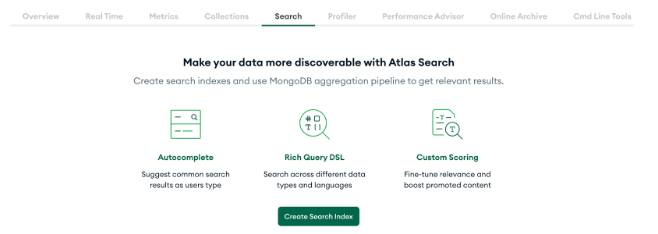
Go to your cluster in the Atlas UI, select the Atlas Search tab, and click Create Search Index . Choose Atlas Vector Search as the index type and select the review_patterns collection. In the index name field, enter vector_index. The code you write later references the index by this exact name, so do not leave the auto-generated default. Then paste the following definition:
{
  "fields": [
    {
      "type": "vector",
      "path": "embedding",
      "numDimensions": 1536,
      "similarity": "cosine"
    }
  ]
}
The path field points to embedding, which is where you stored the vector in the ReviewPattern class. The numDimensions value must match the output of your embedding model, which is 1536 for text-embedding-3-small. If these values do not match, the search will fail.
The similarity field specifies how MongoDB measures the distance between vectors. Cosine similarity measures the angle between two vectors regardless of their magnitude, which makes it a good fit for text embeddings where the direction of the vector matters more than its length.
Searching for similar patterns
With the index in place, you can build a method that finds patterns semantically similar to a given code snippet. This method takes a query vector (the embedding of the submitted code) and runs a $vectorSearch aggregation against the patterns collection.
Aggregation pipelines in MongoDB work like an assembly line. Data flows through a sequence of stages, and each stage transforms the data before passing it to the next one. In this pipeline, the first stage finds similar vectors, the second adds a similarity score to each result, and the third removes the large embedding array from the output:
private List<ReviewPattern> findSimilarPatterns(float[] queryVector, int limit) {
    List<Double> queryVectorList = new ArrayList<>();
    for (float f : queryVector) {
        queryVectorList.add((double) f);
    }

    Document vectorSearchStage = new Document("$vectorSearch",
            new Document("index", "vector_index")
                    .append("path", "embedding")
                    .append("queryVector", queryVectorList)
                    .append("numCandidates", 50)
                    .append("limit", limit));

    AggregationOperation vectorSearch = context -> vectorSearchStage;

    AggregationOperation addScore = context ->
            new Document("$addFields",
                    new Document("searchScore",
                            new Document("$meta", "vectorSearchScore")));

    AggregationOperation excludeEmbedding = context ->
            new Document("$project",
                    new Document("embedding", 0));

    Aggregation aggregation = Aggregation.newAggregation(vectorSearch, addScore, excludeEmbedding);

    AggregationResults<ReviewPattern> results =
            mongoTemplate.aggregate(aggregation, "review_patterns", ReviewPattern.class);

    return results.getMappedResults();
}
The method starts by converting the float[] query vector into a List<Double>. This conversion is necessary because the MongoDB Java driver expects double-precision numbers in the $vectorSearch query vector.
The $vectorSearch stage is the core of this method. It specifies which index to use (vector_index), which field contains the vectors (embedding), and the query vector to compare against. The numCandidates parameter controls how many candidate documents MongoDB evaluates internally before selecting the final results. Setting it higher than limit gives the search algorithm more options to choose from, which improves accuracy at the cost of slightly more processing time. The limit parameter controls how many results to return.
The $addFields stage adds a searchScore field to each result. The $meta: "vectorSearchScore" expression pulls the cosine similarity score that MongoDB calculated during the vector search. This score ranges from 0 to 1, where 1 means the vectors are identical. You will pass this score to the LLM later so it knows how confident the vector search was about each match.
The $project stage with "embedding": 0 removes the embedding array from the results. Each embedding is a 1536-element array that the prompt builder does not need, so without this exclusion, every vector search would transfer several kilobytes of unused data per pattern.
Finally, mongoTemplate.aggregate() runs the pipeline against the review_patterns collection and maps each result document back into a ReviewPattern Java object.
To hold the similarity score that $addFields injects, add a searchScore field to ReviewPattern and mark it with @Transient:
@Transient
private double searchScore;
The @Transient annotation tells Spring Data MongoDB not to persist this field to the database. The searchScore only gets populated during vector search results and has no meaning outside that context. Without @Transient, saving a pattern returned by vector search would write a stale score to the database.
4. Building the code review engine
The ReviewService is where the pieces connect. It accepts a code submission, finds matching patterns via vector search, sends both to an LLM, and parses the structured response into findings. The following diagram shows the complete flow from submission to response: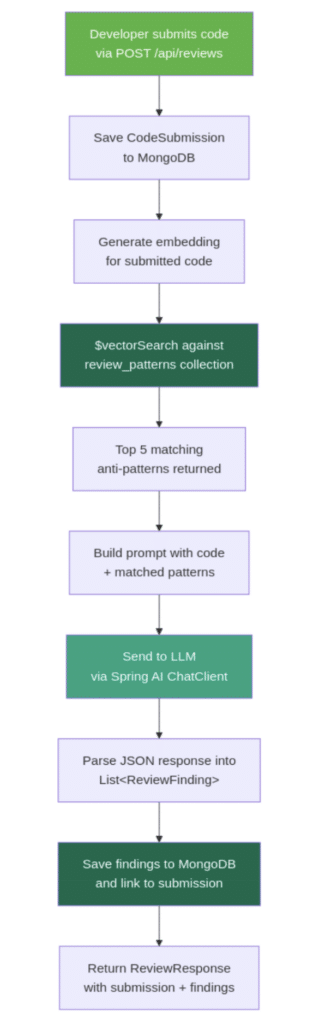
Figure 1: Review flow diagram showing the steps from code submission through embedding, vector search, LLM analysis, and saving findings to MongoDB
Before building the service, you need two more document classes: one for storing the code that developers submit, and one for storing the issues that the review engine identifies.
Defining the submission and finding models
The CodeSubmission document stores each code snippet that a developer sends for review:
@Document(collection = "code_submissions")
public class CodeSubmission {

    @Id
    private String id;
    private String code;
    private String language;
    private String fileName;
    private String submittedBy;
    private Instant submittedAt;
    private List<String> findingIds;

    // constructors, getters, and setters omitted for brevity
}
The code field holds the raw source code the developer submits. The language and fileName fields provide context about what kind of code it is. The submittedAt field uses Instant, which stores a precise UTC timestamp. The findingIds field is a list of references to the ReviewFinding documents that the review produces. Rather than embedding findings inside the submission document, storing IDs keeps the submission document small and lets you query findings independently.
The ReviewFinding document stores individual issues that the review engine identifies. Each finding references its parent submission and optionally references the pattern it matched:
@Document(collection = "review_findings")
public class ReviewFinding {

    @Id
    private String id;
    @Indexed
    private String submissionId;
    private String matchedPatternId;
    private int startLine;
    private int endLine;
    private Severity severity;
    private String category;
    private String message;
    private String suggestion;
    private double confidence;

    // constructors, getters, and setters omitted for brevity
}
The @Indexed annotation on submissionId tells Spring Data MongoDB to create a database index on that field. When you look up all findings for a given submission, MongoDB uses this index to jump directly to the matching documents instead of scanning the entire collection. Without it, every call to findBySubmissionId would get slower as the collection grows.
The startLine and endLine fields mark where in the submitted code the issue appears. The matchedPatternId field is nullable because the LLM may flag issues that do not map to any stored pattern. For example, the LLM might notice a logic error that is too specific to be a general anti-pattern. The confidence field is a score from 0.0 to 1.0 that the LLM assigns to indicate how certain it is about the finding.
The review service
Here is the flow that the review service follows for each submission:
- Save the code submission to MongoDB.
- Embed the submitted code and run vector search to find the top 5 matching patterns.
- Build a prompt with the code and matched patterns, then call the LLM.
- Parse the LLM response into
ReviewFindingobjects and save them.
@Service
public class ReviewService {

    private final MongoTemplate mongoTemplate;
    private final EmbeddingModel embeddingModel;
    private final ChatClient chatClient;
    private final CodeSubmissionRepository submissionRepository;
    private final ReviewFindingRepository findingRepository;

    public ReviewService(MongoTemplate mongoTemplate,
                         EmbeddingModel embeddingModel,
                         ChatClient.Builder chatClientBuilder,
                         CodeSubmissionRepository submissionRepository,
                         ReviewFindingRepository findingRepository) {
        this.mongoTemplate = mongoTemplate;
        this.embeddingModel = embeddingModel;
        this.chatClient = chatClientBuilder.build();
        this.submissionRepository = submissionRepository;
        this.findingRepository = findingRepository;
    }

    public ReviewResponse reviewCode(ReviewRequest request) {
        if (request.code() == null || request.code().isBlank()) {
            throw new ResponseStatusException(HttpStatus.BAD_REQUEST, "Code must not be empty");
        }

        CodeSubmission submission = new CodeSubmission();
        submission.setCode(request.code());
        submission.setLanguage(request.language());
        submission.setFileName(request.fileName());
        submission.setSubmittedAt(Instant.now());

        float[] codeEmbedding = embeddingModel.embed(request.code());
        List<ReviewPattern> matchedPatterns = findSimilarPatterns(codeEmbedding, 5);

        String systemPrompt = buildSystemPrompt();
        String userPrompt = buildUserPrompt(request.code(), matchedPatterns);

        List<ReviewFinding> findings = chatClient.prompt()
                .system(systemPrompt)
                .user(userPrompt)
                .call()
                .entity(new ParameterizedTypeReference<>() {});

        submission = submissionRepository.save(submission);

        for (ReviewFinding finding : findings) {
            finding.setSubmissionId(submission.getId());
        }
        List<ReviewFinding> savedFindings = findingRepository.saveAll(findings);
        List<String> findingIds = savedFindings.stream()
                .map(ReviewFinding::getId)
                .toList();

        submission.setFindingIds(findingIds);
        submissionRepository.save(submission);

        return new ReviewResponse(submission, savedFindings);
    }

    // findSimilarPatterns from section 3 goes here
    // buildSystemPrompt and buildUserPrompt shown below
}
The constructor takes five dependencies. The ChatClient.Builder is a Spring AI auto-configured bean that provides a builder for creating chat clients. The service calls .build() in the constructor to create a ChatClient instance that it reuses for every review request. MongoTemplate provides lower-level MongoDB operations that the repository interfaces do not cover, which you need for the vector search aggregation pipeline.
The reviewCode method starts with a null check on the submitted code. Without it, an empty request would trigger an expensive embedding API call and LLM call before eventually failing. Returning a 400 error early is cheaper and gives the caller a clear error message.
Next, the method creates a CodeSubmission object and populates its fields from the request. It then generates an embedding for the submitted code using the same embeddingModel.embed() method used for patterns. This vector represents the semantic meaning of the code, and findSimilarPatterns uses it to search for patterns whose embeddings point in a similar direction.
The chatClient.prompt() chain builds and sends the LLM request. .system(systemPrompt) sets the system-level instructions that define how the LLM should behave. .user(userPrompt) provides the actual code and matched patterns. .call() sends the request to the OpenAI API. .entity(new ParameterizedTypeReference<>() {}) tells Spring AI to parse the LLM’s JSON response directly into a List<ReviewFinding>. Spring AI generates the JSON schema from the target type and instructs the LLM to return JSON in that format, so you do not need to write parsing code yourself.
After the LLM returns findings, the method saves the submission first to get its generated id, then assigns that id to each finding before saving them with findingRepository.saveAll(). Using saveAll in a single batch is more efficient than saving each finding individually, since batch saving makes one database round trip instead of one per finding. Finally, the submission is updated with the list of finding IDs and saved again.
The method returns savedFindings (the list from saveAll) rather than the original findings list. The saved list has MongoDB-generated IDs on each finding. Returning the original list would give clients findings without IDs, making it harder to reference specific findings later.
One catch with the two saves is that if the application crashes between them, the findings will be in the database with a valid submissionId, but the submission document will have an empty findingIds. The data is not lost, though. Each finding still references its parent, so findingRepository.findBySubmissionId(submission.getId()) returns them and you can rebuild the submission’s findingIds afterward. If you want stricter atomicity, wrap both writes in a MongoDB multi-document transaction with Spring’s @Transactional. Otherwise, treat findingIds as a lookup optimization and query by submissionId as a fallback.
Prompt design
The system prompt sets the reviewer persona and defines the exact output format. Being specific about the JSON structure is important because the entity() call on the chat client needs the response to match the ReviewFinding class:
private String buildSystemPrompt() {
    return """
        You are a senior Java code reviewer. Analyze the submitted code and identify issues.
        You will receive a code snippet and a set of known anti-patterns that matched semantically.
        For each issue you find, return a JSON array of findings. Each finding must have these fields:
        - startLine (int): the line number where the issue starts
        - endLine (int): the line number where the issue ends
        - severity (string): one of "CRITICAL", "WARNING", or "INFO"
        - category (string): one of "security", "performance", "maintainability", "error-handling"
        - message (string): a concise description of the issue
        - suggestion (string): how to fix the issue
        - confidence (double): your confidence from 0.0 to 1.0
        - matchedPatternId (string or null): the pattern ID if it matches a provided pattern

        Focus on real issues. Do not flag stylistic preferences or minor formatting.
        Return ONLY the JSON array, no additional text.
        """;
}
The last two lines are important. “Focus on real issues” prevents the LLM from flagging every minor style choice as a finding. “Return ONLY the JSON array” ensures the response is parseable by Spring AI’s entity() method. Without that instruction, the LLM might wrap the JSON in markdown code fences or add explanatory text around it, which would break parsing.
The user prompt provides the code to review and the matched patterns from vector search:
private String buildUserPrompt(String code, List<ReviewPattern> patterns) {
    StringBuilder prompt = new StringBuilder();
    prompt.append("## Code to review\n\n```java\n");
    prompt.append(code);
    prompt.append("\n```\n\n");
    prompt.append("## Known anti-patterns to check against\n\n");

    for (int i = 0; i < patterns.size(); i++) {
        ReviewPattern pattern = patterns.get(i);
        prompt.append(String.format("%d. **%s** (ID: %s, similarity: %.3f)\n",
                i + 1, pattern.getName(), pattern.getId(), pattern.getSearchScore()));
        prompt.append("   Description: ").append(pattern.getDescription()).append("\n");
        prompt.append("   Example: ```java\n   ").append(pattern.getExampleBadCode());
        prompt.append("\n   ```\n");
        prompt.append("   Why: ").append(pattern.getExplanation()).append("\n\n");
    }

    return prompt.toString();
}
The prompt includes each pattern’s ID so the LLM can populate the matchedPatternId field in its findings. This creates a traceable link from each issue back to the stored pattern that triggered it. The similarity score from vector search is included too, which gives the LLM a signal about how confident the match is. A pattern with a 0.92 similarity score deserves more weight than one at 0.61, and the LLM can factor that into its confidence assessment.
The chatClient.prompt() call can fail if the OpenAI service is unavailable or if the response does not parse into the expected structure. In this tutorial, the exception propagates as a 500 error. In production, you would want to catch the failure and return a meaningful error response to the caller rather than an unhandled stack trace.
The review controller
The controller exposes three endpoints: one for submitting code for review, one for retrieving a past review by submission ID, and one for listing just the findings:
@RestController
@RequestMapping("/api/reviews")
public class ReviewController {

    private final ReviewService reviewService;

    public ReviewController(ReviewService reviewService) {
        this.reviewService = reviewService;
    }

    @PostMapping
    @ResponseStatus(HttpStatus.CREATED)
    public ReviewResponse submitReview(@RequestBody ReviewRequest request) {
        return reviewService.reviewCode(request);
    }

    @GetMapping("/{submissionId}")
    public ReviewResponse getReview(@PathVariable String submissionId) {
        return reviewService.getReview(submissionId);
    }

    @GetMapping("/{submissionId}/findings")
    public List<ReviewFinding> getFindings(@PathVariable String submissionId) {
        return reviewService.getFindings(submissionId);
    }
}
The POST endpoint at /api/reviews accepts a JSON body with the code to review and returns the full review response including the submission and all findings. The GET endpoint at /api/reviews/{submissionId} retrieves a previous review, and /api/reviews/{submissionId}/findings returns just the findings for a given submission, which is useful when you only need the issues without the submission metadata.
Testing the review engine
Submit a Java method with a few intentional issues:
curl -X POST http://localhost:8080/api/reviews \
  -H "Content-Type: application/json" \
  -d '{
    "code": "public void processFile(String path) {\n    String content = \"\";\n    try {\n        FileInputStream fis = new FileInputStream(path);\n        byte[] data = fis.readAllBytes();\n        content = new String(data);\n    } catch (Exception e) {\n        // handle later\n    }\n    String[] lines = content.split(\"\\n\");\n    String result = \"\";\n    for (String line : lines) {\n        result += line.trim() + \"\\n\";\n    }\n    System.out.println(result);\n}",
    "language": "java"
  }'
This code has three issues: an unclosed FileInputStream (no try-with-resources), a generic catch (Exception e) with an empty body, and string concatenation with += inside a loop. The response includes a finding for each issue, with the matched pattern ID, severity, line range, and a suggestion for how to fix it. The confidence scores typically range from 0.7 to 0.95 depending on how closely the code matches the stored patterns.
5. Tracking review trends with aggregation pipelines
After enough reviews accumulate, you can use MongoDB aggregation pipelines to answer questions like “what issues keep showing up?” across all submissions. Aggregation pipelines work by passing documents through a series of stages, where each stage performs an operation like filtering, grouping, or sorting. The output of one stage becomes the input for the next.
Create an AnalyticsService with three pipelines that surface different views of your review data.
The first pipeline groups findings by category and counts how many times each category appears. This tells you where a team’s code most often needs improvement:
public List<CategoryCount> getCategoryCounts() {
    Aggregation aggregation = Aggregation.newAggregation(
            Aggregation.group("category").count().as("count"),
            Aggregation.sort(Sort.Direction.DESC, "count")
    );
    return mongoTemplate.aggregate(aggregation, "review_findings", CategoryCount.class)
            .getMappedResults();
}
Aggregation.group("category") is a $group stage that collects all findings with the same category value into one group. .count().as("count") adds a field called count to each group that holds the number of documents in it. Aggregation.sort(Sort.Direction.DESC, "count") orders the groups so the most frequent category appears first. mongoTemplate.aggregate() runs the pipeline against the review_findings collection and maps each result into a CategoryCount object.
The second pipeline uses the same structure but groups by severity instead. This shows the balance of critical, warning, and informational findings across all reviews:
public List<SeverityCount> getSeverityDistribution() {
    Aggregation aggregation = Aggregation.newAggregation(
            Aggregation.group("severity").count().as("count"),
            Aggregation.sort(Sort.Direction.DESC, "count")
    );
    return mongoTemplate.aggregate(aggregation, "review_findings", SeverityCount.class)
            .getMappedResults();
}
If most findings are CRITICAL, the team may need to focus on fundamental practices. If the distribution skews toward INFO, the codebase is generally healthy.
The third pipeline is more involved. It identifies which specific patterns keep recurring across reviews by joining data from two collections. The following diagram shows how documents flow through each stage: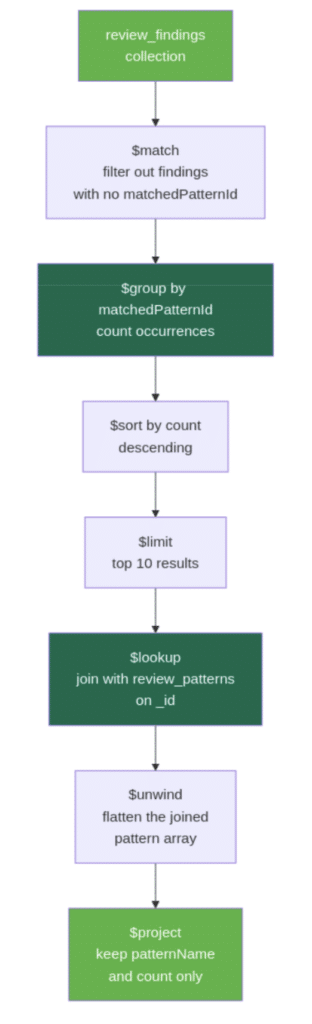
Aggregation pipeline diagram showing the stages from match through group, sort, limit, lookup, unwind, and project
public List<PatternFrequency> getTopPatterns() {
    Aggregation aggregation = Aggregation.newAggregation(
            Aggregation.match(Criteria.where("matchedPatternId").ne(null)),
            Aggregation.group("matchedPatternId").count().as("count"),
            Aggregation.sort(Sort.Direction.DESC, "count"),
            Aggregation.limit(10),
            Aggregation.lookup("review_patterns", "_id", "_id", "pattern"),
            Aggregation.unwind("pattern"),
            Aggregation.project()
                    .and("pattern.name").as("patternName")
                    .and("count").as("count")
    );
    return mongoTemplate.aggregate(aggregation, "review_findings", PatternFrequency.class)
            .getMappedResults();
}
This pipeline has several stages, so here is what each one does:
Aggregation.match(Criteria.where("matchedPatternId").ne(null))filters out findings that have no matched pattern. Not every finding maps to a stored pattern (the LLM can flag issues independently), so this stage removes those before counting.Aggregation.group("matchedPatternId").count().as("count")groups the remaining findings by which pattern they matched and counts the occurrences.Aggregation.sort(Sort.Direction.DESC, "count")orders patterns by how frequently they were matched.Aggregation.limit(10)keeps only the top 10 results.Aggregation.lookup("review_patterns", "_id", "_id", "pattern")performs a join with thereview_patternscollection. The_idfrom the grouped result (which holds thematchedPatternIdvalue) is matched against the_idin thereview_patternscollection. The matching document is placed into a new array field calledpattern. This is similar to a SQL JOIN, but the result is always an array because MongoDB does not assume a one-to-one relationship.Aggregation.unwind("pattern")flattens that array. Since each grouped result matches exactly one pattern, thepatternarray has one element.unwindreplaces the array with the single document inside it, which makes the fields easier to access in the next stage.Aggregation.project()selects the final output fields..and("pattern.name").as("patternName")pulls thenamefield from the joined pattern document and renames it topatternName..and("count").as("count")keeps the count from the grouping stage. Everything else is excluded from the output.
Expose these three pipelines through an AnalyticsController:
@RestController
@RequestMapping("/api/analytics")
public class AnalyticsController {

    private final AnalyticsService analyticsService;

    public AnalyticsController(AnalyticsService analyticsService) {
        this.analyticsService = analyticsService;
    }

    @GetMapping("/categories")
    public List<CategoryCount> getCategoryCounts() {
        return analyticsService.getCategoryCounts();
    }

    @GetMapping("/severity")
    public List<SeverityCount> getSeverityDistribution() {
        return analyticsService.getSeverityDistribution();
    }

    @GetMapping("/top-patterns")
    public List<PatternFrequency> getTopPatterns() {
        return analyticsService.getTopPatterns();
    }
}
After running several reviews through the system, the category endpoint might return something like:
[
  { "category": "error-handling", "count": 12 },
  { "category": "maintainability", "count": 8 },
  { "category": "security", "count": 5 },
  { "category": "performance", "count": 4 }
]
This tells you that error handling is the most frequent issue category across all reviewed code. These pipelines scan the entire review_findings collection each time they run. For a tutorial with a few dozen reviews, that is fine. In production with thousands of findings, you would want indexes on category, severity, and matchedPatternId to speed up the $group stages.
6. Testing the full workflow
Here is the complete flow from start to finish:
Start the application. The DataSeeder loads about 20 patterns and generates their embeddings on first run. You should see the patterns in the review_patterns collection in Atlas.
Add a custom pattern. The library is extensible. Add a pattern that is specific to your codebase:
curl -X POST http://localhost:8080/api/patterns \
  -H "Content-Type: application/json" \
  -d '{
    "id": "logging-user-passwords",
    "name": "Logging user passwords",
    "description": "Writing user passwords to log output in authentication flows",
    "language": "java",
    "severity": "CRITICAL",
    "category": "security",
    "exampleBadCode": "logger.info(\"Login: user={}, pass={}\", username, password);",
    "exampleGoodCode": "logger.info(\"Login attempt: user={}\", username);",
    "explanation": "Passwords in logs violate security policy and compliance requirements."
  }'
Submit code with a known issue. Send a snippet with an obvious anti-pattern:
curl -X POST http://localhost:8080/api/reviews \
  -H "Content-Type: application/json" \
  -d '{
    "code": "public String readConfig() {\n    FileInputStream fis = new FileInputStream(\"app.conf\");\n    byte[] data = fis.readAllBytes();\n    return new String(data);\n}",
    "language": "java"
  }'
The response includes a finding for the unclosed FileInputStream with a matchedPatternId pointing to the “unclosed resources” pattern.
Submit code with a subtler issue. Try a snippet that does not exactly match any stored pattern’s example:
curl -X POST http://localhost:8080/api/reviews \
  -H "Content-Type: application/json" \
  -d '{
    "code": "public void backup(Path source, Path dest) throws Exception {\n    BufferedReader reader = Files.newBufferedReader(source);\n    BufferedWriter writer = Files.newBufferedWriter(dest);\n    String line;\n    while ((line = reader.readLine()) != null) {\n        writer.write(line);\n        writer.newLine();\n    }\n}",
    "language": "java"
  }'
Even though this uses BufferedReader and BufferedWriter instead of FileInputStream, the vector search still finds the “unclosed resources” pattern as a top match because the semantic meaning is the same: resources opened without try-with-resources. Check the similarity score in the response to see how closely it matched.
Check analytics. After running a few reviews, hit the analytics endpoints:
curl http://localhost:8080/api/analytics/categories
curl http://localhost:8080/api/analytics/severity
curl http://localhost:8080/api/analytics/top-patterns
These show the accumulated data across all your reviews.
Conclusion
You built a code review assistant with three layers. Atlas Vector Search matches submitted code against the pattern library by semantic similarity, so it finds issues even when the code looks different from the stored examples. Spring AI sends the matched patterns and the code to an LLM, which returns structured findings with severity, line ranges, and fix suggestions. MongoDB aggregation pipelines turn the accumulated findings into trends across submissions.
From here, you could expand the pattern library with anti-patterns from your own team’s code reviews. You could add support for reviewing full files or Git diffs instead of snippets, or experiment with code-specific embedding models for better similarity matching. A feedback endpoint where developers mark findings as helpful or not would let you improve pattern quality over time.
The complete source code is available in the companion repository on GitHub.
Found a mistake, or something to add? Edit this page on GitHub

Farhan Hasin Chowdhury
Senior Backend Engineer & Technical Leader | Distributed Systems, Cloud & AI | Node.js, Python, AWS, Kubernetes