
Do you want your ad here?

Contact us to get your ad seen by thousands of users every day!

[email protected]

New JVM Ecosystem Report 2021 Has Arrived!

  • June 18, 2021
  • 5162 Unique Views
  • < 1 min read
Table of Contents
Report Highlights:

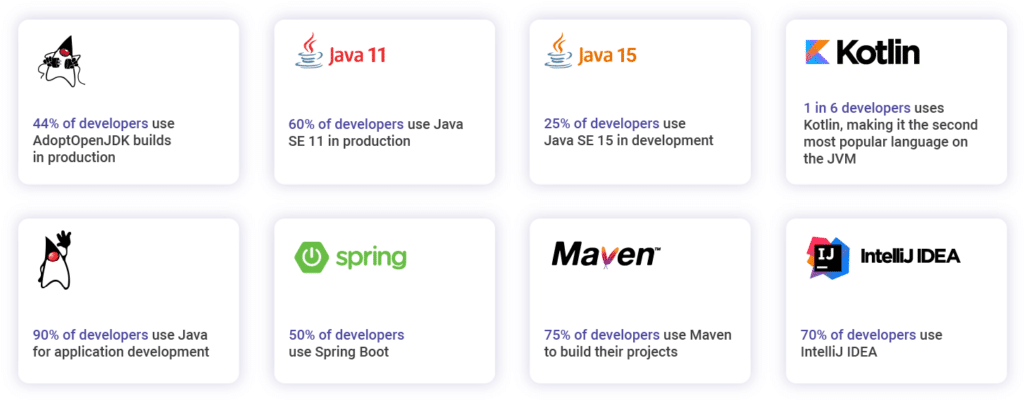
Snyk has just released the annual JVM ecosystem report! This report presents the results of the largest annual survey on the state of the JVM ecosystem. 

This year's survey is a cooperation between Snyk and Azul and was slightly different from the previous surveys. We aimed for the survey to be more concise and focus only on the most important aspects of JVM developers today. Additionally, this year every participant was allowed to choose multiple options. We believe that the way the 2021 survey was designed, we have a better and more comprehensive view of the current JVM ecosystem. In this report, we also looked at different open data sources like GitHub and Google Trends to see how that data compares to the survey results.

Next to the results, there are some great highlight stories in this report like:

Report Highlights:

The highlight of the 2021 JVM Ecosystem report

We would like to thank everyone who participated and offered their insights on Java and JVM-related topics. Big shoutout to Foojay.io, the VirtualJUG, and other Java communities for the invaluable help. This massive effort results in an impressive number of developers participating in the survey, giving great insight into the current state of the JVM ecosystem.

Do you want your ad here?

Contact us to get your ad seen by thousands of users every day!

[email protected]

Comments (2)

Highlight your code snippets using [code lang="language name"] shortcode. Just insert your code between opening and closing tag: [code lang="java"] code [/code]. Or specify another language.

Tobiloba avatar

Tobiloba

3 years ago

I see that you save the point of interest as text in the DB but the response gotten from ChatGPT is JSON. Does this mean you convert the response into string using libraries like gson before saving it in the database?

16

Highlight your code snippets using [code lang="language name"] shortcode. Just insert your code between opening and closing tag: [code lang="java"] code [/code]. Or specify another language.

Denis Magda avatar

Denis Magda

3 years ago

Hey, The response is a String object in the JSON format [1]. The repository takes this JSON string as is and stores to the database [2]. Presently, Spring Data auto-generates the CREATE TABLE statement on the startup and sets the "point of interest" column's type to "text" (or "varchar", don't remember). However, it's always possible to ask Spring Data to use the "json" or "jsonb" type for the column if you wish to query the JSON at the database level. Finally, Vaadin displays a list of PointsOfInterests. Those are generated using the org.json library [3]. Let me know if you have other questions. Hope this helps. [1] https://github.com/YugabyteDB-Samples/budget-journey-gpt/blob/main/src/main/java/com/yugabyte/com/TripsAdvisorService.java#L103 [2] https://github.com/YugabyteDB-Samples/budget-journey-gpt/blob/main/src/main/java/com/yugabyte/com/TripsAdvisorService.java#L74 [3] https://github.com/YugabyteDB-Samples/budget-journey-gpt/blob/main/src/main/java/com/yugabyte/com/TripsAdvisorService.java#L114

19

Highlight your code snippets using [code lang="language name"] shortcode. Just insert your code between opening and closing tag: [code lang="java"] code [/code]. Or specify another language.

Subscribe to foojay updates:

https://foojay.io/feed/
Copied to the clipboard