
Explore Spring AI SDK - Amazon Bedrock AgentCore - Part 1

Introduction
Artificial intelligence has rapidly expanded across every industry since the inception of ChatGPT. It represents a breakthrough in how we build and use software. Moreover, this breakthrough technology has driven major transformation. At the same time, it has created significant noise and hype.
Today, AI is no longer experimental. Instead, it has become essential, much like electricity and the internet. As a result, it now plays a key role in our daily lives. Overall, this shift reflects strong technological acceleration across industries.
From a development perspective, the software development lifecycle is evolving. In particular, it is steadily moving toward AI engineering. In my view, this shift improves the productivity of developers and architects.
However, we must remain cautious. For example, we should not blindly trust outputs from tools like ChatGPT, GitHub Copilot, or other AI assistants. Instead, we must review and validate all generated text, code, and content. Only then should we deploy it to production for customers.
Role of Agentic AI Frameworks
Meanwhile, as AI continues to evolve and deliver staggering results, many agentic AI frameworks are emerging. Consequently, developers and architects can build and experiment with use cases in a short time. In addition, these frameworks act as breakthrough technology and accelerate innovation.
At the same time, provider SDKs handle key architectural and infrastructure concerns. For instance, they manage scalability, reliability, security, and observability. Therefore, this support reflects strong technological acceleration in the ecosystem.
As a result, developers and architects can focus mainly on building core agent logic.
For Python and TypeScript developers, AWS has open-sourced the Strands Agents SDK. It follows a model-driven approach to building and running AI agents with just a few lines of code.
Meanwhile, the Amazon Bedrock SDK handles the underlying infrastructure capabilities. This includes scalability, reliability, security, and observability. From my experience, I have explored, built, and deployed several agents using this framework. I find it to be a very interesting and powerful framework to work with.
In this article, we focus on Spring AI and its integration with the generally available Amazon Bedrock SDK. Specifically, the Spring AI AgentCore SDK enables developers to build production-ready AI agents. Furthermore, they can run these agents on the highly scalable AgentCore Runtime.
What is Spring AI and Spring AI SDK?
According to Spring AI documentation , it is an application framework for AI engineering . Using this framework, developers can connect Data and APIs with AI models.
The Spring AI AgentCore SDK is an open-source library that brings Amazon Bedrock AgentCore capabilities into Spring AI. It uses familiar patterns such as annotations, auto-configuration, and composable advisors.
With Spring AI Builders, developers can simply add a dependency and annotate a method. The SDK then handles the rest.
What is Amazon Bedrock AgentCore and Why?
According to Amazon documentation, it is an agentic AI platform that enables developers to build, deploy, and operate agents at scale using any framework and any model.
One key reason to use Amazon Bedrock AgentCore is that it simplifies development. It allows developers to focus on building AI agents and implementing business logic. However, configuring capabilities such as scalability, reliability, security, governance, and observability typically requires significant time and effort.
With Amazon Bedrock AgentCore, the platform handles the infrastructure layer. It provides these capabilities out of the box. As a result, developers can concentrate on core agent development rather than managing underlying systems.
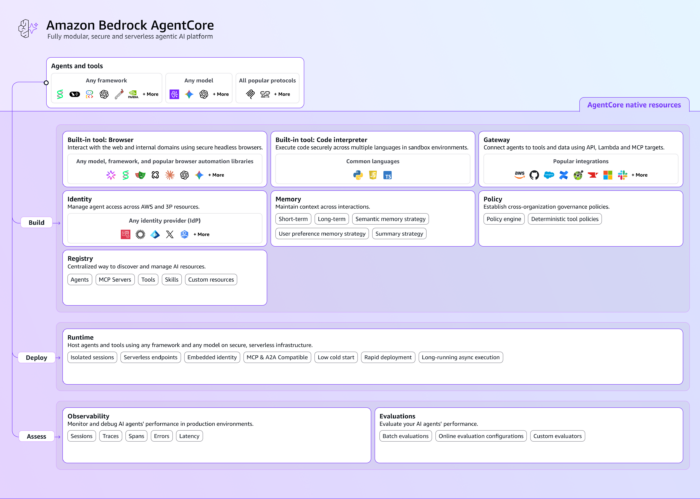
Source: Amazon
Amazon Bedrock AgentCore Capabilties
Amazon Bedrock AgentCore provides the following capabilities.
1. AgentCore Runtime
- The execution environment where your AI agents run
- Handles scaling, session management, and isolation automatically
- Lets you deploy agents without managing infrastructure
2. AgentCore Memory
- Helps agents remember context across interactions
- Supports:
- Short-term memory (conversation context): It stores recent messages using a sliding window approach.
- Long-term memory (persistent knowledge): It persists knowledge across sessions using multiple strategies like Semantic, User Preference, Summary, and Episodic memory strategies.
- Enables more personalized and intelligent responses
3. AgentCore Gateway
- Connects agents to APIs, tools, and external systems
- Converts APIs/Lambda functions into agent-compatible tools (MCP)
- Simplifies tool integration with minimal code
4. AgentCore Identity
- Manages authentication and access control for agents
- Integrates with existing identity providers (e.g., Cognito, Okta, OAuth2)
- Ensures secure interactions with systems and data
5. AgentCore Policy
- Defines rules and boundaries for agent behavior
- Controls what actions an agent can perform
- Ensures compliance and governance without slowing execution
6. Build-inTool: Code Interpreter
- Provides a secure sandbox for executing code
- Supports multiple languages (Python, JS, etc.)
- Helps agents perform complex computations and tasks
7. Build-inTool: Browser
- Allows agents to interact with websites
- Can navigate pages, fill forms, and extract data
- Runs in a secure, managed environment
8. Gen AI Observability
- Monitors and tracks agent performance in production
- Provides tracing, debugging, and visualization of workflows
- Helps identify failures and optimize performance
- Separate feature is available in CloudWatch as a sidecar as a Gen AI Observability
9. Evaluations
- Measures agent quality and performance
- Evaluates correctness, reliability, and task success
- Helps improve agents using data-driven insights
Step-by-step guide
We can start by creating a sample agent. Then, we can gradually add and integrate AgentCore services such as memory, gateway, identity, and policies. We can also incorporate built-in tools like the browser and code interpreter.
Observability, evaluations, and advanced identity management are still evolving. These capabilities are expected in upcoming SDK releases.
Prerequisites
- An AWS Account
- Java 17 or higher (Java 25 recommended)
- Spring Boot 3.5.x or higher
- Maven or Gradle
- IntelliJ IDE (Recommended)
Project Structure
Using start.spring.io, you can scaffold the project structure and add the required dependencies.
You can use the following link to quickly create the project with the required configuration and dependencies:
This link preconfigures a Spring Boot project with the necessary setup, allowing you to get started quickly.
simple-spring-boot-agent/
├── src/
│   └── main/
│       ├── java/com/bsmlabs/springai/
│       │   ├── agents/
│       │   │   └── SampleChatAgent.java       # Core agent — @AgentCoreInvocation handler
│       │   ├── models/
│       │   │   └── PromptRequest.java          # Input model (Java record)
│       │   └── tools/
│       │       └── MathematicalTools.java      # Tool definitions for the LLM
│       └── resources/
│           └── application.properties          # AWS Bedrock config
├── test-sample-request.http                    # Ready-to-run HTTP test requests
└── pom.xml
1. Add the below Bill of Materials(BOM) SDK Dependencies and then include runtime starter to pom.xml
<dependencyManagement>
        <dependencies>
            <dependency>
                <groupId>org.springframework.ai</groupId>
                <artifactId>spring-ai-bom</artifactId>
                <version>${spring-ai.version}</version>
                <type>pom</type>
                <scope>import</scope>
            </dependency>
            <dependency>
                <groupId>org.springaicommunity</groupId>
                <artifactId>spring-ai-agentcore-bom</artifactId>
                <version>${spring-ai-agentcore.version}</version>
                <type>pom</type>
                <scope>import</scope>
            </dependency>
        </dependencies>
    </dependencyManagement>

     <dependencies>
        <dependency>
         <groupId>org.springaicommunity</groupId>
         <artifactId>spring-ai-agentcore-runtime-starter</artifactId>
         </dependency>
     </dependencies>
complete pom.xml
<?xml version="1.0" encoding="UTF-8"?>
<project xmlns="http://maven.apache.org/POM/4.0.0" xmlns:xsi="http://www.w3.org/2001/XMLSchema-instance"
    xsi:schemaLocation="http://maven.apache.org/POM/4.0.0 https://maven.apache.org/xsd/maven-4.0.0.xsd">
    <modelVersion>4.0.0</modelVersion>
    <parent>
        <groupId>org.springframework.boot</groupId>
        <artifactId>spring-boot-starter-parent</artifactId>
        <version>3.5.8</version>
        <relativePath/> <!-- lookup parent from repository -->
    </parent>
    <groupId>com.bsmlabs</groupId>
    <artifactId>simple-spring-boot-agent</artifactId>
    <version>0.0.1-SNAPSHOT</version>
    <name/>
    <description/>
    <url/>
    <licenses>
        <license/>
    </licenses>
    <developers>
        <developer>
            <name>Mahendra Rao B</name>
        </developer>
    </developers>
    <scm>
        <connection/>
        <developerConnection/>
        <tag/>
        <url>https://github.com/bsmahi/simple-spring-boot-agent</url>
    </scm>
    </scm>
    <properties>
        <java.version>21</java.version>
        <spring-ai.version>1.1.4</spring-ai.version>
        <spring-ai-agentcore.version>1.0.0</spring-ai-agentcore.version>
    </properties>
    <dependencies>
        <dependency>
            <groupId>org.springframework.boot</groupId>
            <artifactId>spring-boot-starter-actuator</artifactId>
        </dependency>
        <dependency>
            <groupId>org.springframework.boot</groupId>
            <artifactId>spring-boot-starter-web</artifactId>
        </dependency>

        <dependency>
            <groupId>org.springframework.ai</groupId>
            <artifactId>spring-ai-starter-model-bedrock-converse</artifactId>
        </dependency>
        <!-- AgentCore Capabilities Dependencies, add one by one or as needed -->
        <dependency>
            <groupId>org.springaicommunity</groupId>
            <artifactId>spring-ai-agentcore-runtime-starter</artifactId>
        </dependency>

        <dependency>
            <groupId>org.springframework.boot</groupId>
            <artifactId>spring-boot-starter-test</artifactId>
            <scope>test</scope>
        </dependency>
    </dependencies>

    <dependencyManagement>
        <dependencies>
            <dependency>
                <groupId>org.springframework.ai</groupId>
                <artifactId>spring-ai-bom</artifactId>
                <version>${spring-ai.version}</version>
                <type>pom</type>
                <scope>import</scope>
            </dependency>
            <dependency>
                <groupId>org.springaicommunity</groupId>
                <artifactId>spring-ai-agentcore-bom</artifactId>
                <version>${spring-ai-agentcore.version}</version>
                <type>pom</type>
                <scope>import</scope>
            </dependency>
        </dependencies>
    </dependencyManagement>

    <build>
        <plugins>
            <plugin>
                <groupId>org.springframework.boot</groupId>
                <artifactId>spring-boot-maven-plugin</artifactId>
            </plugin>
        </plugins>
    </build>

</project>
2. Add the below class
public record PromptRequest(String prompt){};3. Add the below Mathematical Tool class
package com.bsmlabs.springai.tools;

import org.springframework.ai.tool.annotation.Tool;
import org.springframework.ai.tool.annotation.ToolParam;

public class MathematicalTools {

    @Tool(description = "Adds two numbers and returns the result.")
    double add(
            @ToolParam(description = "First number") double a,
            @ToolParam(description = "Second number") double b) {
        return a + b;
    }

    @Tool(description = "Subtracts the second number from the first and returns the result.")
    double subtract(
            @ToolParam(description = "Number to subtract from") double a,
            @ToolParam(description = "Number to subtract") double b) {
        return a - b;
    }

    @Tool(description = "Multiplies two numbers and returns the result.")
    double multiply(
            @ToolParam(description = "First number") double a,
            @ToolParam(description = "Second number") double b) {
        return a * b;
    }

    @Tool(description = "Divides the first number by the second. Returns an error if dividing by zero.")
    String divide(
            @ToolParam(description = "Dividend") double a,
            @ToolParam(description = "Divisor") double b) {
        if (b == 0) return "Error: cannot divide by zero.";
        return String.valueOf(a / b);
    }

    @Tool(description = "Returns the remainder when the first number is divided by the second (modulo).")
    String modulo(
            @ToolParam(description = "Dividend") double a,
            @ToolParam(description = "Divisor") double b) {
        if (b == 0) return "Error: cannot divide by zero.";
        return String.valueOf(a % b);
    }

    @Tool(description = "Raises a base number to the power of an exponent.")
    double power(
            @ToolParam(description = "Base number") double base,
            @ToolParam(description = "Exponent") double exponent) {
        return Math.pow(base, exponent);
    }

    @Tool(description = "Returns the square root of a number. Returns an error for negative input.")
    String squareRoot(
            @ToolParam(description = "The number to find the square root of") double number) {
        if (number < 0) return "Error: cannot take square root of a negative number.";
        return String.valueOf(Math.sqrt(number));
    }

    @Tool(description = "Returns the absolute value of a number (removes the negative sign).")
    double absoluteValue(
            @ToolParam(description = "The number") double number) {
        return Math.abs(number);
    }

    @Tool(description = "Rounds a number to a specified number of decimal places.")
    double round(
            @ToolParam(description = "The number to round") double number,
            @ToolParam(description = "Number of decimal places (0 for whole number)") int decimalPlaces) {
        double scale = Math.pow(10, decimalPlaces);
        return Math.round(number * scale) / scale;
    }

    @Tool(description = "Returns the larger of two numbers.")
    double max(
            @ToolParam(description = "First number") double a,
            @ToolParam(description = "Second number") double b) {
        return Math.max(a, b);
    }

    @Tool(description = "Returns the smaller of two numbers.")
    double min(
            @ToolParam(description = "First number") double a,
            @ToolParam(description = "Second number") double b) {
        return Math.min(a, b);
    }

    @Tool(description = "Calculates the percentage of a value. E.g. what is 20% of 150?")
    double percentage(
            @ToolParam(description = "The percentage value (e.g. 20 for 20%)") double percent,
            @ToolParam(description = "The total value") double total) {
        return (percent / 100.0) * total;
    }
}
4. Create a Sample Agent
package com.bsmlabs.springai.agents;

import com.bsmlabs.springai.models.PromptRequest;
import com.bsmlabs.springai.tools.MathematicalTools;
import org.slf4j.Logger;
import org.slf4j.LoggerFactory;
import org.springaicommunity.agentcore.annotation.AgentCoreInvocation;
import org.springaicommunity.agentcore.context.AgentCoreContext;
import org.springaicommunity.agentcore.context.AgentCoreHeaders;
import org.springframework.ai.chat.client.ChatClient;
import org.springframework.stereotype.Service;

@Service
public class SampleChatAgent {

    private static final Logger logger = LoggerFactory.getLogger(SampleChatAgent.class);

    private final ChatClient chatClient;

    public SampleChatAgent(ChatClient.Builder chatClient){
        this.chatClient = chatClient
                .defaultTools(new MathematicalTools())
                .build();
    }

    /**
     * <code>@AgentCoreInvocation</code> marks a method as the agent invocation handler for the AgentCore runtime.
     * You can annotate only one method per application with this annotation.
     * Multiple @AgentCoreInvocation methods found. Only one is allowed in MVP.
     */
    @AgentCoreInvocation
    public String agentCoreHandler(PromptRequest promptRequest,
                                   AgentCoreContext agentCoreContext){
        String sessionId = agentCoreContext.getHeader(AgentCoreHeaders.SESSION_ID);

        logger.info(agentCoreContext.getHeader(AgentCoreHeaders.SESSION_ID));

        return chatClient.prompt()
                .user(promptRequest.prompt())
                .call()
                .content();
    }

}PromptRequest— a custom model (likely a Java record) that wraps the user’s input prompt.MathematicalTools— a custom tool class that exposes functions (like addition, square root, etc.) that the AI can invoke during reasoning.AgentCoreInvocation,AgentCoreContext,AgentCoreHeaders— annotations and utilities from the spring-ai-community/agent-core library, which adds agent orchestration capabilities on top of Spring AI.@AgentCoreInvocationmarks a method as the agent invocation handler for the AgentCore runtime.- You can annotate only one method per application with this annotation.
- If you declare
@AgentCoreInvocationin multiple times in a class, it will throw an error Multiple @AgentCoreInvocation methods found. Only one is allowed in MVP.
ChatClient— Spring AI’s primary abstraction for communicating with an LLM (like OpenAI, Anthropic, etc.). It is similar to other Spring client patterns, such as RestClient and WebClient.- .prompt() — Starts building a new prompt
.user(...)— Sets the user message from the incoming request- .call() — Sends the request to the configured LLM
- .content() — Extracts the plain text response
return chatClient.prompt()
                .user(promptRequest.prompt())
                .call()
                .content();
If the LLM determines it needs a tool (e.g., to compute something), Spring AI handles the tool-call loop automatically behind .call() — invoking MathematicalTools, feeding the result back to the model, and returning the final answer.
5. Configure Amazon Bedrock Properties
Configure both region and model in application.properties/application.yml
spring.application.name=sample-spring-boot-agent
spring.ai.bedrock.aws.region=ap-south-1
spring.ai.bedrock.converse.chat.options.model=global.amazon.nova-2-lite-v1:0
spring:
  application:
    name: simple-spring-boot-agent
  ai:
    bedrock:
      aws:
        region: ap-south-1
      converse:
        chat:
          options:
             model: global.amazon.nova-2-lite-v1:0
6. Verify
Since we have enabled Swagger OpenAPI, we can easily validate the APIs.
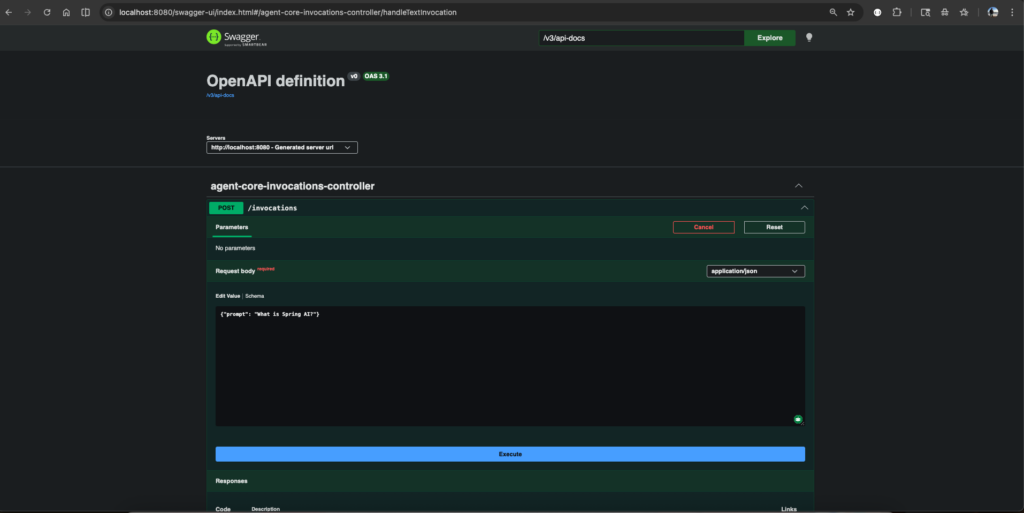 Swagger OpenAPI
or using curl command
// Run the application
mvn spring-boot:run
// In terminal run the below command
curl -X POST http://localhost:8080/invocations \ -H "Content-Type: application/json" \ -d '{"prompt": "What is Spring AI?"}'
// Verify Mathematical Tool
curl -X POST http://localhost:8080/invocations \ -H "Content-Type: application/json" \ -d '{"prompt": "What is 14+13?"}'
This is an AgentCore-compatible AI agent. It requires no custom controllers, no protocol handling, and no health check implementation.
7. Add Streaming
Add the spring-boot-starter-webflux dependency and comment spring-boot-starter-web dependency
<dependency>
    <groupId>org.springframework.boot</groupId>
    <artifactId>spring-boot-starter-webflux</artifactId>
</dependency>
To stream responses as they are generated, change the return type to Flux<String>. The SDK then automatically switches to Server-Sent Events (SSE) output.
@AgentCoreInvocation
public Flux<String> streamingChat(PromptRequest request) {
return chatClient.prompt()
.user(request.prompt())
.stream()
.content();
}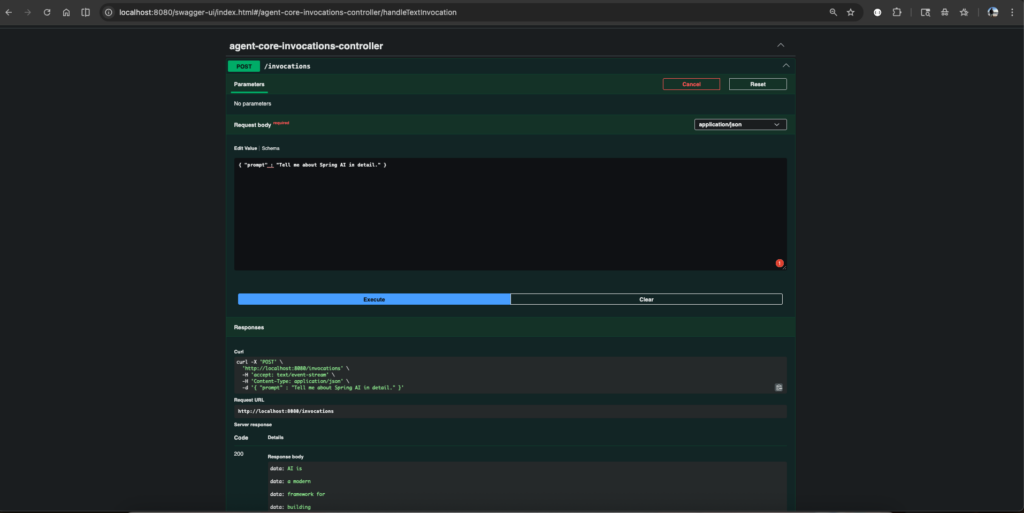 Streaming
End-to-end flow
User Request
     │
     ▼
@AgentCoreInvocation ──► AgentCoreContext (session, headers)
     │
     ▼
ChatClient.prompt()
     │
     ├──► LLM reasons about the prompt
     │         │
     │         └──► Needs math? ──► MathematicalTools ──► result fed back
     │
     ▼
Final LLM response returned as String
In the next part, I will discuss the inclusion of the remaining AgentCore services like memory, adding built-in tools like browser, code interpreter, and deployment to Amazon Bedrock AgentCore runtime.
You can find the complete code here.
Happy Learning Spring AI
References
- Bedrock Converse API: https://docs.spring.io/spring-ai/reference/api/chat/bedrock-converse.html
- https://spring.io/ai
- Amazon Bedrock AgentCore: https://docs.aws.amazon.com/bedrock-agentcore/latest/devguide/what-is-bedrock-agentcore.html
- Spring AI: https://spring.io/projects/spring-ai
- AWS Blog Spring AI SDK: https://aws.amazon.com/blogs/machine-learning/spring-ai-sdk-for-amazon-bedrock-agentcore-is-now-generally-available/
Found a mistake, or something to add? Edit this page on GitHub

Mahendra Rao B
I am a Senior Technical Architect from India with over 18 years of experience in Java, Spring, microservices, and AWS. I am passionate about crafting scalable solutions and contributing to open-source projects such as Spring, Arconia, and OpenRewrite.