Exploring MongoT

Let’s explore this fascinating and awesome Java project from MongoDB - MongoT!
You can check out the source code here:
git clone https://github.com/mongodb/mongot
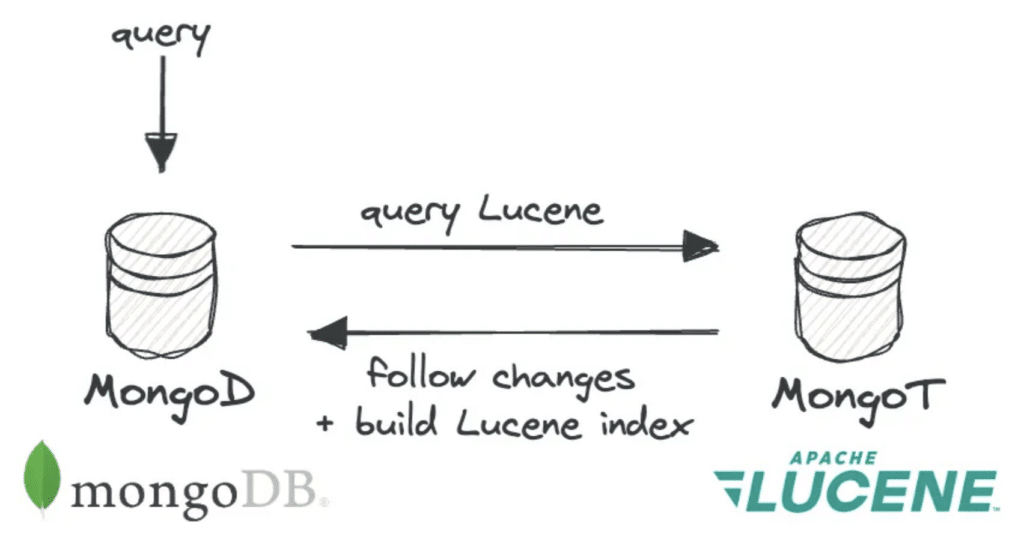
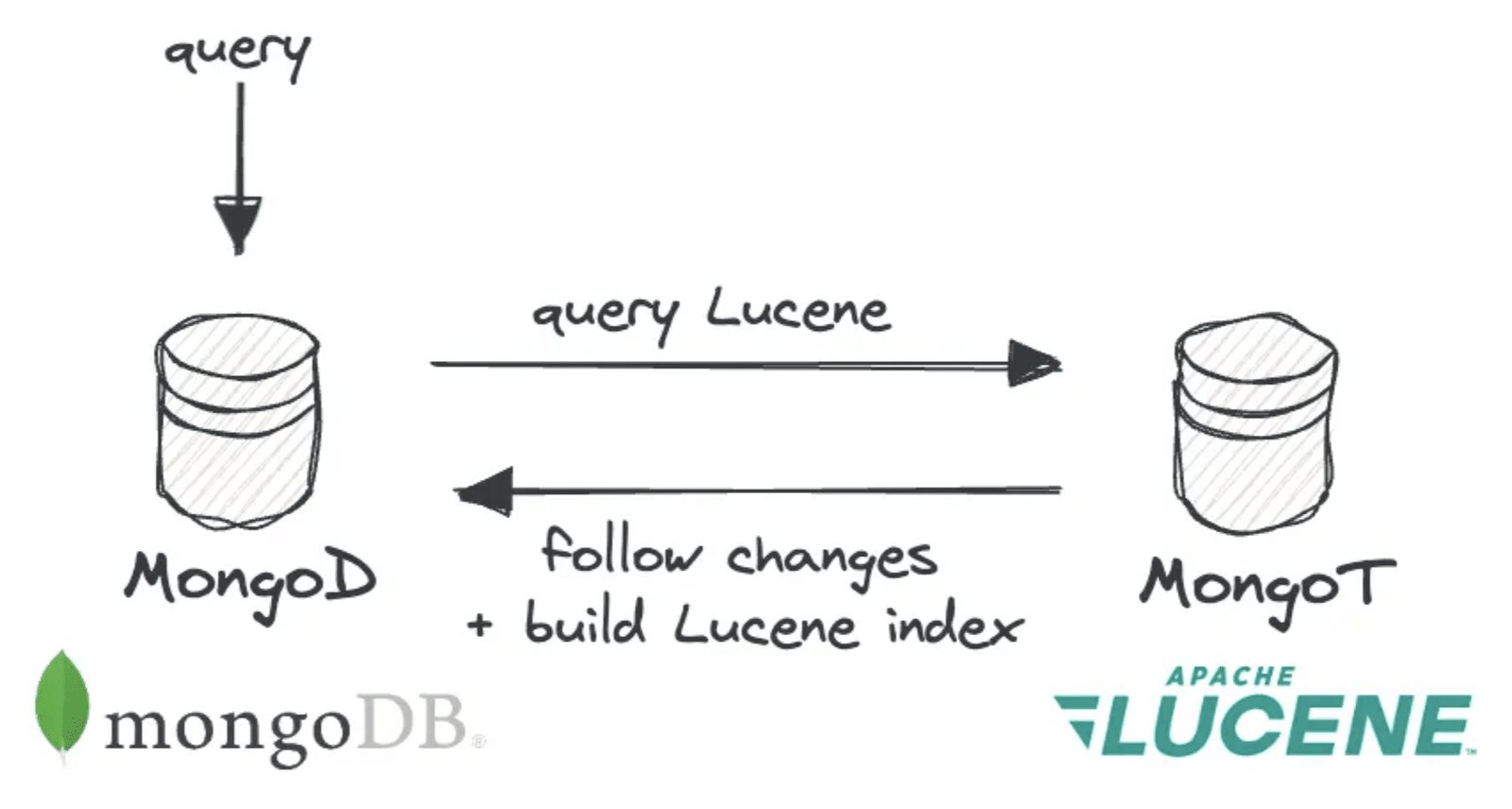
MongoT is a wrapper around the amazing Java search engine: Lucene.
Lucene is a powerful search toolkit built around an inverted token index structure that enables advanced text search capabilities, including ranked results, autocomplete, synonyms, fuzzy matching, highlighting, and faceting — all with high performance regardless of dataset size. Unlike MongoDB’s native query engine, it can efficiently search across multiple indexes simultaneously by intersecting lists of ordinal document IDs in parallel, using optimization techniques like skip-lists, ordinal compression, and document frequency ordering. It also supports indexing of various field types (integers, dates, keywords, etc.) and has expanded into vector search, enabling semantic similarity search by meaning rather than exact text matching.
Adding vector search to MongoDB was clearly a core goal for the MongoT project, as it is important to participate in the semantic search space. I think it is really worth digging into the capabilities it offers beyond vector search, too, as all the Lucene search types massively complement MongoDB database’s own incredible B-tree index-based search features.
Let’s dive in!
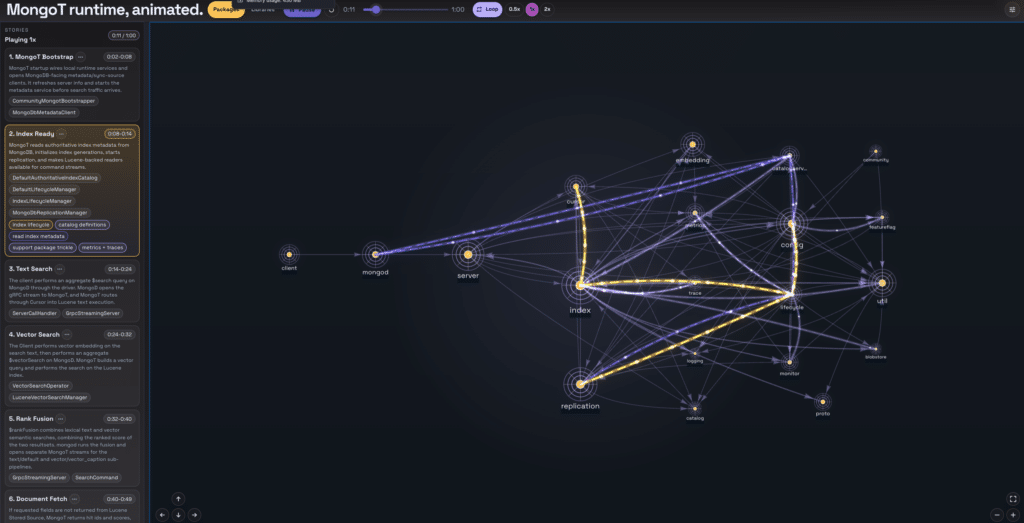
(Check out the live demo of this screenshot here)
Once you see the code in the MongoT project, you may be a little overwhelmed at first by the volume and complexity of it (I was!).
Never fear, though! We are going to break it down and walk through a few real-world query examples, and see exactly how it all hangs together. By the end, I want you to feel comfortable with the codebase, try forking it, and have some fun debugging, testing, and even making some changes.
If you (like me!) are a visual learner, have a play with the animated tour through the code packages along the way: https://luketn.com/mongot-app-tour/index.html
Simple Example - Text Search
Let’s start with a real example. Here’s an actual Atlas Search query:
db.image.aggregate([
  {
    $search: {
      text: {
        query: "Pizza",
        path: "caption"
      }
    }
  }
]);
->
[{
  caption: 'Stacks of dominos pizza boxes with a pizza.',
  url: 'http://images.cocodataset.org/train2017/000000371822.jpg',
  hasPerson: false,
  food: [
    'pizza'
  ]
},...]
The client application sends that as a MongoDB aggregate command through its driver to MongoD (the driver never connects to MongoT directly - it connects only to MongoD). When MongoD reaches the $search stage, it rewrites the public stage into an internal remote-search stage, builds a MongoT search command, and opens a remote cursor against MongoT.
Inside MongoT, the request lands on the gRPC command stream, dispatches to SearchCommand, resolves the search index, creates a cursor, builds the Lucene query, executes the initial Lucene search, materializes BSON results, and returns the first batch to mongod.
The cursor is left open (if it wasn’t exhausted) so that future getMore’s on the MongoD cursor can, in turn, fetch more results on the MongoT cursor.
Breakdown Table (for a ~9ms $search aggregation path through MongoT)
| Phase | Code Path | Indicative Time Taken | Percentage of Command (excluding streaming results) | What It Means |
| Query context | SearchCommand.run | 17 us | 1.91% | Builds per-query execution context before parsing the request. |
| Parse BSON | SearchQuery.fromBson | 211 us | 23.71% | Converts the incoming MongoT search command into MongoT query model objects. |
| Index lookup | SearchCommand.getIndexFromCatalog | 3 us | 0.34% | Finds the named search index in MongoT’s in-memory catalog. |
| Cursor setup | MongotCursorManagerImpl.newCursor, CursorFactory.createCursor, IndexCursorManagerImpl.createCursor | 46 us | 5.16% | Creates cursor state around the index reader and batch producer. |
| Build Lucene query | LuceneSearchQueryFactoryDistributor.createQuery, TextQueryFactory.createQuery | 37 us | 4.16% | Translates MongoT’s query model into a Lucene Query. This is construction, not execution. |
| Lucene collect hits | MeteredLuceneSearchManager.initialSearch, LuceneOperatorSearchManager.initialSearch | 92 us | 10.34% | Executes the initial Lucene text search and returns the first TopDocs. |
| Reader orchestration | LuceneSearchIndexReader.query, LuceneSearchIndexReader.collectorQuery | 107 us | 12.02% | Handles reader bookkeeping, stored-source checks, branch dispatch, and locking around Lucene execution. |
| Advance batch | MongotCursor.getNextBatch, LuceneSearchBatchProducer.execute | 12 us | 1.35% | Advances the batch producer for the first batch; later, getMore can use searchAfter. |
| Materialize BSON | LuceneSearchBatchProducer.getSearchResultsFromIter, ProjectStage.project, MetaIdRetriever.getRootMetaId | 372 us | 41.80% | Converts Lucene hits into BSON response documents, including stored-source or id/score output. |
| Batch orchestration | MongotCursorManagerImpl.getNextBatch, IndexCursorManagerImpl.getNextBatch | 16 us | 1.80% | Wraps first-batch loading and cursor exhaustion checks. |
| Response document | SearchCommand.getBatch, MongotCursorBatch.toBson | 13 us | 1.46% | Builds the command response wrapper, cursor document, and metadata variables. |
| Encode BSON | SearchCommand.getBatch, MongotCursorBatch.toBson | 1 us | 0.11% | Serializes the response payload returned on the command stream. |
| Stream lifecycle | ServerCallHandler.onNext, ServerCallHandler.handleMessage, CommandManager | 8.078 ms outside command | N/A | gRPC stream lifetime outside the initial command span, including response observer handling, client consumption, cleanup, and any later cursor work in the same stream. |
Local Debugging
Next, let’s get MongoT up and running locally from source code. I’m going to use IntelliJ for the IDE in this walkthrough, but the steps should be similar in any IDE.
Follow these steps:
- First up, you’ll need the JetBrains IntelliJ Bazel plugin installed in order to work with the project: https://plugins.jetbrains.com/plugin/22977-bazel
- Clone the repo and open it in IntelliJ (IntelliJ will automatically recognize the Bazel project and configure an IntelliJ project mapped onto the Bazel configurations)
git clone https://github.com/mongodb/mongot
cd mongot
idea .
- Enable debugging by adding the following changes to the mongot-local container in community-quick-start/docker-compose.yml file:
  mongot-local:
...
    command:
      - /mongot-community/mongot
      - --jvm-flags
      - "-agentlib:jdwp=transport=dt_socket,server=y,suspend=n,address=*:5005"
      - --config=/mongot-community/config.default.yml
mongot-local:
...
ports:
...
- 5005:5005 # Debug port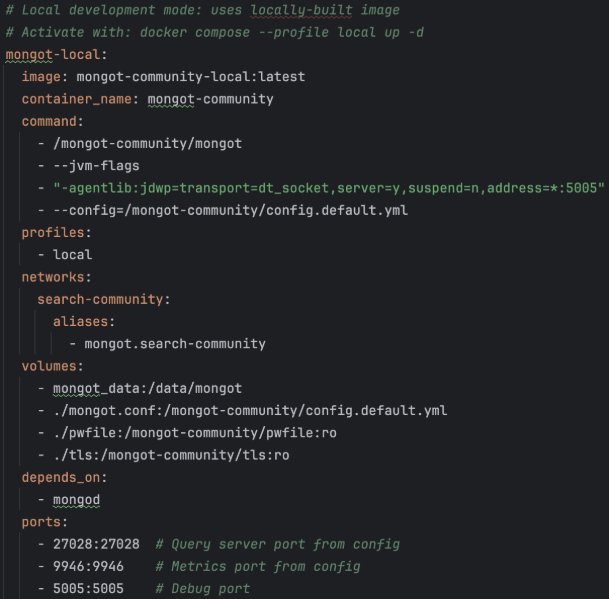
This will allow us to connect and debug the locally built mongot code over the 5005 debugger port.
- Run the local built mongot code from a shell on the root of the project:
make docker.up MODE=local
Once the build is finished, and the containers are running, we can attach a debugger on port 5005.
- Create a Remote JVM run config:
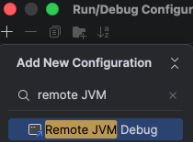
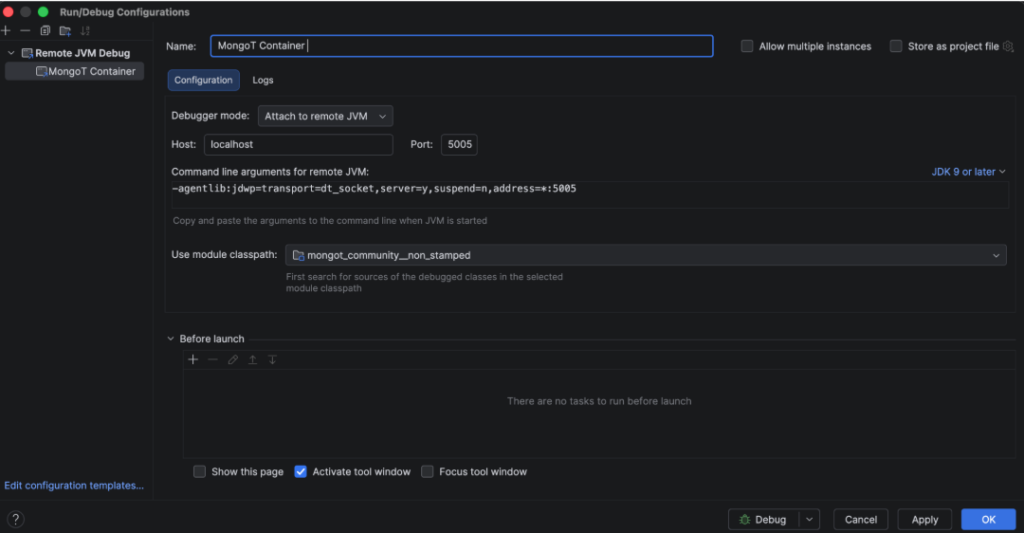
- Run the new MongoT Container run config, and you’ll see your IntelliJ is now debugging the source code:

You can connect to MongoDB using Compass: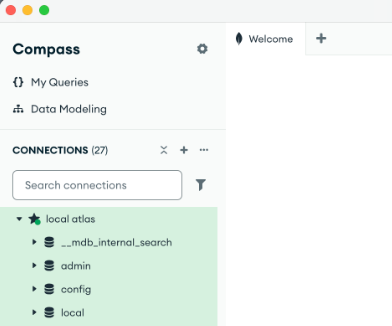
When configuring the connection you’ll need to configure the TLS settings to point at the ca.pem and client-combined.pem files in the community-quick-start/tls directory: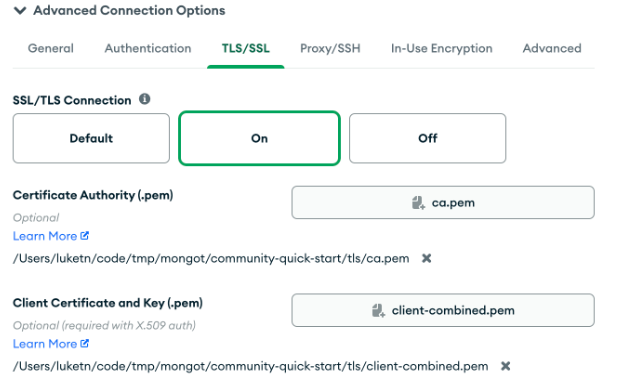
Sample Data
You can find great sample databases for Atlas published by MongoDB here: https://www.mongodb.com/docs/atlas/sample-data
When we ran the community quick start above the local instance was prepopulated with some of these sample datasets.
For the rest of the article, I’m going to use my own little example, which you can find the data and index mappings for here: https://github.com/luketn/atlas-search-coco-dataset
(It’s a faceted index on the popular COCO image dataset.)
If you want to dig into the code for that, there’s a walkthrough here: https://github.com/luketn/atlas-search-coco
https://tech-blog.luketn.com/java-faceted-full-text-search-api-using-mongodb-atlas-search
Here’s the Atlas Search Coco sample project serving up queried data from the Coco image dataset through a locally debugged MongoT: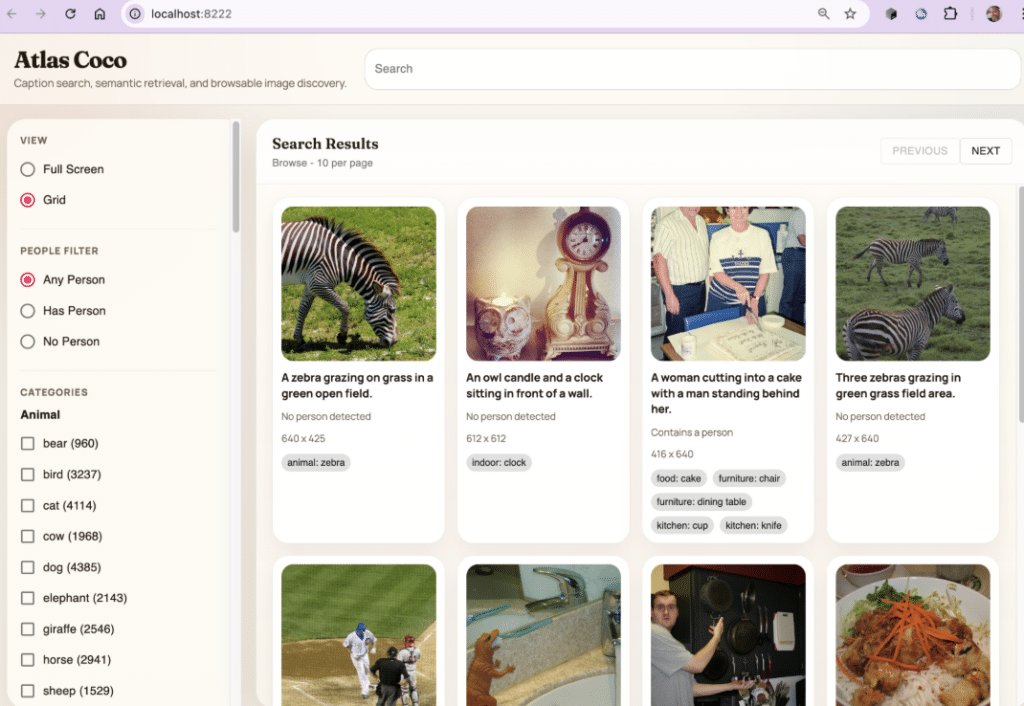
And here is the index that was built in the local MongoT through Compass: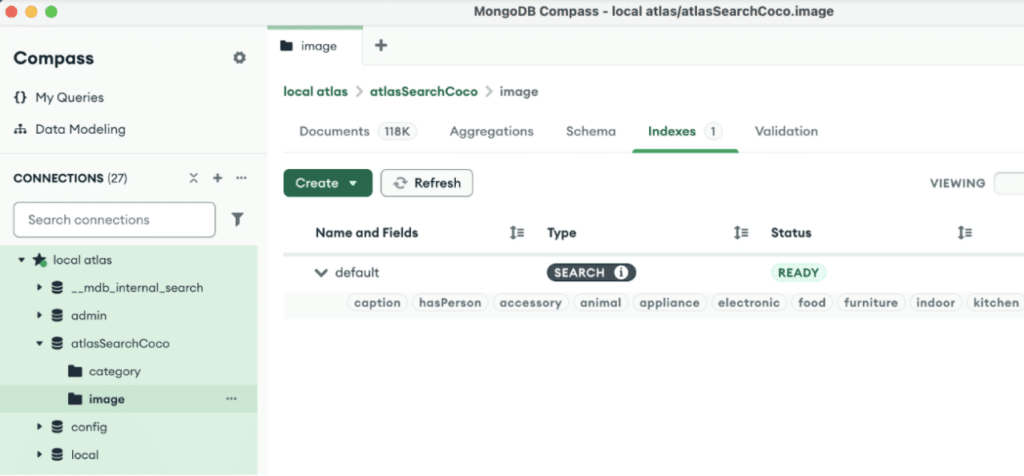
If you explore this app, you’ll find some fun things you can do with local LLMs, vector embeddings, and queries that I played around with while writing this article.
Create some sample databases (or real ones!), create Atlas Search indexes, and perform queries locally. Put breakpoints in the code and have fun exploring to see how it all hangs together.
Interesting Example - Faceted Text Search
Let’s go a bit deeper and perform a faceted search example.
Here’s an Atlas Search query matching an image with a caption ‘frisbee’ and an animal category of ‘dog’. We’re asking for a count of two facets on the result set, so we can see how many of our matches also contain the category ‘sports’.
Run the following from MongoDB Compass in the shell, and put a breakpoint in the code on TextQueryFactory.createQuery.
db.image.aggregate([
 {
   $search: {
     facet: {
       operator: {
         compound: {
           filter: [
             {
               text: {
                 path: "caption",
                 query: "frisbee"
               }
             },
             {
               equals: {
                 path: "animal",
                 value: "dog"
               }
             }
           ]
         }
       },
       facets: {
         animal: {
           type: "string",
           path: "animal",
           numBuckets: 10
         },
         sports: {
           type: "string",
           path: "sports",
           numBuckets: 10
         }
       }
     },
     count: {
       type: "total"
     }
   }
 },
 {
   $facet: {
     docs: [],
     meta: [
       {
         $replaceWith: "$$SEARCH_META"
       },
       {
         $limit: 1
       }
     ]
   }
 }
]);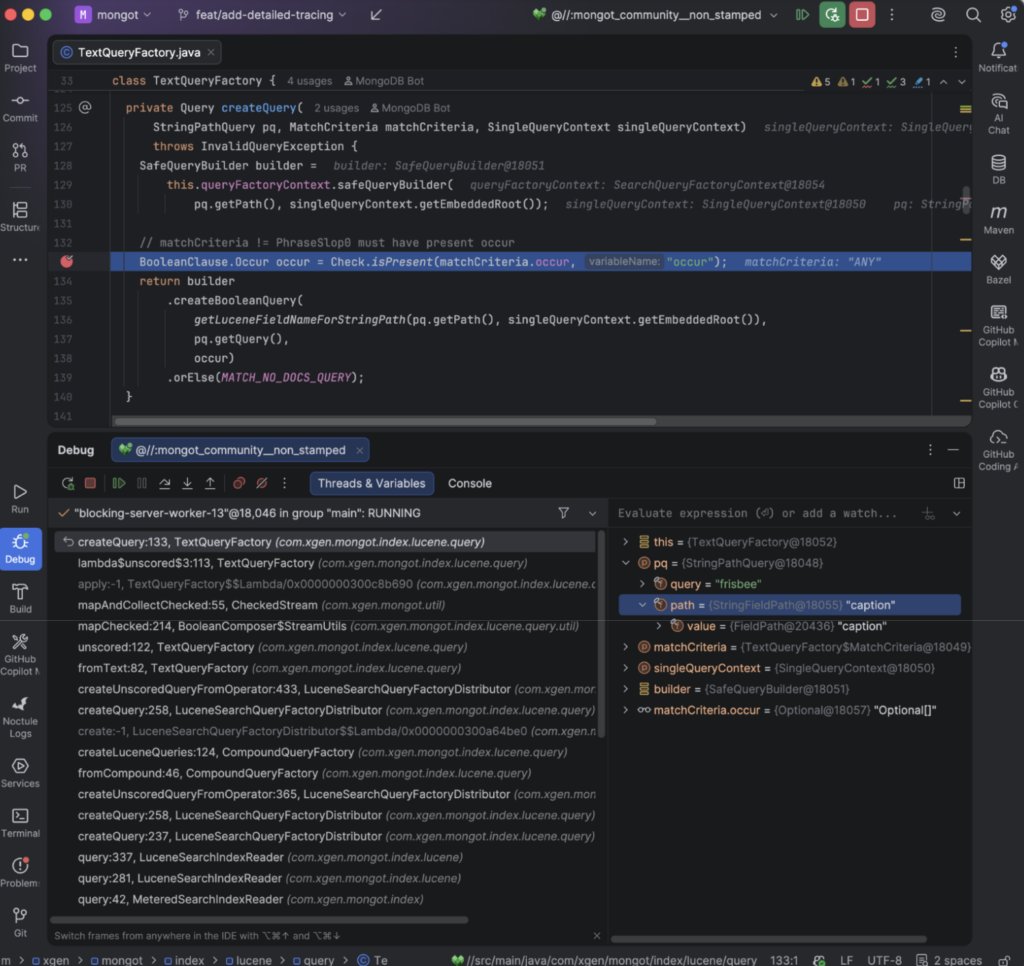
You can step through and see it create the Lucene query object instances, e.g., TermQuery ($type:string/caption:frisbee) being built from the Atlas Search facet compound clauses.
Continue stepping through, you’ll eventually get to LuceneFacetCollectorSearchManager.initialSearch: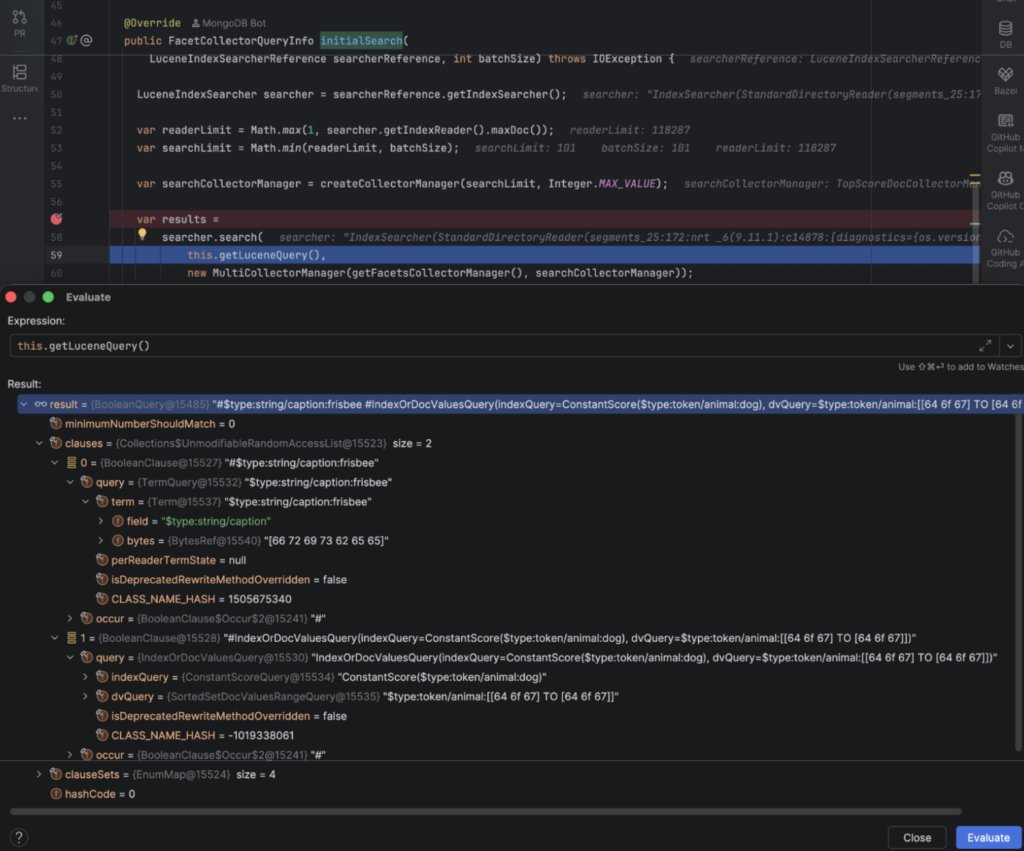
Here you can see the fully composed BooleanQuery, combining the string-type TermQuery on frisbee with the token-type TermQuery on dog.
This is interesting just for learning the (somewhat obtuse) Java library API for Lucene queries.
The results from Lucene include the docs matched and the facets: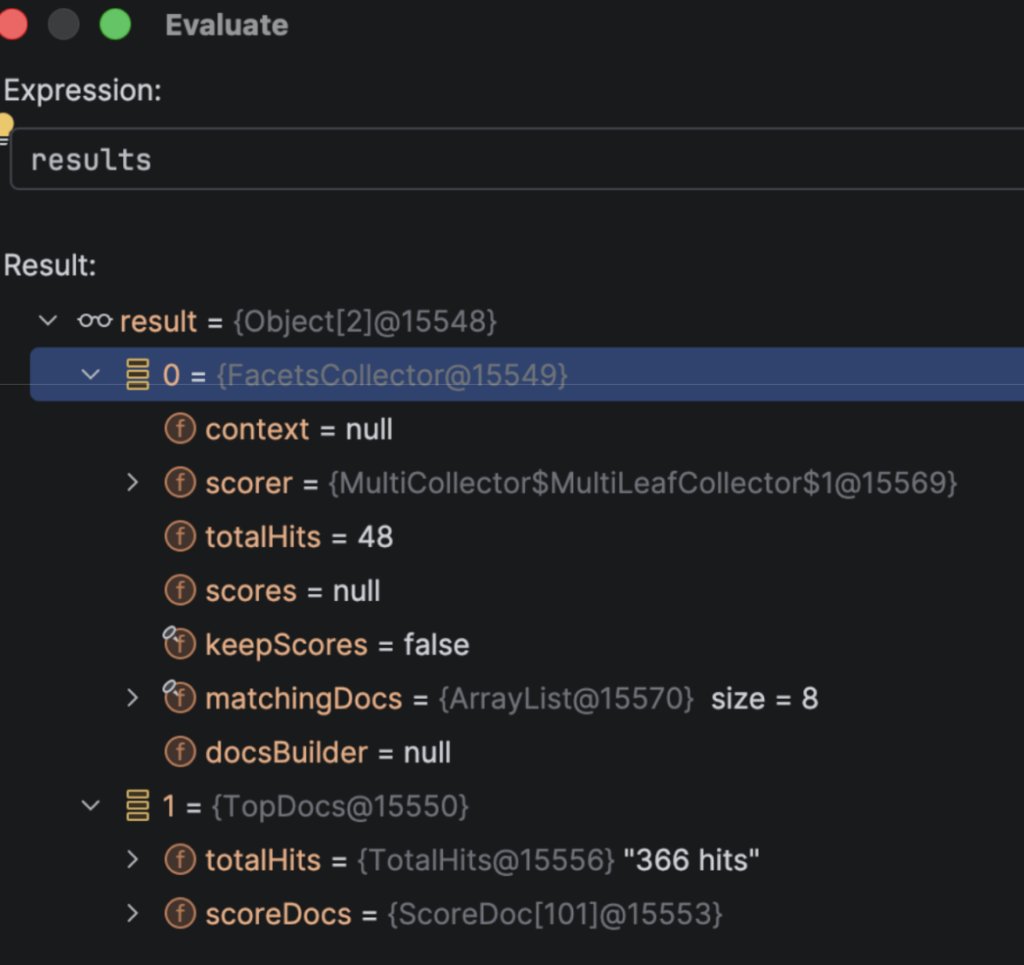
You can keep digging around and see all the ways the wrapper is marshaling documents from Lucene indexes.
You’ll notice some interesting things, like the _ids in Lucene Indexes are integers. This is core to the way Lucene works, and I’ll get into why in a minute: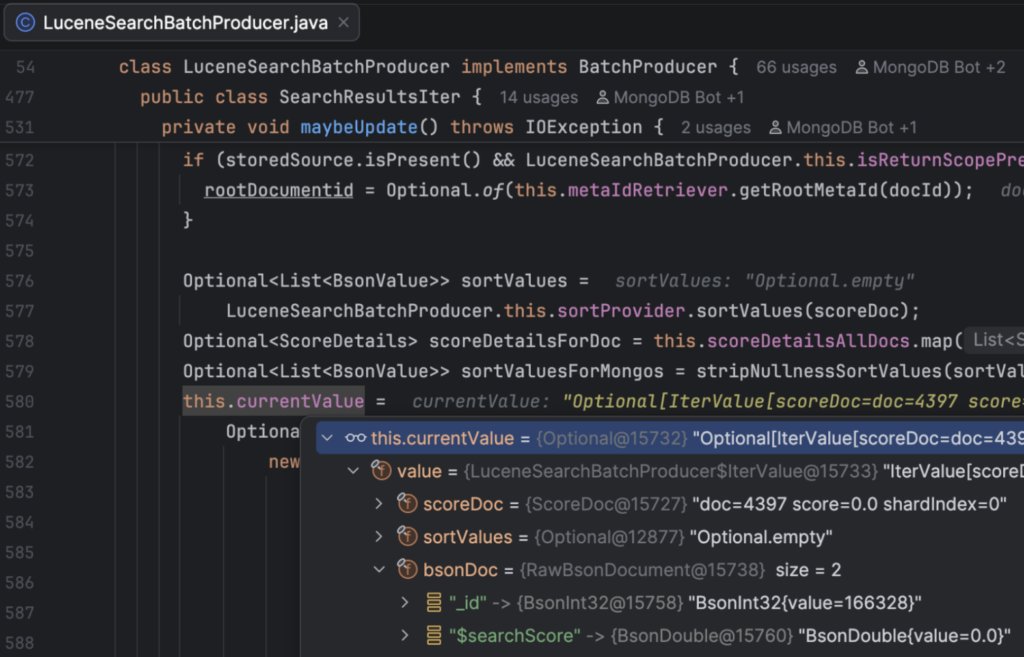
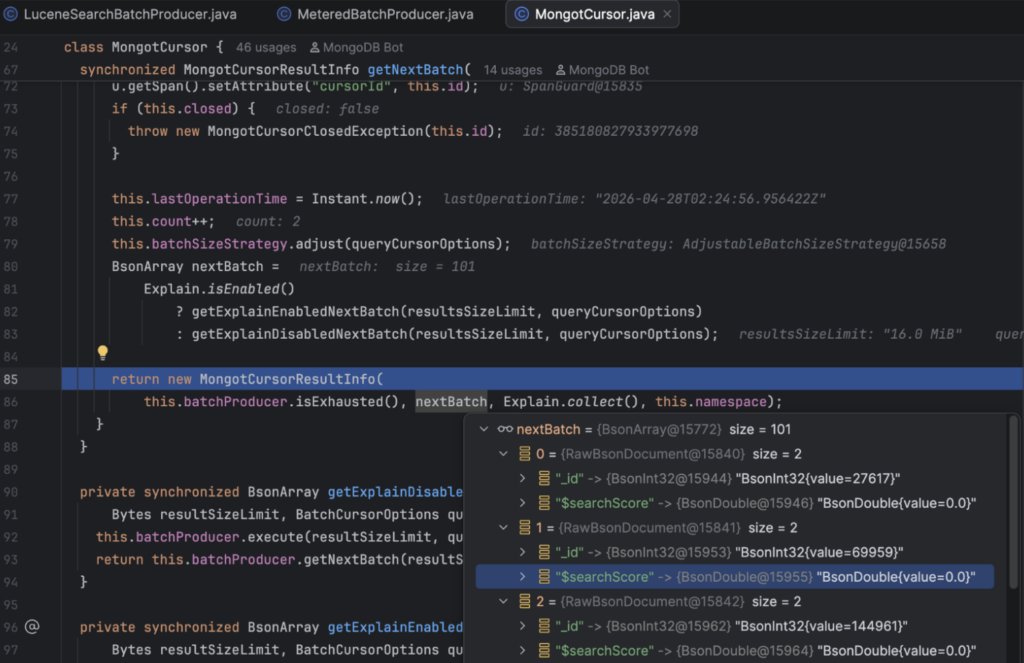
The MongoDB ObjectID (or whatever type you use) _id is stored as metadata and returned as part of the result set if required:
com.xgen.mongot.index.lucene.query.util.MetaIdRetriever#getRootMetaId
Eventually, MongoDB shows the results like this:
->
{
  docs: [
    {
      _id: 27617, // in the Atlas Search Coco sample data I am using integer IDs
      caption: 'A dog relaxes on the green grass as he holds a yellow frisbee.',
      url:'http://images.cocodataset.org/train2017/000000027617.jpg',
      hasPerson: false,
      animal: [
        'dog'
      ],
      kitchen: [
        'bowl'
      ]
    },
    ... 365 more items
  ],
  meta: [
    {
      count: {
        total: 366
      },
      facet: {
        sports: {
          buckets: [
            {
              _id: 'frisbee',
              count: 364
            },
            {
              _id: 'sports ball',
              count: 4
            },
            {
              _id: 'baseball glove',
              count: 1
            }
          ]
        },
        animal: {
          buckets: [
            {
              _id: 'dog',
              count: 366
            }
          ]
        }
      }
    }
  ]
Lucene Indexing Strategy + Benefits over MongoD Indexes
Let’s step back a moment from the detail, and ask why use Atlas Search at all?
There are three compelling reasons for me:
- Advanced Text Search
- Multiple-index searching with merged results
- Vector Search
I have always been a massive fan of Lucene.
It’s an awesome search toolkit, and I’ve used it as an embedded Java library in my applications as well as in services like the excellent Elasticsearch (and its open-source fork OpenSearch) and Solr.
Performance is great, the query syntax is intuitive (once you get used to it), and its indexing approach is extremely efficient and flexible. With vector search now supported, we have complete text search and advanced parallel indexing, which complement MongoDB’s own search perfectly.
Current State of MongoDB’s Built-In Search
MongoDB’s native indexing and query engine is extremely quick and powerful when you have well-defined fields and query patterns.
When designing built-in indexes to be efficient and get great performance, you can:
- optimize collection and document design
- optimize indexes by using the ESR Rule
- tune the number of indexes for good read and write performance
- optimize queries using explain plans and practical experiments
However, there are a few types of search where MongoDB falls short. Lucene comes into the picture to enhance or resolve these use cases:
Advanced Text Search
MongoDB has some basic capabilities for text search, using a $text or $regex query. These are ok for simple searching on small datasets, but often (especially for $regex) extremely slow when your dataset grows larger and/or your queries become more complex.
By comparison, Lucene can perform advanced text searches in the style of Google / Amazon’s search box, with ranked results, autocomplete, synonyms, fuzzy matching, highlighting, and faceting. Not only that, it can do so with great performance, almost irrespective of your data size, thanks to its ‘inverted’ token index structure.
This is a super deep topic, and I won’t cover all of it here, but there are great references both in the Lucene documentation and MongoDB’s: https://lucene.apache.org/core
https://www.mongodb.com/atlas/search
Multiple-index searching with merged results
MongoDB can’t do multiple-index searching. MongoDB uses a single index per query, and if there is further filtering to be done, it will be done directly on the documents. A MongoDB query for multiple indexed fields looks broadly like this: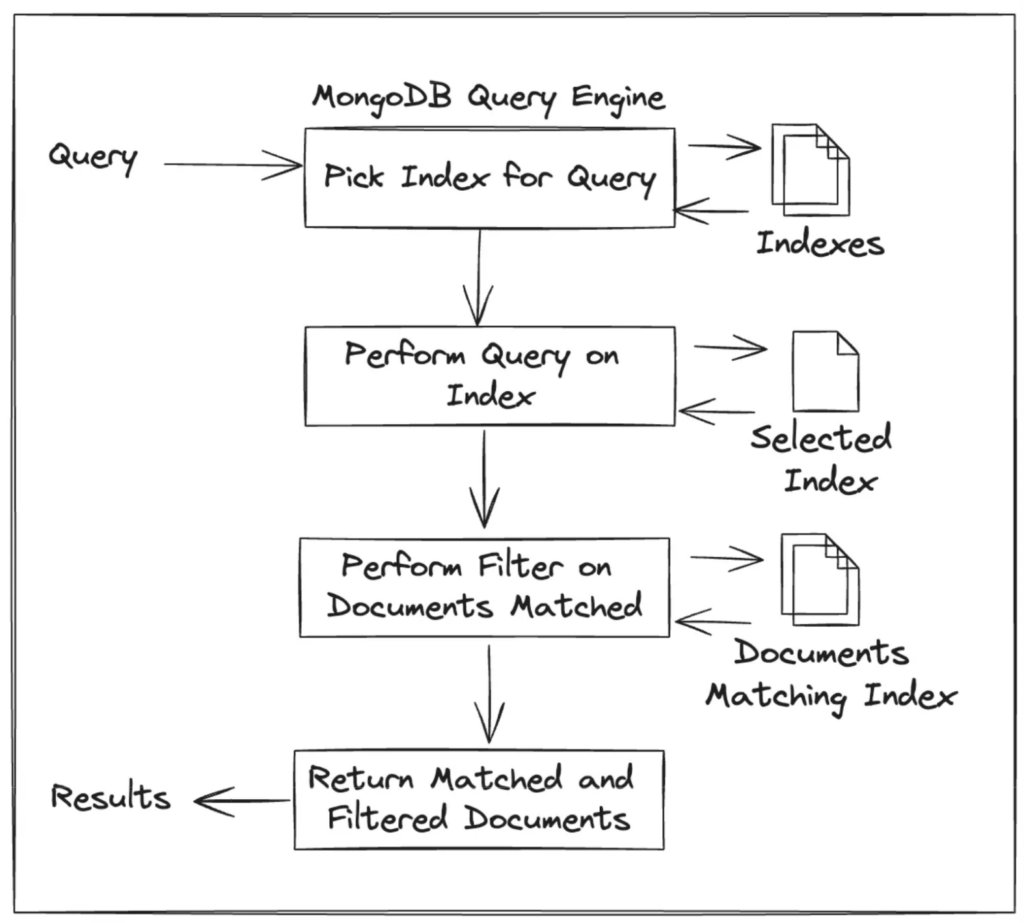
(Gross oversimplification of MongoDB’s query engine)
i.e., the query planner picks one index and uses that.
Lucene, by contrast, can perform searches over multiple indexes efficiently and return the intersection of the results.
Documents in Lucene are each assigned an ordinal id — a docid (0, 1, 2…).
In a typical text field index, Lucene analyzes text into terms. It stores those terms in a term dictionary, and each term points to a postings list: a compact, sorted list of Lucene internal document IDs for documents that contain that term.
You can also have simpler 1-1 indexes over fields that don’t need the text extracted, like integers, floating point numbers, dates, enums, and keywords.
You can think of Lucene indexes like a set of maps between Term Ids to a list of Document Ids.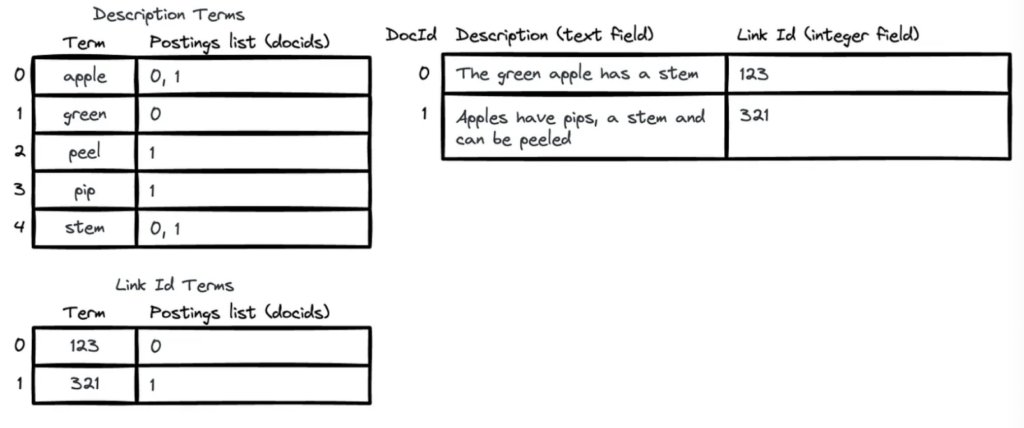
Lucene is very efficient at performing index intersection, because of the basic structure and sort order of the data and ordinal indexes, and several optimization techniques like:
- skip-lists: additional structures that allow skipping large chunks of ordinals
- ordinal compression: storing ordinals for documents in a variety of compressed formats, which are smaller to retrieve and iterate
- document frequency ordering: order terms by least frequency so that rarer terms (which would be more selective) reduce the set of ids to intersect first
MongoT creates Lucene documents to match MongoDB documents, mapping every Atlas Search indexed field into a Lucene document.
Depending on the preferences you choose for each field in the Atlas Search field mappings, MongoT will store the values of the MongoDB document differently in the Lucene document. It may store a single value using multiple Lucene document field types in order to support filtering, sorting, and faceting:
https://lucene.apache.org/core/9_10_0/core/org/apache/lucene/index/package-summary.html#field_types
For this reason, it is probably worth taking some time tuning the Atlas Search index field mappings to ensure you are only selecting the options you really need. The bigger and more complex the field mappings and types are, the worse the performance and the heavier the resource requirements.
As we saw in the Interesting Example, MongoDB document _ids (typically ObjectIds) are stored with the Lucene index and mapped to and from ordinal Document Ids. This maintains the connection to the MongoD data whilst gaining the performance advantage of the ordinal id data structures of Lucene.
Vector Search
Vector indexes in Lucene efficiently find the ’nearest’ semantically similar match for a search term.
Atlas text search will get you a match between ‘circular’ and ‘circle’, through lexical text matching techniques.
Vector-based semantic search will get you a match from ‘circular’ to ‘round’.
It’s pretty amazing, and users have come to expect that search engines just get what you mean, not just what you wrote. So it is becoming a must-have feature.
This works using an algorithm over an array of numbers - an ’embedding’, and computing a distance on a number of dimensions. To be honest, the math here is a bit beyond my understanding, but I can use local or API-based endpoints to take some text and produce embedding vectors.
One thing I really love about having both lexical and vector support is being able to combine the two, seeing both lexical and semantic meaning matches to your query. I think it makes for a super powerful search engine and logical + accurate results.
The big downside of vectors is the time required to compute the embedding on the search term, and the cost for producing embeddings across large corpora of text.
An exciting capability of MongoT is automatic embeddings, which is the ability to plug in a vector embedding engine (currently supports Voyage AI). When you have a vector engine enabled, vectors are computed automatically behind the scenes as you insert and update data, and you can provide query text to the $vectorSearch instead of a queryVector array, wherein MongoT will automatically perform the embedding of the query term too. This is so cool, and I think it is the way all vector solutions will work in the future (i.e., the array of numbers is an invisible abstracted implementation detail).
Further Reading
There’s a lot more to Lucene and its indexing and querying capabilities.
If you want to go deeper on how Lucene indexes work, I highly recommend this:
What is in a Lucene index? Adrien Grand, Software Engineer, Elasticsearch
https://www.slideshare.net/lucenerevolution/what-is-inaluceneagrandfinal
Vector Search Example
Let’s set up vector search!
Before you get started, you’ll need to sign up for the Voyage API and create an API key:
https://dashboard.voyageai.com/organization/api-keys
Warning - You’ll need a payment method to compute vectors, so this could cost actual $, although in my tests I was well within the free tier.
And restart MongoT.
Then you’ll need to update the MongoT config file (mongot-dev.yml) with a few new fields:
embedding:
  queryKeyFile: "/Users/luketn/code/personal/mongot/voyage-api-key"
  indexingKeyFile: "/Users/luketn/code/personal/mongot/voyage-api-key"
  providerEndpoint: "https://api.voyageai.com/v1/embeddings"
  isAutoEmbeddingViewWriter: true
And restart MongoT.
You should see in the log:
CommunityMongotBootstrapper…Initialized auto-embedding with 4 model(s)
Once you have the Voyage API enabled, you can create a vector search index like this:
db.image.createSearchIndex({
  name: "caption_auto_embed",
  type: "vectorSearch",
  definition: {
    fields: [
      {
        type: "autoEmbed",
        path: "caption",
        model: "voyage-4",
        modality: "text"
      }
    ]
  }
});
MongoT will automatically hit the API in batches, and compute embeddings for the caption field using the voyage-4 model, storing them separately in an internally managed embeddings collection, which is great since it doesn’t pollute the MongoDB document with index data!
(although I’d argue maybe a Lucene index file would have been a better abstraction)
Then you can perform searches with simple text query parameters
db.image.aggregate([{$vectorSearch: {
  index: "caption_auto_embed",
  query: "circular flying",
  path: "caption",
  numCandidates: 10,
  limit: 10
}}]);
Behind the scenes, MongoT computes the embedding for the query text ‘circular flying’, uses Voyage API to compute a semantic meaning as an array of floats, then uses Lucene to find the nearest matches semantically in the index.
You can put a breakpoint on EmbeddingServiceManager.embed() and take a look at how the query path works: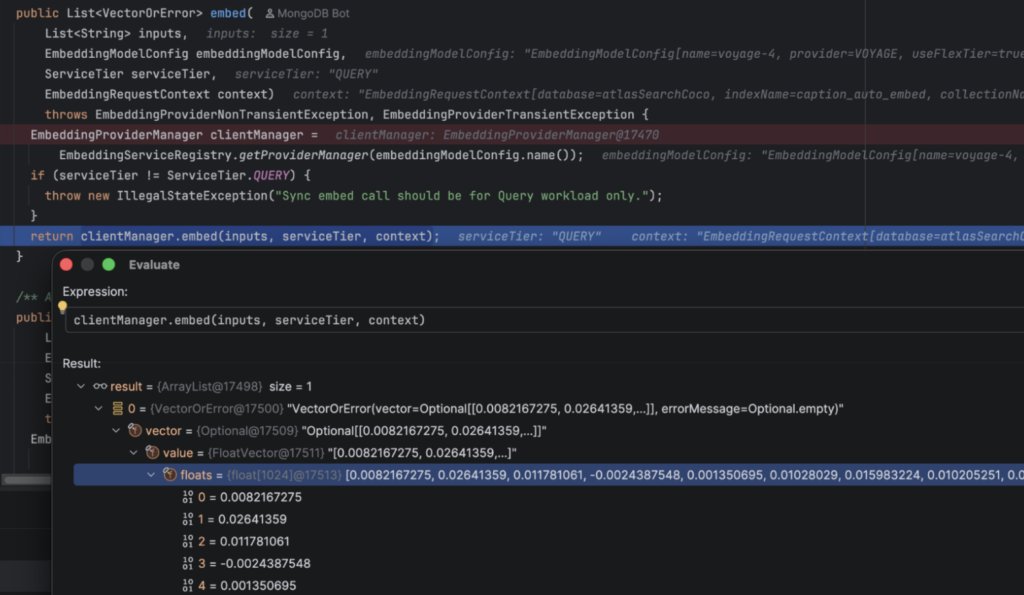
So cool. There is obviously a real financial cost to this, but it is the ultimate in convenience.
If you’ve taken the alternative path of computing embeddings yourself, maybe messing around with local models, storing the vectors in MongoDB documents, and indexing them, you’ll understand the value this path has. I did exactly that while writing the article using LM Studio locally - it’s a whole thing. I won’t cover it here, but if you’re interested, feel free to reach out with questions, or I can cover it in another article.
Having tried both the manual vector computation with LM Studio and the Voyage API, I’m recommending the Voyage API :).
With that said, diving into vector search is something to go into with eyes open to the costs - both financial and in time and resources. It’s not something that comes for free.
Local Grafana Monitoring
If you’re feeling really adventurous, you can configure MongoT to output performance traces and metrics using OpenTelemetry, collecting trace data with Jaeger, metrics with Prometheus, and visualizing with Grafana.
I won’t write a full guide here on doing this, but there is a helper script in my fork of MongoT to start Jaeger, Prometheus, and Grafana here:
https://github.com/luketn/mongot/blob/main/local-monitoring.sh
(which also writes the MongoT config to connect to them)
And a few notes here:
https://github.com/luketn/mongot/blob/main/LOCAL-RUN.md
Performance
The performance of MongoT is incredible. I added a little dashboard to Grafana:
https://github.com/luketn/mongot/blob/main/local-grafana-mongot-dashboard.json
And tweaked the MongoT code a little to output some nicer buckets for the distribution of search commands flowing through the system:
https://github.com/luketn/mongot/pull/1/changes
And then ran a K6 load test script to see what sort of performance MongoT was providing for the overall search. As you can see, MongoT *(Lucene) more than pulls its weight in the overall performance of Atlas Search queries.
Here you can see the end- to- end performance of a Java Atlas Search API.
As represented by the MongoT performance dashboard in Grafana: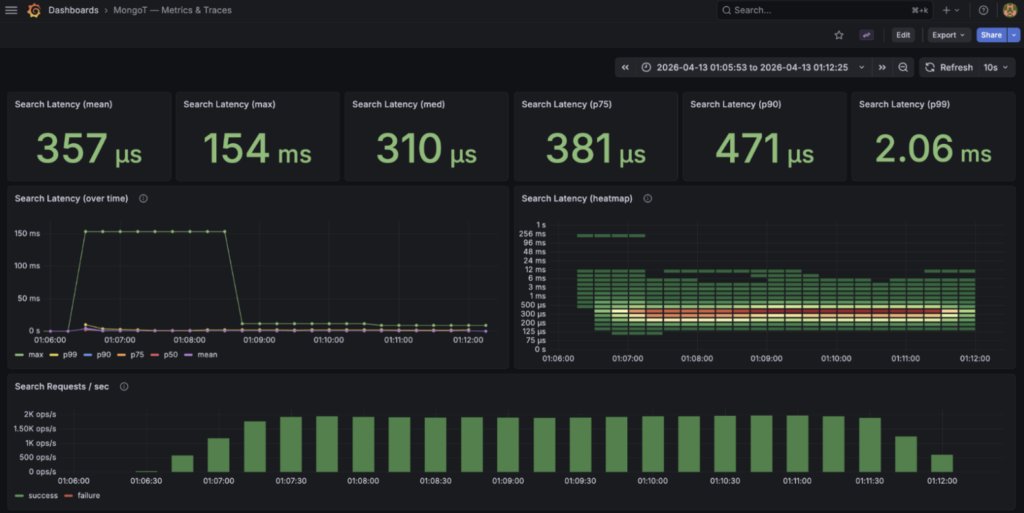
And as seen by the K6 client:
k6 run -e K6_VUS=25 -e K6_DURATION=5m k6.js

█ TOTAL RESULTS
   HTTP
   http_req_duration: avg=12.8ms, min=2.4ms, med=12.3ms, max=208.4ms p(90)=17.4ms p(95)=18.9ms
   http_reqs: 574,519  1,914.977657/s
   CUSTOM
   search_docs_returned: avg=4.4, min=0, med=5, max=5, p(90)=5, p(95)=5
   EXECUTION
   vus: 25
   NETWORK
   data_received: 2.7 GB  9.1 MB/s
   data_sent: 84 MB   281 kB/s
(run on an M4 MacBook Pro)
What does this mean? Well, the full round-trip of a Java HTTP Atlas Search API call as measured by the K6 client had a median response time of 12.8ms (using a large range of data scenarios drawn from the COCO image dataset).
If I add some tracing to each request, I can see the overheads of Java vs the MongoT->MongoD end-to-end query command: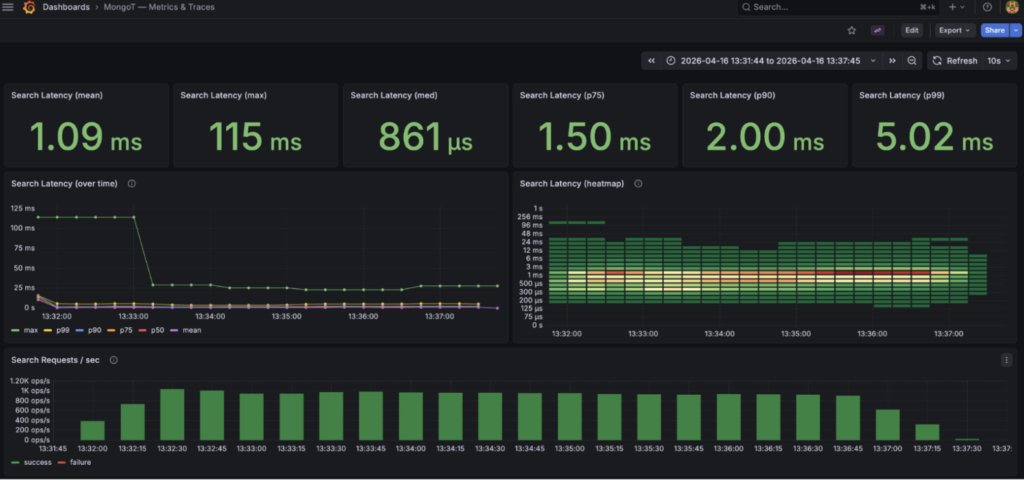
k6 run -e K6_VUS=25 -e K6_DURATION=5m k6.js
   CUSTOM
    docs_returned: avg=4.42, min=0, med=5, max=5, p(90)=5, p(95)=5
    http_time_ms: avg=25.6, min=7.4, med=25.5, max=83.238, p(90)=31.5   p(95)=33.7
    java_time_ms: avg=2.9, min=0.2, med=3.1, max=46.8, p(90)=3.6, p(95)=3.9
    mongodb_time_ms: avg=7.2, min=2.0 med=6.8, max=48.7, p(90)=9.85     p(95)=11.0
    requests: 291719  972.301245/s
I have to admit getting a bit deep down in the rabbit hole here, and spending more time further expanding the number of spans in the traces emitted by default. I created a branch of MongoT on my own fork and added a bunch of detailed tracing:
https://github.com/luketn/mongot/pull/2/changes
With these traces, you can see that the actual Lucene index query part of the whole system is a tiny fraction of the overall query time.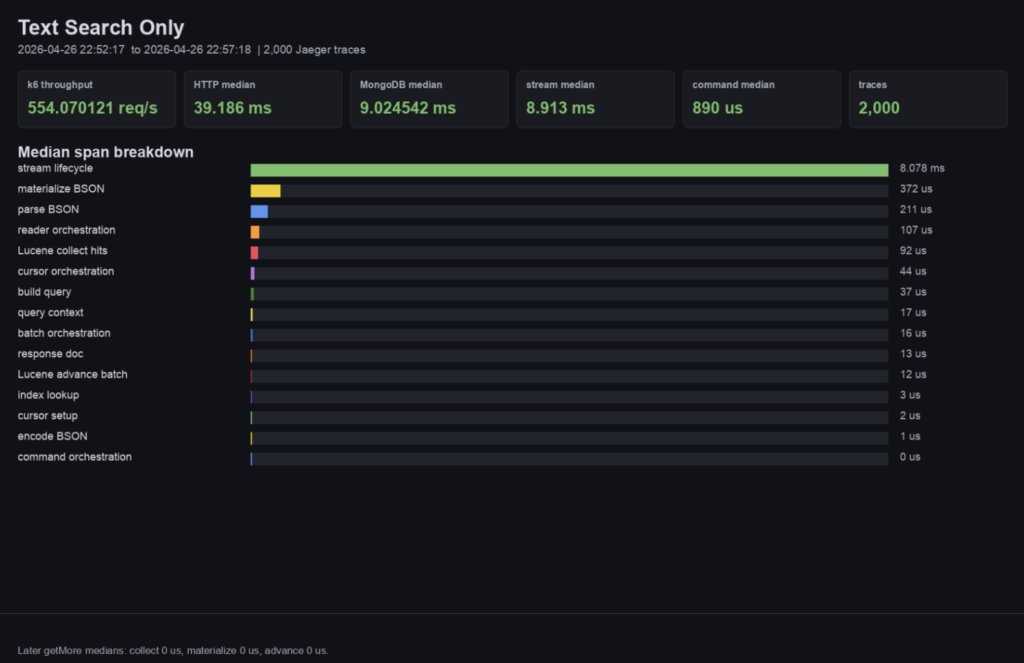
And over a K6 load client run: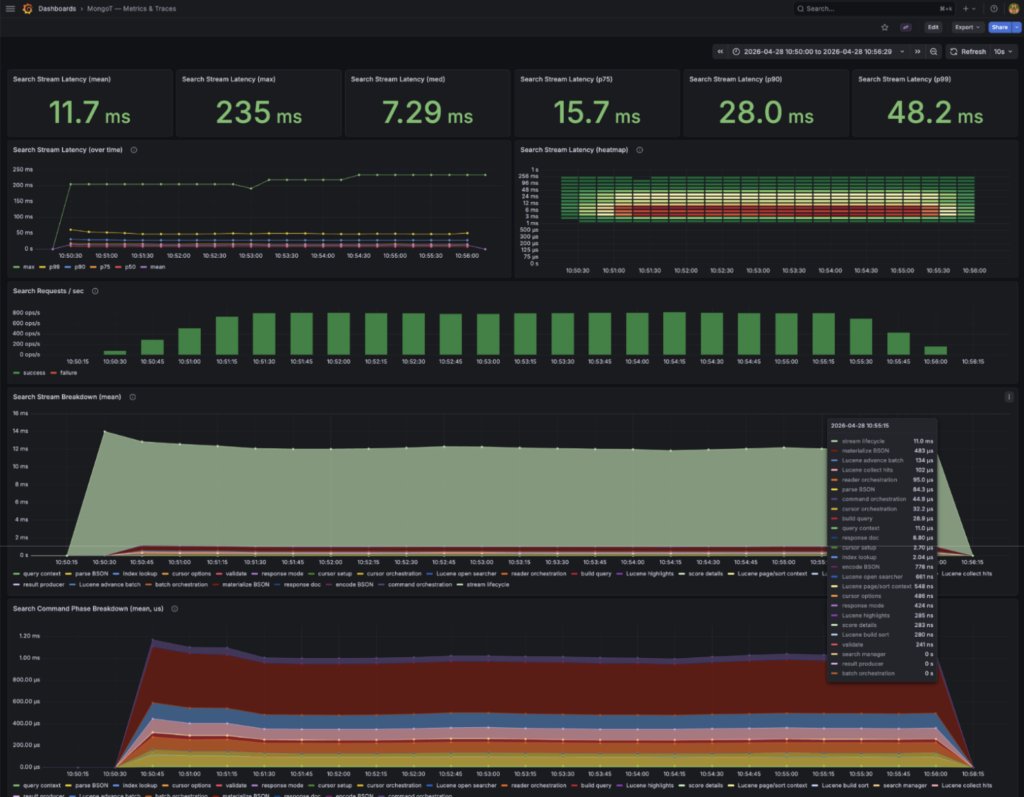
(Note times are slowed by additional tracing)
What does that mean? Well, I think one of the most interesting things about this project is Lucene itself.
If you look at the breakdown of timings within MongoT, only a small fraction of the time is spent performing the actual Lucene Index search. The rest of the time is spent parsing to and from BSON, coordinating cursors, and other activities unrelated to the actual search.
All that said, the overall performance for Atlas Search is amazing, and as a pairing, they are a rock-solid, high-performance search engine, tightly coupled (in a good way!) between the transactional data and the search index.
I really like a visual representation of performance, and being able to pull out traces: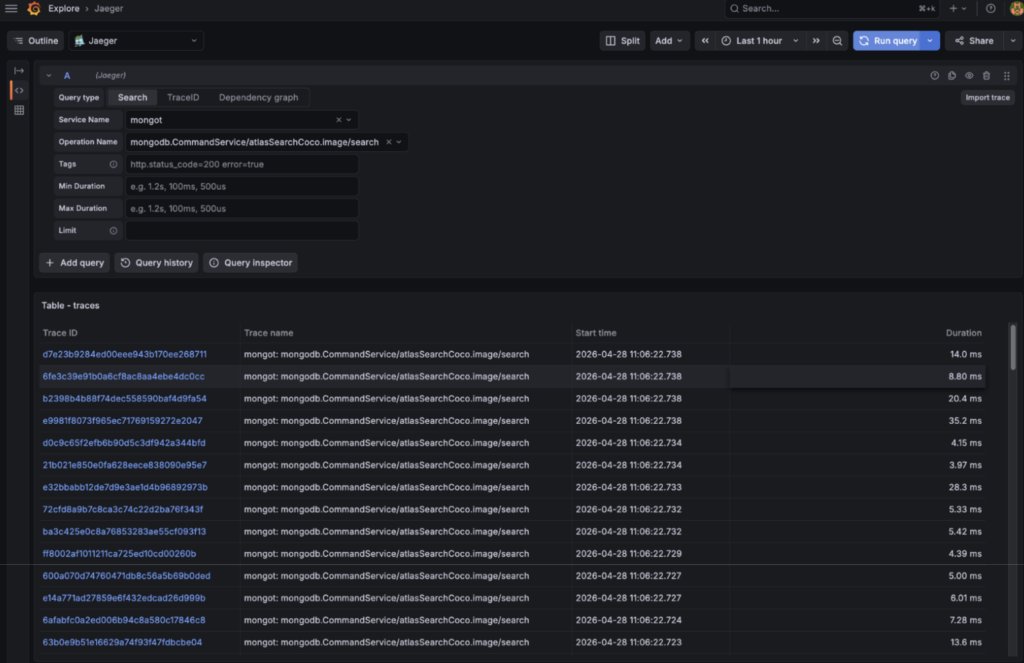
And then walk through the spans in a search trace:
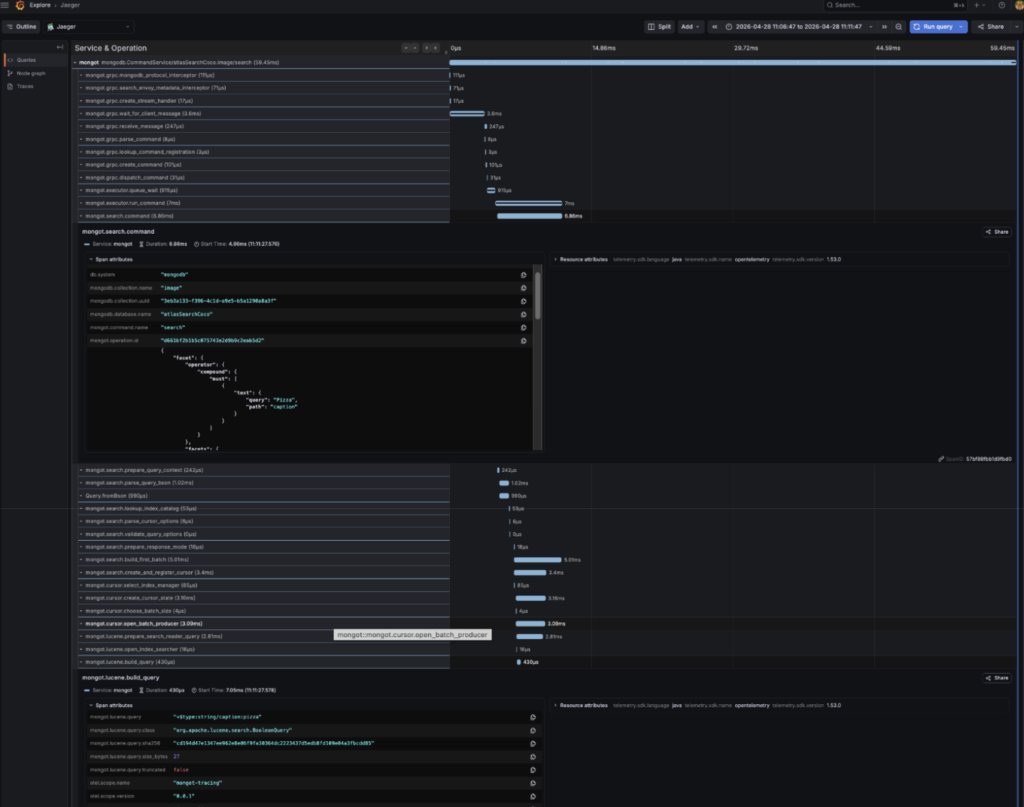
Really helps me understand the code and how it works. Of course, the additional tracing severely impacts performance, but if you want to, check out the branch and play with the Grafana dashboards!
Java Code Packages
Here’s a list of the major packages of the MongoT project as they interact with one another:
| Package | Description | Linked Major Packages |
| com.xgen.mongot.community | Community-edition entrypoint and top-level assembly/bootstrap wiring. | com.xgen.mongot.util, com.xgen.mongot.config, com.xgen.mongot.logging |
| com.xgen.mongot.index | Core search/vector engine: index definitions, ingestion, Lucene integration, query execution, result shaping, and index status/metadata. | com.xgen.mongot.util, com.xgen.mongot.featureflag, com.xgen.mongot.metrics, com.xgen.mongot.cursor, com.xgen.mongot.embedding, com.xgen.mongot.monitor, com.xgen.mongot.trace, com.xgen.mongot.server, com.xgen.proto, com.xgen.mongot.blobstore, com.xgen.mongot.config, com.xgen.mongot.logging |
| com.xgen.mongot.replication | MongoDB replication pipeline, including initial sync, steady-state change-stream processing, durability, and indexing work scheduling. | com.xgen.mongot.util, com.xgen.mongot.index, com.xgen.mongot.metrics, com.xgen.mongot.embedding, com.xgen.mongot.logging, com.xgen.mongot.featureflag, com.xgen.mongot.catalog, com.xgen.mongot.cursor, com.xgen.mongot.monitor |
| com.xgen.mongot.server | External server surface: gRPC/command handling, protocol plumbing, request routing, and streaming responses. | com.xgen.mongot.util, com.xgen.mongot.index, com.xgen.mongot.cursor, com.xgen.mongot.config, com.xgen.mongot.catalogservice, com.xgen.mongot.catalog, com.xgen.mongot.embedding, com.xgen.mongot.metrics, com.xgen.mongot.featureflag, com.xgen.mongot.trace |
| com.xgen.mongot.embedding | Embedding-provider integration, request context, auto-embedding helpers, and materialized-view support for vector workflows. | com.xgen.mongot.util, com.xgen.mongot.index, com.xgen.mongot.metrics, com.xgen.mongot.replication |
| com.xgen.mongot.config | Configuration models, validation, providers, change planning, and config-management workflow for MongoT subsystems. | com.xgen.mongot.util, com.xgen.mongot.index, com.xgen.mongot.replication, com.xgen.mongot.featureflag, com.xgen.mongot.metrics, com.xgen.mongot.catalog, com.xgen.mongot.catalogservice, com.xgen.mongot.embedding, com.xgen.mongot.server, com.xgen.mongot.monitor, com.xgen.mongot.cursor, com.xgen.mongot.lifecycle, com.xgen.mongot.logging |
| com.xgen.mongot.cursor | Cursor domain model, managers, batching, and serialization for paged search results / getMore flows. | com.xgen.mongot.index, com.xgen.mongot.util, com.xgen.mongot.trace, com.xgen.mongot.catalog, com.xgen.mongot.metrics |
| com.xgen.mongot.catalogservice | Metadata service layer for authoritative index definitions, per-server index stats, and server heartbeats stored in the internal metadata database. | com.xgen.mongot.util, com.xgen.mongot.index, com.xgen.mongot.replication |
| com.xgen.mongot.catalog | Local index catalog abstractions and implementations are used to resolve/search the index state. | com.xgen.mongot.index |
| com.xgen.mongot.blobstore | This is interesting; it seems like it is perhaps a future roadmap feature for the community edition or something intended for us to extend. Couldn’t see how to configure this to do snapshots of the index to blob storage like AWS S3. | com.xgen.mongot.util |
| com.xgen.mongot.featureflag | Static and dynamic feature flag definitions plus runtime flag registry/config.Some interesting ones in there, such as: ENABLE_10K_BUCKET_LIMITDon’t know about you, but I hit cases where the current 1000 bucket limit was constraining! | com.xgen.mongot.util, com.xgen.mongot.index |
| com.xgen.mongot.lifecycle | Startup/shutdown lifecycle coordination, especially around index lifecycle management. | com.xgen.mongot.index, com.xgen.mongot.util, com.xgen.mongot.replication, com.xgen.mongot.catalog, com.xgen.mongot.metrics, com.xgen.mongot.blobstore, com.xgen.mongot.monitor |
| com.xgen.mongot.logging | Structured logging helpers and JSON log-format customization. | None |
| com.xgen.mongot.metrics | Metrics abstractions plus Full-Time Diagnostic Data Capture (FTDC) collection/reporting infrastructure. | com.xgen.mongot.util, com.xgen.mongot.index |
| com.xgen.mongot.monitor | Disk and replication-state monitoring, gates, and hysteresis controls used to protect service behavior under stress. | com.xgen.mongot.util, com.xgen.mongot.config, com.xgen.mongot.metrics |
| com.xgen.mongot.trace | OpenTelemetry tracing helpers, exporters, sampling toggles, and trace parsing utilities. | None |
| com.xgen.mongot.util | Shared foundation code used across MongoT: BSON/proto conversion, concurrency helpers, collections, versioning, and general utilities. | com.xgen.proto, com.xgen.mongot.metrics, com.xgen.mongot.logging |
| com.xgen.proto | BSON-aware protobuf runtime plus code-generation plugin for BSON-capable protobuf messages. | None |
Digging into the most important of these packages - com.xgen.mongot.index:
| Package | Description | Linked Major Packages |
| com.xgen.mongot.index.lucene | Largest execution layer: Lucene-backed indexing, search, highlighting, result shaping, commit management, and searcher orchestration. | com.xgen.mongot.index.query, com.xgen.mongot.index.definition, com.xgen.mongot.index.analyzer, com.xgen.mongot.index.path, com.xgen.mongot.index.ingestion, com.xgen.mongot.index.version, com.xgen.mongot.index.synonym, com.xgen.mongot.index.status, com.xgen.mongot.index.blobstore |
| com.xgen.mongot.index.query | Query AST, operators, collectors, pagination, score shaping, and translation from request semantics into Lucene execution. | com.xgen.mongot.index.path, com.xgen.mongot.index.definition, com.xgen.mongot.index.lucene |
| com.xgen.mongot.index.definition | Core schema model for search, vector, and view indexes, including field definitions, options, and validation logic. | com.xgen.mongot.index.version, com.xgen.mongot.index.analyzer, com.xgen.mongot.index.query, com.xgen.mongot.index.lucene, com.xgen.mongot.index.path |
| com.xgen.mongot.index.ingestion | BSON document processing, field extraction, and ingestion-time transforms that feed Lucene indexing. | com.xgen.mongot.index.definition, com.xgen.mongot.index.lucene |
| com.xgen.mongot.index.analyzer | Analyzer builders, providers, factories, and language-specific tokenization plumbing for index definitions and query-time analysis. | com.xgen.mongot.index.definition, com.xgen.mongot.index.lucene, com.xgen.mongot.index.path, com.xgen.mongot.index.query |
| com.xgen.mongot.index.autoembedding | Auto-embedding and materialized-view index helpers that derive generated fields and coordinate embedding-oriented index metadata. | com.xgen.mongot.index.definition, com.xgen.mongot.index.mongodb, com.xgen.mongot.index.status, com.xgen.mongot.index.version, com.xgen.mongot.index.analyzer, com.xgen.mongot.index.query |
| com.xgen.mongot.index.blobstore | Snapshotting hooks for persisting and restoring index state through blob storage. | com.xgen.mongot.index.version |
| com.xgen.mongot.index.mongodb | Narrow MongoDB-facing helpers for materialized-view writes and index-related metrics/state propagation. | com.xgen.mongot.index.lucene, com.xgen.mongot.index.status, com.xgen.mongot.index.version |
| com.xgen.mongot.index.path | Shared path abstractions for dotted field-path parsing and traversal across schema and query code. | None |
| com.xgen.mongot.index.status | Index and synonym status enums/models used to expose lifecycle and readiness state. | None |
| com.xgen.mongot.index.synonym | Synonym mapping models, registries, and status tracking are integrated with Lucene query behavior. | com.xgen.mongot.index.status, com.xgen.mongot.index.definition |
| com.xgen.mongot.index.version | Index format/version identifiers, generation metadata, and compatibility/capability checks. | None |
Ref: https://github.com/luketn/mongot/blob/main/MONGOT_PACKAGE_TOUR.md
So what can you learn from MongoT?
For me, this is an incredible example of an awesome database company, MongoDB, building a production-grade search engine companion app.
There are many aspects that are interesting to learn from:
- How to perform change stream in a robust and reliable way to sync data to any external system (Lucene being a great example)
- How to manage a Lucene index in Java, and perform searches on it
- How to build a scalable Java service that can grow to a huge scale in production
- How to do semantic search with vectors in a seamless way
We haven’t dug too deeply here in this introduction to any of these, but hopefully it gives you a quick tour to get you started and some ideas about the goodies there are to explore.
Wrap
I’ve been exploring the codebase and playing with Atlas Search (both lexical and semantic) for the last few weeks. It’s been a lot of fun, and I learned a lot too.
I hope you get a lot out of exploring and trying it yourself, too.
Happy searching!
Found a mistake, or something to add? Edit this page on GitHub

Luke Thompson
Chief Architect at Clarifresh - reducing food waste and making customers happy in the fresh fruit and vegetable business by building an awesome mobile software platform for quality control (QC).